前言
前段时间写了一个小程序,里边有一个音频播放器,我去微信组件库发现,(微信官方文档地址)微信的组件库不满足需求,自己动手撸一个,哈哈哈
废话不多说,先给大家看一下我实现的播放器效果:
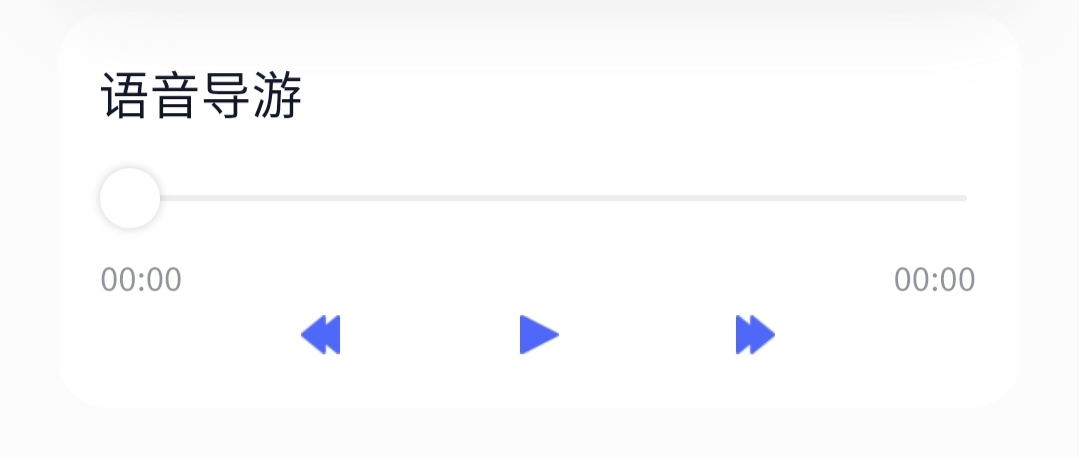
wxml:
<!--页面代码-->
  <view class='trip_audio'>
    <view class='trip_tit'>语音导游</view>
    <slider style="width:582rpx;margin-left:50rpx;" bindchange="changeValue" value='{{currentNum/durationNum}}' backgroundColor='#EDEDED' selected-color="#4F68FA" block-size="20"></slider>
    <view class='time'>
      <view class='time_left'>{{current}}</view>
      <!-- <view class='time_left'>{{currentNum}}</view> -->
      <view class='time_right'>{{duration}}</view>
    </view>
    <view class='trip_btn'>
      <image src='/images/details_iplay_forward_fill.png' bindtap='back'></image>
      <image src='/images/details_iplay_fill.png' bindtap='play'></image>
      <image src='/images/details_iplay_forward_filll.png' bindtap='go'></image>
    </view>
  </view>
js代码
// 创建一个播放对象
const myaudio = wx.createInnerAudioContext();
Page({

  /**
   * 页面的初始数据
   */
  data: {
    tridPlay: true,// 播放的flag
    duration: '00:00',// 播放时长     时间格式
    current:'00:00',// 当前播放时长   时间格式
    durationNum:0,// 播放时长数字     数字格式
    currentNum:0// 当前播放时长数字   数字格式
  },
  /**
   * 生命周期函数--监听页面显示
   */
  onShow: function() {
    let that = this
    myaudio.src = 'http://ws.stream.qqmusic.qq.com/M500001VfvsJ21xFqb.mp3?guid=ffffffff82def4af4b12b3cd9337d5e7&uin=346897220&vkey=6292F51E1E384E06DCBDC9AB7C49FD713D632D313AC4858BACB8DDD29067D3C601481D36E62053BF8DFEAF74C0A5CCFADD6471160CAF3E6A&fromtag=46'
    myaudio.onTimeUpdate(function(){
      let durationnum = parseInt(myaudio.duration)
      let time = that.formatSeconds(myaudio.duration)
      that.setData({
        duration: time,
        durationNum: durationnum,
      })
      that.changeCurrent(myaudio.currentTime)
    })
  },
  // 左侧补零
  addZero(val){
    if(val<10){
      return 0+''+val
    }else{
      return val
    }
  },
  // 时间格式化
  formatSeconds(value) {
    var secondTime = parseInt(value); // 秒
    var minuteTime = 0; // 分
    var hourTime = 0; // 小时
    if (secondTime > 60) {
      minuteTime = parseInt(secondTime / 60);
      secondTime = parseInt(secondTime % 60);
      if (minuteTime > 60) {
        hourTime = parseInt(minuteTime / 60);
        minuteTime = parseInt(minuteTime % 60);
      }
    }
    var result = "" + this.addZero(parseInt(secondTime)) + "";
    if (minuteTime > 0) {
      result = "" + this.addZero(parseInt(minuteTime)) + ":" + result;
    }else{
      result = "" + this.addZero(parseInt(minuteTime)) + ":" + result;
    }
    if (hourTime > 0) {
      result = "" + parseInt(hourTime) + ":" + result;
    }
    return result;
  },
  // 播放暂停
  play() {
    let that = this;
    if (that.data.tridPlay) {
      myaudio.play();
      that.setData({
        tridPlay: false
      })
    } else {
      myaudio.pause()
      that.setData({
        tridPlay: true
      })
    }

  },
  // 快进
  go() {
    myaudio.seek(parseInt(myaudio.currentTime) + 10)
    this.changeCurrent(parseInt(myaudio.currentTime) + 10)
  },
  // 快退
  back() {
    myaudio.seek(parseInt(myaudio.currentTime) - 10)
    this.changeCurrent(parseInt(myaudio.currentTime) - 10)
  },
  // 滑块拖动快进,快退
  changeValue(e){
    let val = e.detail.value
    let step = (val / 100) * this.data.durationNum
    myaudio.seek(parseInt(step))
    this.changeCurrent(step)
    // setTimeout(() => { myaudio.pause()},0)
    // setTimeout(() => { myaudio.play() }, 10)
    // myaudio.pause()
    // myaudio.play()
  },
  // 当前播放格式化
  changeCurrent(step){
    let currentnum = parseInt(step)
    let currentt = this.formatSeconds(currentnum)
    this.setData({
      current: currentt,
      currentNum: currentnum*100
    })
  },
css:
.trip_audio{
  width:670rpx;
height:276rpx;
background:rgba(255,255,255,1);
border-radius:36rpx;
margin: 20rpx auto 0;
/* background: #FE6F2A; */
}
.trip_tit{
  padding: 30rpx;
  font-size:36rpx;
font-family:PingFangSC-Semibold;
font-weight:600;
color:rgba(16,21,40,1);
padding-bottom: 10rpx;
}
.time{
  height:34rpx;
font-size:24rpx;
font-family:PingFang-SC-Medium;
font-weight:500;
color:rgba(16,21,40,0.46);
line-height:34rpx;
width: 610rpx;
margin: 0 auto;
}
.trip_btn{
  width: 330rpx;
  height: 28rpx;
  display: flex;
  justify-content: space-between;
  margin: 10rpx auto;
}
.trip_btn image{
  width: 28rpx;
  height: 28rpx;
  display: block;
}
.time_left{
  float: left;
}
.time_right{
  float: right
}
播放图片我就不给啦,哈哈哈,其实不难吧,多看官方文档, 主要用到的几个api说一下
wx.createInnerAudioContext();        //创建 audio 上下文 AudioContext 对象。

myaudio.src                          //给创建的音频插入地址

myaudio.onTimeUpdate()               //监听音频播放进度更新事件

myaudio.currentTime                 //获取当前时间单位S

myaudio.duration                    //获取总播放时长单位S

myaudio.play()                     //播放音频。

myaudio.pause()                    //暂停音频。

myaudio.seek(number)               //跳转位置,单位 s
要注意的是,你跳转页面或者切后台的时候,这个音频不会主动主动关掉,你需要在onhide里吧这个音频暂停,如果这篇文章对你有帮助,点个赞吧,哈哈哈