1.org.apache.ibatis.binding.BindingException
背景:Spring+SpringMVC+MyBatis整合 报错: Invalid bound statement (not found) 错误原因:没有找到对应路径下的方法
解决方法:
- mapper.xml中的namespace要与对应的mapper接口路径相同
- mapper.xml中的每一个操作的id要与方法名对应
- mapper.xml要与对应的mapper接口在同一包下
- 通过mapperLocations指定xml文件的位置
- 如果使用的是maven项目,需要在pom.xml的里面添加如下代码
    <resources>
      <resource>
        <directory>src/main/java</directory>
        <includes>
          <include>**/*.xml</include>
        </includes>
        <filtering>true</filtering>
      </resource>
    </resources>
2.java.io.FileNotFoundException
背景:使用Spring包下的StreamUtils.copy()方法进行文件copy 错误原因:目标目录路径出错 解决方法: 复制文件夹的路径,在文件加最后面加上两个“\”+文件名,需要将“\”与计算机路径上的“\”进行匹配。

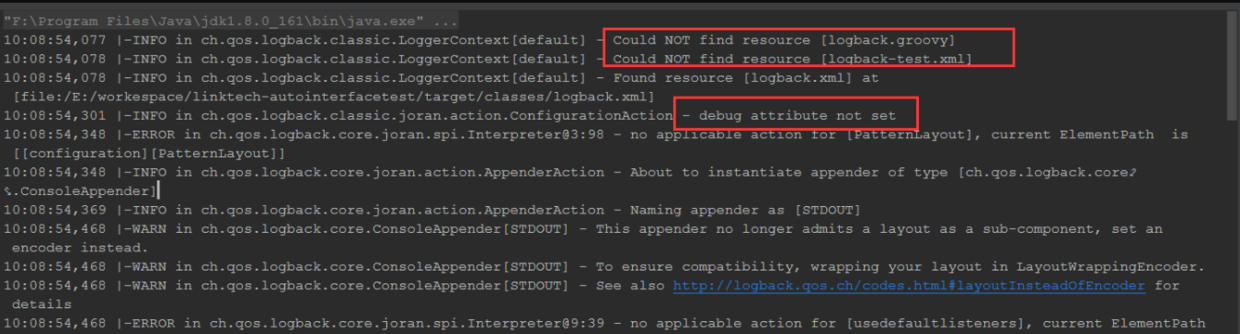
3.Could NOT find resource [logback-test.xml]
背景:使用log4j和self4j日志报错Could Not find resouce [logback.groovy]及Could Not find resource[logback-test.xml]
        <dependency>
            <groupId>org.slf4j</groupId>
            <artifactId>slf4j-api</artifactId>
            <version>1.5.6</version>
            <type>jar</type>
        </dependency>

        <dependency>
            <groupId>slf4j-simple</groupId>
            <artifactId>slf4j-simple</artifactId>
            <version>1.7.25</version>
        </dependency>

        <dependency>
            <groupId>ch.qos.logback</groupId>
            <artifactId>logback-core</artifactId>
            <version>1.1.2</version>
        </dependency>

        <dependency>
            <groupId>log4j</groupId>
            <artifactId>log4j</artifactId>
            <version>1.2.14</version>
            <scope>provided</scope>
        </dependency>
4.org.springframework.beans.factory.BeanCreationException
mapper无法使用@Autowired注解自动注入
原因:
- mybatis配置文件没有扫描到
- 没有扫描到mapper.xml文件,需要注意basePackage
- mapper.java和mapper.xml之间没有联系起来
5.org.springframework.beans.factory.BeanCreationException: Error creating bean with name 'com.hxx.dubbo.service.FindUserDubboService': Cannot resolve reference to bean 'findUserDubboService' while setting bean property 'ref'
场景:使用dubbo时服务无法启动
解决:注意provider端的服务实现类的引用书写
6.java.lang.ClassNotFoundException: javax.jms.JMSContext
使用的spring版本是5.1.5.RELEASE,activeMQ的版本是5.9.0,这个版本的Spring需要使用JMS 2.0版本,但spring-jms的依赖没有自动导入JMS 2.0,而activemq-all会导入JMS 1.1的依赖,这就导致出现版本问题 解决: 添加JMS2.0的依赖
<dependency>
    <groupId>javax.jms</groupId>
    <artifactId>javax.jms-api</artifactId>
    <version>2.0.1</version>
</dependency>
为了防止冲突,可以从activemq-all中去除JMS 1.1,pom 如下所示
        <!--activeMQ-->
        <!--ActiveMQ客户端完整jar包依赖-->
        <dependency>
            <groupId>org.apache.activemq</groupId>
            <artifactId>activemq-all</artifactId>
            <exclusions>
                <exclusion>
                    <artifactId>spring-context</artifactId>
                    <groupId>org.springframework</groupId>
                </exclusion>
                <exclusion>
                    <groupId>org.apache.geronimo.specs</groupId>
                    <artifactId>geronimo-jms_1.1_spec</artifactId>
                </exclusion>
            </exclusions>
        </dependency>
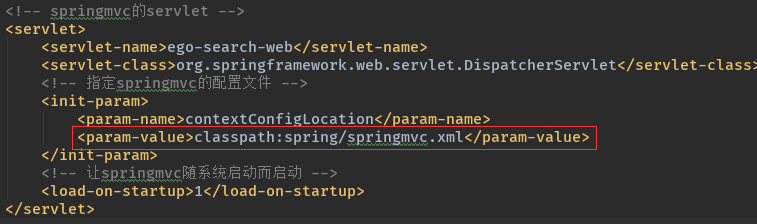
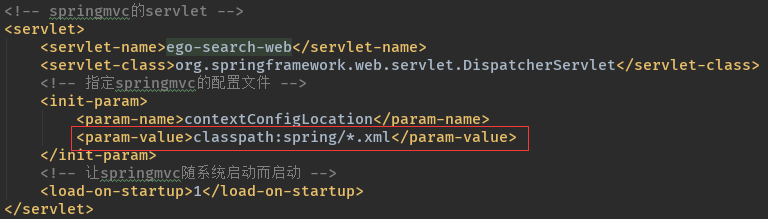
7.org.springframework.beans.factory.UnsatisfiedDependencyException: Error creating bean with name 'itemCatController': Unsatisfied dependency expressed through field 'managerItemCatService';
这个问题主要是springmvc的问题。
解决:
8.Spring中报"Could not resolve placeholder"的解决方案
场景:当有多份配置文件需要加载properties文件时,如果同时使用<context:property-placeholder location="classpath:cache.properties"/>这样就会报Could not resolve placeholder
解决:在每份配置文件中添加

注意:
1.在一个或多个Spring配置文件下直接使用
<context:property-placeholder location="classpath:cache.properties"/>加载多个文件的话肯定会报错。
2.添加ignore-unresolvable="true"要全部添加,一个加一个不加也不行
9.外部无法连接redis
场景:刚安装了redis数据库外部无法连接,修改完redis.conf后导致redis-cli无法关闭 解决:在配置文件中修改
1.bind 127.0.0.1改为 #bind 127.0.0.1
2.protected-mode yes 改为 protected-mode no
使用 ps -ef |grep redis 查看redis进程号
然后使用kill -9 进程号 杀死进程
重启redis
10.cmd登录ftp服务器失败
场景:在windows的cmd窗口中输入ftp服务器的用户名和密码时登录失败 vsftpd 530 login incorrect 的N中情况
解决: 1.密码错误 2.检查/etc/vsftpd/vsftpd.conf配置
vim /etc/vsftpd/vsftpd.conf
设置为
local_enable=YES
pam_service_name=vsftpd     //这里重要,有人说ubuntu是pam_service_name=ftp,可以试试
userlist_enable=YES
3.检查/etc/pam.d/vsftpd
vim /etc/pam.d/vsftpd
注释掉
#auth required pam_shells.so
最后无论哪种情况 重启试试
sudo service vsftpd restart