**原生JS小程序分享活动 **
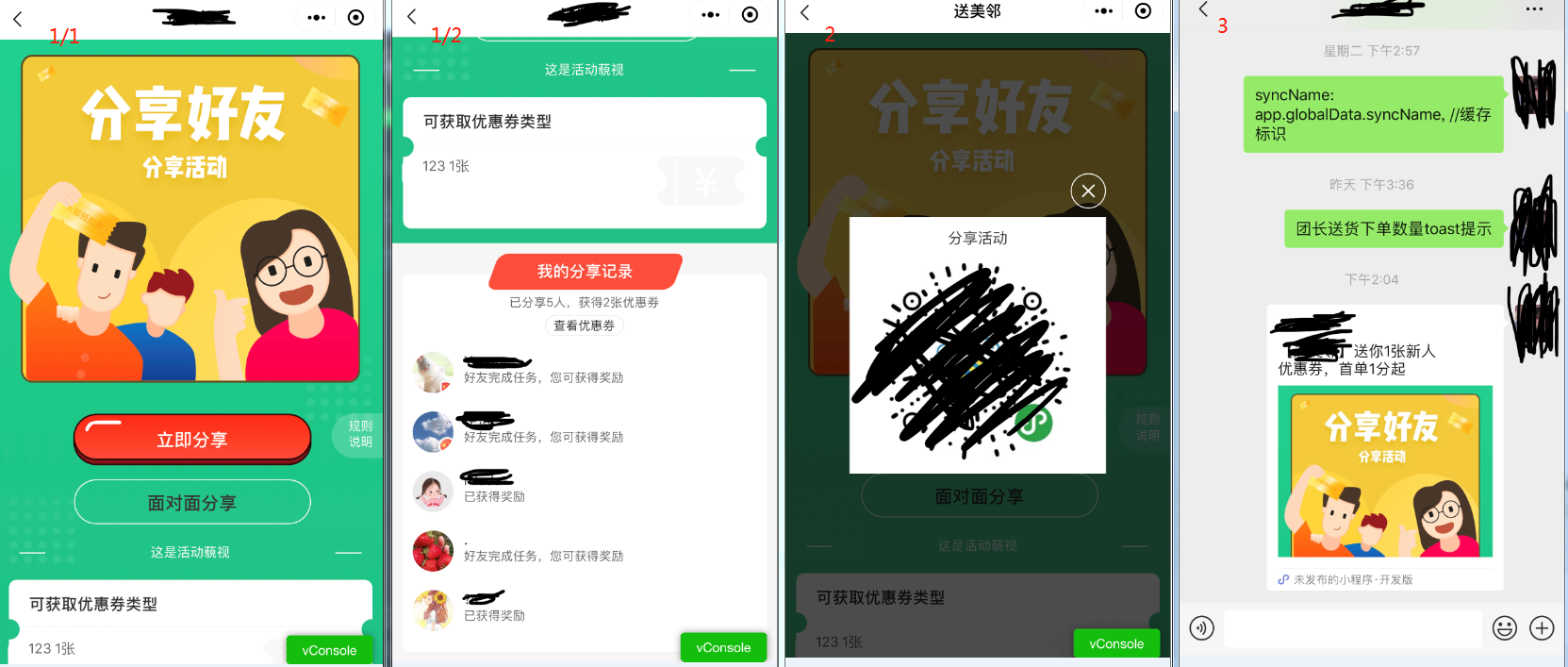
功能要求:1.点击个人中心的分享好友入口进入下图图1的页面,若当前有活动则展示活动相关信息,分享活动包括立即分享(分享到微信群或好友(图3))和面对面分享(点击弹出小程序二维码(图2))
2.被分享人点击分享人的小程序链接或者扫描二维码进入小程序并获得相应奖励,并且定位地址自动定位至分享人的小区,被分享人完成指定任务后分享人可自动获得相应奖励
3.活动图标会以浮窗的形式出现在指定页面(该功能不展示)

整理思路:点击面对面分享,调用小程序api接口并传参(分享人uid,分享人小区,活动id),被分享人点击分享小程序自动获取传参并自动定位至分享人小区,同时接口得到反馈被分享人的信息自动出现在分享人的分享记录中,完成指定任务同理;点击二维码,调用后台接口弹出小程序二维码,被分享人扫描二维码...(与上同理)。其实功能点并不难,大部分还是样式的调整令人头秃,但也有几个需要注意的地方。
效果:
WXML代码
如果分享活动已经结束,页面文字会变化,并且不允许分享该活动,效果图未展示
<!--pages/share/index.wxml-->
<view class='page'>
  <view class='sharebg'>
    <view class='imgbg'>
    <!--status为1的时候,表示活动正在进行中-->
      <view class='imgtxt' wx:if='{{share.status==1}}'>
        <text>分享好友</text>
        <!--活动标题-->
        <text>{{share.packageName}}</text>
      </view>
      <view class='imgtxt' wx:else>
        <text>哇哦~</text>
        <text>活动已经结束啦...</text>
      </view>
    </view>
    <view class='button' wx:if='{{share.status==1}}'>
      <view style='display:flex;justify-content:space-between'>
        <view style='margin-left: 19.5%;'>
        <!--按钮-->
          <button class='share' open-type="share">立即分享</button>
          <button class='faceShare' bindtap="faceShare">面对面分享</button>
        </view>
        <view class='sharerule' bindtap="miniPageChange" data-miniPath="/pages/share/rule/index">规则说明</view>
      </view>
        <!--活动说明-->
      <view class='content' wx:if='{{share.remark}}'>
        <view>—— </view>
        <view style="width:600rpx"> {{share.remark}} </view>
        <view> ——</view>
      </view>
    </view>
    <view class='coupon' wx:if='{{couponList.length!=0}}'>
      <view class='couponTitle'>可获取优惠券类型</view>
      <image class='line' src='https://file.baimipay.cn/linee.png'></image>
      <image class='quan' src='https://file.baimipay.cn/youhuiquan.png'></image>
      <view class='couponList couponfff'>
        <text wx:for='{{couponList}}' wx:for-item="items" wx:key='{{items.id}}'>{{items.couponName}} {{items.couponNum}}张</text>
      </view>
    </view>
    <view class='pointbg'></view>

  </view>
    <!--分享记录-->
  <view class='shareRecord'>
    <view class='recordtitle'>我的分享记录</view>
    <view class='recordbg'>
      <view class='smalltitle'>
        <view class='sharsnum'>已分享{{shareNum}}人,获得{{couponNum}}张优惠券</view>
        <view style="margin-top:12rpx;" bindtap="miniPageChange" data-miniPath="/pages/myInfo/myCoupon/index">
          <text class='mycoupon'>查看优惠券</text>
        </view>
      </view>
      <view class='friend' wx:for='{{listData}}' wx:key="{{item.id}}">
        <view class='headpic'>
          <image src='{{item.avatarUrl}}'></image>
        </view>
        <view class='personinfo'>
          <text>{{item.nickName}}</text>
          <text wx:if='{{item.isGrant}}'>已获得奖励</text>
          <text wx:else>好友完成任务,您可获得奖励</text>
        </view>
      </view>
    </view>
  </view>
  <view class='popup-view' wx:if="{{show}}">
    <view class='popup'>
      <icon class='icondialogclose iconfont popup-icon' bindtap='onCloseFlag'></icon>
      <view class='text'>{{share.packageName}}</view>
      <image src='{{qrCode}}'></image>
    </view>
  </view>
</view>
JS代码
// pages/share/index.js
const app = getApp();
import Share from '../../api/share.js'

Page({
  /**
   * 页面的初始数据
   */
    data: {
    syncName: app.globalData.syncName, //缓存标识
    loaded: false,
    listData: [], //用户列表
    couponList: [], //优惠券列表
    share: {}, //分享活动
    communityId: '', //小区id
    couponNum: '', //获得的优惠券数量
    shareNum: '', //分享人数
    qrCode:'', // 二维码
    show:false
  },

  /**
   * 生命周期函数--监听页面加载
   */
  onLoad: async function() {
      //字体导入
    wx.loadFontFace({
      family: 'WenYue',
      source: 'url("https://file.baimipay.cn/WenYue.otf")',
      success: console.log
    })
    const communityId = wx.getStorageSync(`${this.data.syncName}siteInfo`).id
    this.setData({
      communityId //小区id
    })
    wx.showShareMenu({
      // 要求小程序返回分享目标信息
      withShareTicket: true
    });
  },

  /**
   * 生命周期函数--监听页面显示
   */
  onShow: function() {
    this.load();
  },

  /**
   * 用户点击右上角分享
   */
  onShareAppMessage: function(e) {
    const userid = wx.getStorageSync(`${this.data.syncName}uid`)
    const sharePackageId=this.data.share.id
    const shareCommunityId = this.data.communityId
    if (e.from == 'menu') {} else if (e.from == 'button') {}
    let shareInfo = getApp().globalData.shareInfo
    let sharePath = shareInfo.path + "?shareUid=" + userid + "&sharePackageId=" + sharePackageId + "&shareCommunityId=" + shareCommunityId // 传的地址参数 分享人uid 活动id 小区id
    return {
      title: shareInfo.title,
      path: sharePath,
      imageUrl: shareInfo.imgurl,
    }
  },
  load() {
    this.share();
  },
    //获取分享活动的内容
  share() {
    Share.getShareActivity(this.data.communityId).then(res => {
      if (res.success) {
        console.log(res.d)
        this.setData({
          share: res.d.package,
          shareNum: res.d.shareNum,
          couponNum: res.d.receiveNum,
          listData: res.d.shareLogs,
          couponList: res.d.couponList
        })
      }
      wx.hideLoading()
    }).catch(res => {

    })
  },
  miniPageChange(e) {
    var url = e.currentTarget.dataset.minipath;
    console.log(url)
    wx.navigateTo({
      url,
    })
  },
    //调用后台接口生成二维码
  faceShare(){
    this.setData({
      show:true
    })
    const shareUid = wx.getStorageSync(`${this.data.syncName}uid`)
    const sharePackageId = this.data.share.id
    const shareCommunityId = this.data.communityId
    Share.getQRCode(shareUid, sharePackageId, shareCommunityId).then(res => {
      if (res.success) {

        this.setData({
          qrCode: res.d
        })
      }
      wx.hideLoading()
    }).catch(res => {

    })
  },
  onCloseFlag() {
    this.setData({
      show: false
    });
  },
})
WXSS代码
/* pages/share/index.wxss */

.shareGift {
  margin: 0 auto;
  padding: 50rpx;
  background-color: #333;
  color: #fff;
}

.page {
  background-color: #f6f6f6;
}

.sharebg {
  width: 100%;
  /* min-height: 980rpx; */
  text-align: center;
  background-image: url("https://file.baimipay.cn/greenbg.png");
  background-size: 100% 100%;
  position: relative;
  align-items: center;
  padding: 30rpx 0;
  box-sizing: border-box;
}

.pointbg {
  width: 708rpx;
  height: 406rpx;
  text-align: center;
  background-image: url("https://file.baimipay.cn/bg%20point.png");
  background-size: 100% 100%;
  position: absolute;
  top: 46%;
  left: 3%;
  align-items: center;
  z-index: 10;
}

.sharerule {
  width: 100rpx;
  height: 88rpx;
  color: #fff;
  font-size: 24rpx;
  text-align: center;
  background-color: rgba(255, 255, 255, 0.2);
  border-radius: 100rpx 0 0 100rpx;
  padding: 10rpx 10rpx 10rpx 25rpx;
  box-sizing: border-box;
  z-index: 200;
}

.imgbg {
  width: 684rpx;
  height: 640rpx;
  text-align: center;
  background-image: url("https://file.baimipay.cn/imgbg.png");
  background-size: 100% 100%;
  position: relative;
  left: 3%;
  align-items: center;
  z-index: 100;
}

.imgtxt {
  width: 100%;
  margin-top: 40rpx;
  position: absolute;
}

.imgtxt text {
  font-family: 'WenYue';
  font-size: 120rpx;
  color: #fff;
  display: block;
  /* 距离左 距离上 大小 颜色 */
  text-shadow: 0px 7px 10px #e7bc1f;
}

.imgtxt text:last-child {
  font-size: 50rpx;
}

.button {
  margin-top: 60rpx;
}

.share {
  width: 466rpx;
  height: 102rpx;
  line-height: 102rpx;
  text-align: center;
  background-image: url("https://file.baimipay.cn/mainbtn.png");
  background-size: 100% 100%;
  /* position: absolute; */
  margin: 0 auto;
  background-color: rgba(0, 0, 0, 0);
  color: #fff;
  font-size: 36rpx;
  align-items: center;
  font-weight: 550;
  z-index: 200;
}

.faceShare {
  width: 462rpx;
  height: 88rpx;
  line-height: 88rpx;
  text-align: center;
  border: 3rpx solid #fff;
  background-color: rgba(0, 0, 0, 0);
  border-radius: 44rpx;
  margin: 0 auto;
  margin-top: 28rpx;
  color: #333;
  font-size: 36rpx;
  align-items: center;
  font-weight: 550;
  z-index: 200;
}

.content {
  width: 668rpx;
  height: 70rpx;
  display: flex;
  justify-content: space-between;
  align-items: center;
  margin: 0 auto;
  margin-top: 20rpx;
  color: #fff;
  font-size: 26rpx;
}

.coupon {
  width: 710rpx;
  min-height: 257rpx;
  margin: 0 auto;
  margin-top: 20rpx;
  background-image: url("https://file.baimipay.cn/youhuiquan9.png");
  background-size: 100% 257rpx;
  background-repeat: no-repeat;
  position: relative;
  padding: 28rpx 40rpx;
  box-sizing: border-box;
}

.couponfff {
  width: 710rpx;
  background-color: #fff;
  border-radius: 20rpx;
}

.coupon .line {
  position: absolute;
  width: 646rpx;
  height: 2rpx;
  margin-top: 25rpx;
  left: 4.5%;
}

.coupon .quan {
  position: absolute;
  width: 172rpx;
  height: 96rpx;
  margin-top: 50rpx;
  left: 70%;
}

.couponTitle {
  color: #333;
  font-weight: 550;
  font-size: 32rpx;
  width: 100%;
  text-align: left;
}

.couponList {
  font-size: 28rpx;
  color: #666;
  margin-top: 50rpx;
  margin-left: -40rpx;
  padding-left: 40rpx;
  padding-bottom: 28rpx;
  box-sizing: border-box;
}

.couponList text {
  display: block;
  text-align: left;
}

.shareRecord {
  padding: 20rpx;
  width: 100%;
  box-sizing: border-box;
}

.recordbg {
  background-color: #fff;
  padding: 40rpx 20rpx;
  border-radius: 15rpx;
  margin-top: 40rpx;
}

.recordtitle {
  background-image: url("https://file.baimipay.cn/titlebg.png");
  width: 380rpx;
  height: 72rpx;
  line-height: 72rpx;
  color: #fff;
  font-size: 32rpx;
  text-align: center;
  font-weight: 550;
  background-size: 100% 100%;
  background-repeat: no-repeat;
  position: absolute;
  left: 25%;
}

.smalltitle {
  text-align: center;
}

.friend {
  width: 100%;
  height: 80rpx;
  display: flex;
  margin-top: 38rpx;
}

.headpic {
  width: 80rpx;
  height: 80rpx;
  border-radius: 40rpx;
  background-color: pink;
  overflow: hidden;
  box-sizing: border-box;
}

.headpic image {
  width: 90rpx;
  height: 90rpx;
  margin-top: -5rpx;
  margin-left: -5rpx;
}

.personinfo {
  margin-left: 20rpx;
}

.personinfo text:first-child {
  color: #333;
  font-size: 28rpx;
  display: block;
}

.personinfo text:last-child {
  color: #666;
  font-size: 24rpx;
  display: block;
}

.sharsnum {
  color: #666;
  font-size: 24rpx;
}

.mycoupon {
  border: 1rpx solid #ccc;
  border-radius: 21rpx;
  padding: 5rpx 18rpx;
  color: #333;
  font-size: 24rpx;
}

.popup {
  position: absolute;
  top: 50%;
  left: 50%;
  transform: translateY(-50%) translateX(-50%);
  width: 500rpx;
  height: 500rpx;
  background: #fff;
  z-index: 99;
}

.popup image {
  width: 400rpx;
  height: 400rpx;
  margin: 20rpx;
  margin-left: 40rpx;
}

.popup-view {
  position: fixed;
  left: 0;
  top: 0;
  right: 0;
  bottom: 0;
  background: rgba(0, 0, 0, 0.7);
  z-index: 1000;
}

.popup-icon {
  position: absolute;
  right: 0;
  top: -90rpx;
  z-index: 1000;
  font-size: 70rpx;
  color: #fff;
}

.popup .text {
  padding-top: 20rpx;
  text-align: center;
  font-size: 30rpx;
  font-family: PingFangSC-Regular;
  font-weight: 400;
}

.popup .btn {
  position: absolute;
  left: 50%;
  transform: translateX(-50%);
  width: 340rpx;
  height: 80rpx;
  margin-top: 58rpx;
  line-height: 80rpx;
  background-size: cover;
  text-align: center;
  background-image: url("https://imgs.xqphh.pandabg.cn/miniappindex-btn.png");
}
被分享人进入首页JS
1)被分享人点击链接或扫描二维码进入小程序首页,登陆后自动定位至分享人小区,需要做缓存记录,首次加载页面必须设置缓存sharecommunityId为0;
2)如果用户是通过分享进入小程序,onLoad生命周期下options内会有传值,若有传值,则调用this.init()方法,方法内是自动定位小区的功能,
但是这样做会有漏洞,因为无法判断用户首次进入页面是是否登陆,this.init()方法的前提条件是用户必须登录,如果没有登录过,this.init()方法无效,小程序则无法自动定位小区;
如果用户首次进入页面是登陆状态,this.init()方法内则设置缓存sharecommunityId为1;
3)所以在onShow生命周期下必须写以下代码,判断用户满足 1.已登录 2.有分享人小区(有的话就是通过链接进入的) 3.缓存sharecommunityId为0(表示还未执行过this.init()方法)
这三个条件就执行this.init()方法。
/**
   * 生命周期函数--监听页面加载
   */
onLoad: function(options) {
    wx.setStorageSync(`${this.data.syncName}sharecommunityId`, 0)
    let communityId = ''
    if (options.shareUid) {
      this.setData({
        shareUid: options.shareUid, // 分享人id
        sharePackageId: options.sharePackageId, // 分享活动id
        shareCommunityId: options.shareCommunityId // 分享人所在小区id
      })
      communityId = this.data.shareCommunityId
      if (wx.getStorageSync(`${this.data.syncName}token`)) {
        this.init(communityId);
      }
    } else if (options.scene) {

      const value = options.scene
      let [shareUid, sharePackageId, shareCommunityId] = value.split('_');
      this.setData({
        shareUid: shareUid, // 分享人id
        sharePackageId: sharePackageId, // 分享活动id
        shareCommunityId: shareCommunityId // 分享人所在小区id
      })
      communityId = this.data.shareCommunityId
      if (wx.getStorageSync(`${this.data.syncName}token`)) {
        this.init(communityId);
      }
    }
  },
  /**
   * 生命周期函数--监听页面显示
   */
  onShow: function() {
    if (wx.getStorageSync(`${this.data.syncName}token`) && this.data.shareCommunityId && wx.getStorageSync(`${this.data.syncName}sharecommunityId`) == 0) {
      this.init(this.data.shareCommunityId);
    }
  },