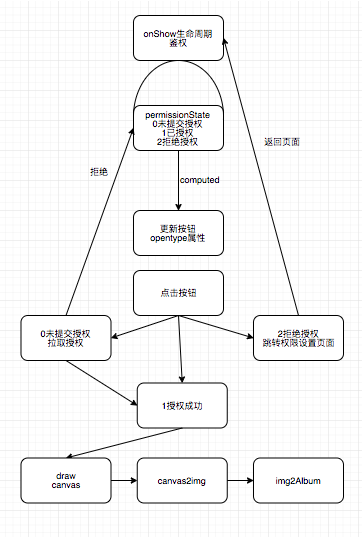
首先 授权分为三种状态: 0-未拉取授权 ,1-已授权,2-未授权。为配合button的open-type唤起设置页能力,先用computed用变量openType来承接permissionState的值。
当未授权的情况下,点击按钮跳转到权限设置页面。
  computed: {
    openType: {
      require: ["permissionState"],
      fn({
        permissionState
      }) {
        return permissionState == 2 ? 'openSetting' : '';
      }
    },
  },
在xml中
<button bindtap="checkPermission" open-type="{{openType}}">保存图片</button>
在生命周期show的时候,更新授权状态,以便从权限设置页面返回后能更新状态
show: function() {
      // 更新授权状态
      wx.getSetting({
        success: (res) => {
          this.setData({
            permissionState: checkPermission(res)
          })
        },
        fail: (err) => {}
      })
    },
checkPermission函数
//通过查询授权与否返回授权状态
function checkPermission(res) {
  let {
    authSetting
  } = res;
  let key = 'scope.writePhotosAlbum';

  return !authSetting.hasOwnProperty(key) ? 0 : authSetting[key] ? 1 : 2
}
除授权失败情况下 点击按钮 判断权限 或拉取,或绘制。
checkPermission(res) {
      if (this.data.permissionState == 1) {
        // 已授权则直接绘制
        this.drawCard();
      } else if (this.data.permissionState == 0) {
        //未授权则拉取授权窗口
        this.getPermission()
      }
},
通过微信API拉取相册权限
//拉取授权
    getPermission() {
      wx.authorize({
        scope: 'scope.writePhotosAlbum',
        success: () => {
          this.setData({
            permissionState: 1
          })
          this.drawCard()
        },
        fail: () => {
          this.setData({
            permissionState: 2
          })
          wx.showToast({
            icon: 'none',
            title: '授权失败',
          })
        }
      })
      },
绘制canvas(省略了部分元素)
drawCard() {
      let ctx = wx.createCanvasContext('canvas', this)
      //绘制背景色
      ctx.setFillStyle('#ffffff')
      ctx.fillRect(0, 15, 240, 390);
      //绘制首页图
      let titleSrc = this.data.img;
      ctx.drawImage(titleSrc, 0, 0, 310, 120);
      //绘制来鸡汤文案
      drawMultiText(ctx, '今天的你可能离顶点还遥遥无期,但你通过今天的努力,积蓄了明天勇攀高峰的力量。', 40, 280, 32, 215, '#333333', 'normal 500 19px Source Han Sans CN')
      //绘制引号
      drawText(ctx, '“', 'normal 800 25px Source Han Sans CN', 24, 200, '#F48400')
      // 绘制数据
      ctx.draw(false, (res => {
        setTimeout(() => {
          this.canvas2Img()
        }, 500)
      }))
    },
封装了绘制文本和多行文本的方法
//文字绘制
function drawText(ctx, str, font, x, y, color) {
  ctx.setFillStyle(color);
  ctx.font = font;
  ctx.fillText(str, x, y)
}
//多行文字绘制
//(上下文 文本 x y 行高 折行宽度 颜色 字体)
function drawMultiText(ctx, str, leftWidth, initHeight, lineHeight, canvasWidth, color, font) {
  let lineWidth = 0;
  let lineNum = 0;
  let lastSubStrIndex = 0; //每次开始截取的字符串的索引
  let titleHeight = 0;
  ctx.setFillStyle(color);
  ctx.font = font;
  for (let i = 0; i < str.length; i++) {
    lineWidth += ctx.measureText(str[i]).width;
    if (lineWidth > canvasWidth && lineNum < 4) {
      ctx.fillText(str.substring(lastSubStrIndex, i), leftWidth, initHeight); //绘制截取部分
      ++lineNum
      initHeight += lineHeight; //字体的高度
      lineWidth = 0;
      lastSubStrIndex = i;
      titleHeight += 30;
    }
    if (i == str.length - 1 && lineNum < 4) { //绘制剩余部分
      ctx.fillText(str.substring(lastSubStrIndex, i + 1), leftWidth, initHeight);
    }
  }
  // 标题border-bottom 线距顶部距离
  titleHeight = titleHeight + 10;
  return titleHeight
}
实现效果:

canvas2img
canvas2Img() {
      wx.canvasToTempFilePath(
        {
          x: 0,
          y: 0,
          width: 330,
          height: 440,
          destWidth: 660,
          destHeight: 880,
          canvasId: "canvas",
          success: res => {
            this.saveAsFile(res.tempFilePath);
          },
          fail(err) {
            console.log(err);
          }
        },
        this
      );
    },
存储到相册
saveAsFile(path) {
      wx.saveImageToPhotosAlbum({
        filePath: path, // 此为图片路径
        success: res => {
          wx.showToast({
            icon: "none",
            title: "保存成功"
          });
        },
        fail: err => {
          wx.showToast({
            icon: "none",
            title: "保存失败,请稍后重试"
          });
        },
        complete: () => {
          //截流释放
          this.setData({
            isDraw: false
          });
        }
      });
    },
业务流程图