

主流浏览器 及其内核
| 浏览器 | 内核 |
|---|---|
| ie | trident |
| chrome | webkit/blink |
| safari | webkit |
| firefox | gecko |
| opera | presto |
基础标签
a 标签
- 链接
- mail
<a href="mailto:ticsta7@163com">调用发邮件</a> - 锚点, 给其他标签id,然后 href=‘id’
- 打电话,tel
- 协议限定符,直接写js
<a href="javascript:while(1){console.log('嗯?')}">点我啊</a>
<a class="mao" href="#mao">
a标签 href属性= #+id 效果相当于跳到id(=mao) 的锚点
</a>
  <br>
  <br>
  <br>
  <br>
  <br>
  <br>
  <br>
  <br>
  <br>
  <br>
  <div id="mao"></div>

  .mao {
    position: fixed;
    right: 50px;
    top: 100px;
}
vscode里面快捷键 h$*6
<h1></h1>
<h2></h2>
<h3></h3>
<h4></h4>
<h5></h5>
<h6></h6>
HTMl编码的格式 &;
空格
< < less than
> > great than
meta标签
关键词:描述文档的主要内容。是搜索引擎抓取网页,并对协议内容进行索引的重要依据
<meta name="keywords" content="这是关键字">
刷新页面 (3s 刷新一次)
<meta http-equiv="refresh" content="3">
base标签
路径前缀,作为页面里所有链接的相对路径的base
<base href="http://github.com/ticsta7">
页面里边的所有的链接,点击时都自动新开窗口
<base target="_blank">
其他标签
上/下 标
<p>X<sup>2</sup> & X<sub>2</sub>。</p>
abbr 鼠标挪上去 出现 title的内容
<p>不过放置 <abbr title="放置后出现">pointer放这里</abbr>时间长一点 </p>
a标签里 target="随便写个名字",点开的时候,是新窗口再点开,就不新开,而是激活刚刚点开的
<a href="http://github.com/ticsta7" target="_blank">github</a>
pre
<pre>
    能保持内部文字原有格式
    想怎么换行都行
</pre>
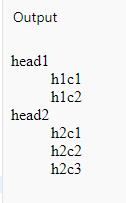
dl 列表 , dt:每一个段的标题, dd:段的内容项 -->
 <dl>
    <dt>head1 </dt>
    <dd>h1c1</dd>
    <dd>h1c2</dd>
    <dt>head2</dt>
    <dd>h2c1</dd>
    <dd>h2c2</dd>
    <dd>h2c3</dd>
  </dl>
table
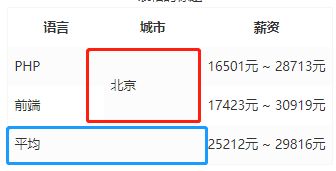
<table>
    <caption>表格的标题</caption>
    <tr>
        <!-- tablehead -->
      <th>语言</th>
      <th>城市</th>
      <th>薪资</th>
    </tr>
    <tr>
      <td>PHP</td>
      <td rowspan="2">北京</td>
      <td>16501元 ~ 28713元</td>
    </tr>
    <tr>
      <td>前端</td>
      <td>17423元 ~ 30919元</td>
    </tr>
    <tr>
      <td colspan="2">平均</td>
      <td>25212元 ~ 29816元</td>
    </tr>
  </table>
杂七杂八
- 行级元素 只能 套行级元素
- 块级元素 随便 套任何元素
- p里面 不能 套 div
- a里面 不能 套 a
- 标准字体和
<h4>是一样大小 - 块级元素:单独占一行,并会尝试着横向把左边和右边全部填满 它前边和后边写的东西都会被挤到上边和下边去
- img:title是用户鼠标放上来显示。alt是图片无法显示时显示
几个小demo
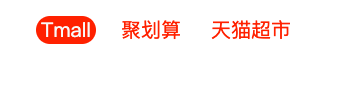
 <ul class="nav">
    <li class="listItem">
      <a href="#">Tmall</a>
    </li>
    <li class="listItem">
      <a href="#">聚划算</a>
    </li>
    <li class="listItem">
      <a href="#">天猫超市</a>
    </li>
  </ul>

 .nav{list-style:none;}

.listItem{
  float:left;
  margin:0 10px;
  color:#f40;
}

a{
    text-decoration:none;
    color:#f40;
    border-radius:15px;
    padding: 0 5px;
}

a:hover{
  color:#f9f9f9;
  background-color:#f40;
}
文本溢出容器,打点显示
- 单行
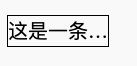
  <p class="longSen">
  这是一条长语句,为了测试长语句文本溢出之后打点显示的demo功能
  </p>

.longSen{
    width: 100px;
    height: 30px;
    line-height: 30px;
    border: 1px solid black;
    /* 到这一句以上 是溢出的 */

    /* 下面处理溢出,固定三件套
    1,让溢出部分 不折行
    2,溢出部分隐藏
    3,'...'显示*/
  white-space: nowrap;
  overflow: hidden;
  text-overflow: ellipsis;
}
- 多行
做截断: height 和 line-height 成整数倍关系,然后 overflow: hidden;
浮动流
