WebSocket
websocket 是一种长连接方式,可以帮助我们通过浏览器和服务端进行长连接,用于可以即时通讯,推送消息等
Java 中 WebSocket 使用比较简单, java 给我们提供了响应的 api 用于处理建立连接,收消息,关闭连接等
1.1 POM 依赖
<project xmlns="http://maven.apache.org/POM/4.0.0" xmlns:xsi="http://www.w3.org/2001/XMLSchema-instance"
xsi:schemaLocation="http://maven.apache.org/POM/4.0.0 http://maven.apache.org/maven-v4_0_0.xsd">
<modelVersion>4.0.0</modelVersion>
<groupId>com.qianfeng</groupId>
<artifactId>testwebsocket</artifactId>
<packaging>war</packaging>
<version>1.0-SNAPSHOT</version>
<name>testwebsocket Maven Webapp</name>
<url>http://maven.apache.org</url>
<dependencies>
<dependency>
<groupId>junit</groupId>
<artifactId>junit</artifactId>
<version>3.8.1</version>
<scope>test</scope>
</dependency>
<dependency>
<groupId>javax.servlet</groupId>
<artifactId>javax.servlet-api</artifactId>
<version>3.1.0</version>
</dependency>
<dependency>
<groupId>javax.servlet.jsp</groupId>
<artifactId>jsp-api</artifactId>
<version>2.2</version>
</dependency>
<dependency>
<groupId>javax.websocket</groupId>
<artifactId>javax.websocket-api</artifactId>
<version>1.1</version>
<scope>provided</scope>
</dependency>
<dependency>
<groupId>net.sf.json-lib</groupId>
<artifactId>json-lib</artifactId>
<version>2.4</version>
</dependency>
</dependencies>
<build>
<finalName>testwebsocket</finalName>
</build>
</project>
1.2 Web.xml
注意 maven 工程的 xml 文件的版本应该是3.0+
<web-app xmlns="http://xmlns.jcp.org/xml/ns/javaee"
xmlns:xsi="http://www.w3.org/2001/XMLSchema-instance"
xsi:schemaLocation="http://xmlns.jcp.org/xml/ns/javaee
http://xmlns.jcp.org/xml/ns/javaee/web-app_3_1.xsd"
version="3.1">
</web-app>
1.3 JAVA 类
package com.qianfeng.servlet;
import net.sf.json.JSONObject;
import javax.websocket.*;
import javax.websocket.server.PathParam;
import javax.websocket.server.ServerEndpoint;
import java.io.IOException;
import java.util.Map;
import java.util.concurrent.ConcurrentHashMap;
@ServerEndpoint("/websocket/{name}")
public class WebSocket {
private String name;
private Session session;
private static Map<String,Session> allClients=new ConcurrentHashMap();
public WebSocket() {
System.out.println("构造方法执行了");
}
@OnOpen
public void onOpen(@PathParam("name") String name, Session session) throws Exception{
this.name=name;
this.session = session;
allClients.put(name, session);
}
@OnMessage
public void onMessage(Session session ,String message) {
System.out.println(session);
System.out.println("当前收到的消息是:"+message);
JSONObject jsonObject = JSONObject.fromObject(message);
String toName = jsonObject.getString("toName");
String content = jsonObject.getString("content");
sendMessage(toName,"来自: "+name+" 的消息,内容是: "+content);
}
@OnError
public void onError(Session session,Throwable e) {
try {
session.close();
allClients.remove(name);
} catch (IOException e1) {
e1.printStackTrace();
}
e.printStackTrace();
}
@OnClose
public void onClose(Session session) {
System.out.println(session);
allClients.remove(name);
}
public void sendMessage(String name, String message) {
Session toSession = allClients.get(name);
if (toSession != null) {
toSession.getAsyncRemote().sendText(message);
return;
}
session.getAsyncRemote().sendText("对方不在线");
}
public String getName() {
return name;
}
public void setName(String name) {
this.name = name;
}
public Session getSession() {
return session;
}
public void setSession(Session session) {
this.session = session;
}
public static Map<String, Session> getAllClients() {
return allClients;
}
public static void setAllClients(Map<String, Session> allClients) {
WebSocket.allClients = allClients;
}
}
1.4 html
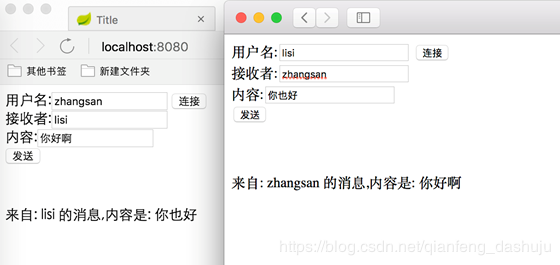
html 中比较简单,就是单纯聊天,没有做很复杂的名单列表,聊天记录列表等功能,
使用的时候 开多个浏览器, 各自填写自己的名字,连接后, 就可以填写收消息人的名字,发送消息了
<!DOCTYPE html>
<html lang="en">
<head>
<meta charset="UTF-8">
<title>Title</title>
<script type="text/javascript">
var websocket = null;
function abc() {
var username=document.getElementById("me").value;
if ('WebSocket' in window) {
websocket = new WebSocket("ws://" + document.location.host + "/websocket/"+username);
} else {
alert('当前浏览器 Not support websocket')
}
websocket.onerror = function() {
setMessageInnerHTML("WebSocket连接发生错误");
};
websocket.onopen = function() {
setMessageInnerHTML("WebSocket连接成功");
}
websocket.onmessage = function(event) {
setMessageInnerHTML(event.data);
}
websocket.onclose = function() {
setMessageInnerHTML("WebSocket连接关闭");
}
window.onbeforeunload = function() {
closeWebSocket();
}
}
function sendmessage() {
var toName=document.getElementById("to").value;
if (websocket!=null) {
var content=document.getElementById("content").value;
var message='{"toName":"'+toName+'","content":"'+content+'"}';
websocket.send(message);
}
}
function closeWebSocket() {
if (websocket!=null) {
websocket.close();
}
}
function setMessageInnerHTML(data) {
document.getElementById("neirong").innerHTML = data;
}
</script>
</head>
<body>
用户名:<input type="text" id="me" /> <button onclick="abc()"> 连接</button><br>
接收者:<input type="text" id="to" /><br>
内容:<input type="text" id="content" /><br>
<button onclick="sendmessage()">发送</button><br>
<br>
<br>
<br>
<span id="neirong"></span>
</body>
</html>
1.5 测试