KVC
KVC的一些使用技巧,可以参考之前的一个简单记录: iOS中关于KVC使用的一些小技巧
KVO
KVO是基于KVC基础的键值观察机制。 KVO的基本使用就不说了,来看看添加KVO对Person的影响:
本文中的代码都基于Person类的定义:
@interface Person : NSObject

@property (nonatomic, copy) NSString *name;
@property (nonatomic, assign) NSInteger age;

@end
static void *kContextPersonKVO = &kContextPersonKVO;

...

Person *p = [[Person alloc] init];
[p addObserver:self forKeyPath:@"age" options:NSKeyValueObservingOptionNew context:kContextPersonKVO];

p.age = 10; // 断点
在断点处查看:
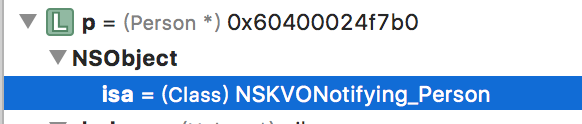
isa-swizzling
KVO的实现机制是isa-swizzling。
Automatic key-value observing is implemented using a technique called isa-swizzling. The isa pointer, as the name suggests, points to the object's class which maintains a dispatch table. This dispatch table essentially contains pointers to the methods the class implements, among other data. When an observer is registered for an attribute of an object the isa pointer of the observed object is modified, pointing to an intermediate class rather than at the true class. As a result the value of the isa pointer does not necessarily reflect the actual class of the instance. You should never rely on the isa pointer to determine class membership. Instead, you should use the class method to determine the class of an object instance.
KVO做了isa-swizzling之后,会动态创建一个继承自原来Class的子类。如原类为Person,则动态创建一个NSKVONotifying_Person继承自Person类。 对Person类的一个实例对象p而言,对其某个属性添加KVO之后, 使用object_getClass(self)方法来查看其isa为NSKVONotifying_Person, 使用class_getSuperclass(object_getClass(self))来查看其super class为Person。 所以, isa-swizzling的关键点在于将被观察对象(实例对象p)的isa指针指向新创建的类NSKVONotifying_Person。 而使用[self class]得到的依然是Person,[self superClass]得到的是NSObject。 所以,对于我们来讲,可以理解为:添加KVO之后,被观察对象(实例对象p)的isa,super_class,检测属性的setter方法被改变了。比如,我们调用属性age的setter方法,实际上会去NSKVONotifying_Person中找到对应重写的setAge:方法,使用willChangeForValue:和didChangeForValue:来实现setter方法的监听。 如果不通过setter方法,而是直接给实例变量_age赋值,是不会触发KVO的响应方法的。
removeObserver方法将isa再指向原来的Person类即可。
KVO的使用场景
监听对象的属性变化
这一点是KVO最基本的用法,就不多说了
观察者模式
KVO的另一个最常见使用场景就是观察者模式。 如对Person的实例变量p的age属性进行KVO监控,可以随时获取age的变化,做出对应的响应。
双向绑定
使用KVO可以实现双向绑定,用于封装一个响应式的框架。 这一点,RAC和RxSwift值得研究一番。
KVO的注意事项
不是所有属性都可以监听。
如果使用KVO监听了UIView的frame属性,改变其center属性,是不会触发KVO的。因为改变center并未调用frame属性的setter方法,可以在center的setter方法中使用willChangeValueFor:和didChangeValueFor:来触发frame属性的KVO。
- (void)setCenter:(CGPoint)center
{
    [aView willChangeValueForKey:@"center"];
    // 根据center计算new frame
    CGRect newFrame = xxx;
    aView.frame = newFrame;
    [aView didChangeValueForKey:@"center"];
}
手动监听NSOperation的属性
默认情况下,NSOperation的这三个属性是只读的,
@interface NSOperation : NSObject

@property (readonly, getter=isCancelled) BOOL cancelled;
@property (readonly, getter=isExecuting) BOOL executing;
@property (readonly, getter=isFinished) BOOL finished;

@end
那我们如果想给这三个属性赋值,已达到自己控制NSOperation状态的目的呢? 可以使用如下方式:
@interface CSDownloadOperation : NSOperation
@end


@interface CSDownloadOperation ()

// 因这些属性是readonly, 不会自动触发KVO. 需要手动触发KVO, 见setter方法.
@property (assign, nonatomic, getter = isExecuting) BOOL executing;
@property (assign, nonatomic, getter = isFinished) BOOL finished;
@property (assign, nonatomic, getter = isCancelled) BOOL cancelled;

@end

@implementation CSDownloadOperation

@synthesize executing = _executing;
@synthesize finished = _finished;
@synthesize cancelled = _cancelled;

// MARK: - setter

- (void)setExecuting:(BOOL)executing
{
    [self willChangeValueForKey:@"isExecuting"];
    _executing = executing;
    [self didChangeValueForKey:@"isExecuting"];
}


/**
 finished
 设置isFinished状态, 不能在start之前执行, 否则会crash.
 */
- (void)setFinished:(BOOL)finished
{
    [self willChangeValueForKey:@"isFinished"];
    _finished = finished;
    [self didChangeValueForKey:@"isFinished"];
}

- (void)setCancelled:(BOOL)cancelled
{
    [self willChangeValueForKey:@"isCancelled"];
    _cancelled = cancelled;
    [self didChangeValueForKey:@"isCancelled"];
}

@end
在需要设置新值的时候,手动触发KVO,然后给对应的实例变量赋值。 这种方式可以用来自定义一个异步执行的NSOperation,比如使用NSURLSession封装的下载操作。
对可变集合进行监控
使用KVO的常见方法不能对可变集合进行监控,只能通过mutableArrayValueForKey:, mutableSetValueForKey:, mutableOrderedSetValueForKey:来分别对NSMutableArray,NSMutableSet,NSMutableOrderedSet进行监控。
We would also like to point out that collections as such are not observable. KVO is about observing relationships rather than collections. We cannot observe an NSArray; we can only observe a property on an object – and that property may be an NSArray. As an example, if we have a ContactList object, we can observe its contacts property, but we cannot pass an NSArray to -addObserver:forKeyPath:... as the object to be observed.
mutableArrayValueForKey
比如如下代码,我们想要对一个可变数组selectedMaterials进行KVO监控,以便对UI和代码逻辑进行更新。
@property (nonatomic, strong) NSMutableArray *selectedMaterials;


[self addObserver:self
       forKeyPath:@"selectedMaterials"
          options:NSKeyValueObservingOptionNew | NSKeyValueObservingOptionInitial
          context:&ctxKVOSelectedMaterials];


- (void)observeValueForKeyPath:(NSString *)keyPath ofObject:(id)object change:(NSDictionary *)change context:(void *)context
{
    if (context == &ctxKVOSelectedMaterials) {
        dispatch_async(dispatch_get_main_queue(), ^{
            [self updateSelectedCount];

            [self.collectionView reloadData];
        });
    } else {
        [super observeValueForKeyPath:keyPath ofObject:object change:change context:context];
    }
}

[self removeObserver:self
          forKeyPath:@"selectedMaterials"
             context:&ctxKVOSelectedMaterials];
同时,触发KVO的代码也有所不同。一定要先获取到可变集合[self mutableArrayValueForKey:@"selectedMaterials"]
// 每次add都会触发一次KVO
[[self mutableArrayValueForKey:@"selectedMaterials"] addObject:material.number];
[[self mutableArrayValueForKey:@"selectedMaterials"] removeObject:material.number];
[[self mutableArrayValueForKey:@"selectedMaterials"] removeAllObjects];
// 多次add仅触发一次KVO
NSIndexSet *indexSet = [NSIndexSet indexSetWithIndexesInRange:NSMakeRange(self.selectedMaterials.count, materials.count)];
[[self mutableArrayValueForKey:@"selectedMaterials"] insertObjects:materials atIndexes:indexSet];
参考文档:
In order to be key-value coding compliant for a mutable ordered to-many relationship you must implement the following methods: -insertObject:inAtIndex: or -insert:atIndexes:. At least one of these methods must be implemented. These are analogous to the NSMutableArray methods insertObject:atIndex: and insertObjects:atIndexes:. -removeObjectFromAtIndex: or -removeAtIndexes:. At least one of these methods must be implemented. These methods correspond to the NSMutableArray methods removeObjectAtIndex: and removeObjectsAtIndexes: respectively. -replaceObjectInAtIndex:withObject: or -replaceAtIndexes:with:. Optional. Implement if benchmarking indicates that performance is an issue. The -insertObject:inAtIndex: method is passed the object to insert, and an NSUInteger that specifies the index where it should be inserted. The -insert:atIndexes: method inserts an array of objects into the collection at the indices specified by the passed NSIndexSet. You are only required to implement one of these two methods.
KVO的缺点
不能使用block
针对这一点,有一些第三方库自己对KVO进行了封装,添加了可传递block的API,类似于NSNotificationCenter的某些方法。
移除已经dealloc的对象则会crash
这一点尤其要注意。一般确保addObserver与removeObserver成对出现即可。
Swift原生类不支持KVO
KVO是runtime的一个特性,所以在Swift中KVO仅对NSObject的子类有效,且需要对监听的属性使用dynamic关键字。不过,Swift中的属性有了willSet和didSet方法,相比KVO更加实用。
同一线程
KVO的observeValueForKeyPath方法执行的线程,始终与执行被监听属性的setter方法的代码处于同一线程。若要在observeValueForKeyPath执行其他线程的任务,可以使用dispatch_async(xxx). 这一点与NSNotification类似。NSNotification不能跨线程:即响应通知的action,默认是与postNotification在同一个线程的,若想在指定线程中执行响应通知的方法,可以使用带有block的addObserver方法,或者使用dispatch_async(xxx)。
FBKVOController
FBKVOController是Facebook开源的KVO封装库,针对KVO的一些缺点做了优化,使用也更加简便。