一、简介
在上一篇文章 HBase 基础入门 中,我们已经介绍了 HBase 的一些基本概念,以及如何安装使用的方法。那么,作为一名 Javaer,自然是希望用 Java 的方式来与 HBase 进行对话了。所幸的是,HBase 本身就是用 Java 编写的,天生自带了 Java 原生API。我们可以通过 hbase-client 来实现 HBase 数据库的操作。所以,这次主要介绍该组件的基本用法。
在使用 hbase-client 之前,有几个要点需要注意:
-
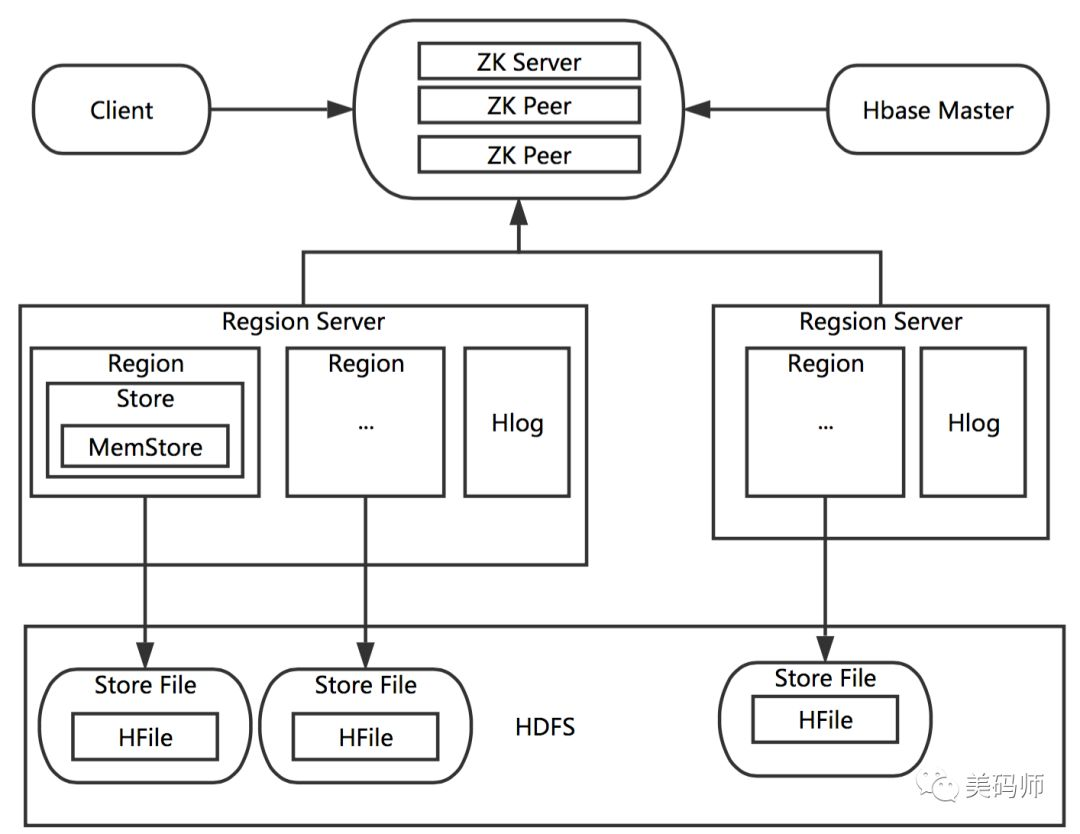
客户端需要能访问 Zoopkeeper,再获得 HMaster、RegionServer 实例进行操作
-
客户端需运行在HBase/Hadoop 集群内,HBase会使用 hostname 来定位节点,因此要求客户端能访问到对应的主机名(或子域名) 如果是远程客户端则需要配置本地的hosts文件。
下面这个图,有助于理解 Client 与 HBase 集群的交互架构:
下面开始介绍 client 的使用。
二、hbase-client 引入
在 Maven 的 pom.xml 中添加依赖:
<dependency>
<groupId>org.apache.hbase</groupId>
<artifactId>hbase-client</artifactId>
<version>2.1.5</version>
<exclusions>
<exclusion>
<artifactId>slf4j-api</artifactId>
<groupId>org.slf4j</groupId>
</exclusion>
<exclusion>
<artifactId>slf4j-log4j12</artifactId>
<groupId>org.slf4j</groupId>
</exclusion>
</exclusions>
</dependency>
<dependency>
<groupId>org.apache.hbase</groupId>
<artifactId>hbase</artifactId>
<version>2.1.5</version>
</dependency>
这里需要注意的是,客户端版本和 HBase 版本需要保持一致,否则可能会遇到不兼容的问题。
三、连接操作
示例代码:
/**
* 建立连接
*
* @return
*/
public static Connection getConnection() {
try {
//获取配置
Configuration configuration = getConfiguration();
//检查配置
HBaseAdmin.checkHBaseAvailable(configuration);
return ConnectionFactory.createConnection(configuration);
} catch (IOException | ServiceException e) {
throw new RuntimeException(e);
}
}
/**
* 获取配置
*
* @return
*/
private static Configuration getConfiguration() {
try {
Properties props = PropertiesLoaderUtils
.loadAllProperties("hbase.properties");
String clientPort = props
.getProperty("hbase.zookeeper.property.clientPort");
String quorum = props
.getProperty("hbase.zookeeper.quorum");
logger.info("connect to zookeeper {}:{}", quorum, clientPort);
Configuration config = HBaseConfiguration.create();
config.set("hbase.zookeeper.property.clientPort", clientPort);
config.set("hbase.zookeeper.quorum", quorum);
return config;
} catch (IOException e) {
throw new RuntimeException(e);
}
}
四、表操作
增删改查方法封装如下:
/**
* 创建表
* @param connection
* @param tableName
* @param columnFamilies
* @throws IOException
*/
public static void createTable(Connection connection, TableName tableName, String... columnFamilies) throws IOException {
Admin admin = null;
try {
admin = connection.getAdmin();
if (admin.tableExists(tableName)) {
logger.warn("table:{} exists!", tableName.getName());
} else {
TableDescriptorBuilder builder = TableDescriptorBuilder.newBuilder(tableName);
for (String columnFamily : columnFamilies) {
builder.setColumnFamily(ColumnFamilyDescriptorBuilder.of(columnFamily));
}
admin.createTable(builder.build());
logger.info("create table:{} success!", tableName.getName());
}
} finally {
if (admin != null) {
admin.close();
}
}
}
/**
* 插入数据
*
* @param connection
* @param tableName
* @param rowKey
* @param columnFamily
* @param column
* @param data
* @throws IOException
*/
public static void put(Connection connection, TableName tableName,
String rowKey, String columnFamily, String column, String data) throws IOException {
Table table = null;
try {
table = connection.getTable(tableName);
Put put = new Put(Bytes.toBytes(rowKey));
put.addColumn(Bytes.toBytes(columnFamily), Bytes.toBytes(column), Bytes.toBytes(data));
table.put(put);
} finally {
if (table != null) {
table.close();
}
}
}
/**
* 根据row key、column 读取
*
* @param connection
* @param tableName
* @param rowKey
* @param columnFamily
* @param column
* @throws IOException
*/
public static String getCell(Connection connection, TableName tableName, String rowKey, String columnFamily, String column) throws IOException {
Table table = null;
try {
table = connection.getTable(tableName);
Get get = new Get(Bytes.toBytes(rowKey));
get.addColumn(Bytes.toBytes(columnFamily), Bytes.toBytes(column));
Result result = table.get(get);
List<Cell> cells = result.listCells();
if (CollectionUtils.isEmpty(cells)) {
return null;
}
String value = new String(CellUtil.cloneValue(cells.get(0)), "UTF-8");
return value;
} finally {
if (table != null) {
table.close();
}
}
}
/**
* 根据rowkey 获取一行
*
* @param connection
* @param tableName
* @param rowKey
* @return
* @throws IOException
*/
public static Map<String, String> getRow(Connection connection, TableName tableName, String rowKey) throws IOException {
Table table = null;
try {
table = connection.getTable(tableName);
Get get = new Get(Bytes.toBytes(rowKey));
Result result = table.get(get);
List<Cell> cells = result.listCells();
if (CollectionUtils.isEmpty(cells)) {
return Collections.emptyMap();
}
Map<String, String> objectMap = new HashMap<>();
for (Cell cell : cells) {
String qualifier = new String(CellUtil.cloneQualifier(cell));
String value = new String(CellUtil.cloneValue(cell), "UTF-8");
objectMap.put(qualifier, value);
}
return objectMap;
} finally {
if (table != null) {
table.close();
}
}
}
/**
* 扫描权标的内容
*
* @param connection
* @param tableName
* @param rowkeyStart
* @param rowkeyEnd
* @throws IOException
*/
public static List<Map<String, String>> scan(Connection connection, TableName tableName, String rowkeyStart, String rowkeyEnd) throws IOException {
Table table = null;
try {
table = connection.getTable(tableName);
ResultScanner rs = null;
try {
Scan scan = new Scan();
if (!StringUtils.isEmpty(rowkeyStart)) {
scan.withStartRow(Bytes.toBytes(rowkeyStart));
}
if (!StringUtils.isEmpty(rowkeyEnd)) {
scan.withStopRow(Bytes.toBytes(rowkeyEnd));
}
rs = table.getScanner(scan);
List<Map<String, String>> dataList = new ArrayList<>();
for (Result r : rs) {
Map<String, String> objectMap = new HashMap<>();
for (Cell cell : r.listCells()) {
String qualifier = new String(CellUtil.cloneQualifier(cell));
String value = new String(CellUtil.cloneValue(cell), "UTF-8");
objectMap.put(qualifier, value);
}
dataList.add(objectMap);
}
return dataList;
} finally {
if (rs != null) {
rs.close();
}
}
} finally {
if (table != null) {
table.close();
}
}
}
/**
* 删除表
*
* @param connection
* @param tableName
* @throws IOException
*/
public static void deleteTable(Connection connection, TableName tableName) throws IOException {
Admin admin = null;
try {
admin = connection.getAdmin();
if (admin.tableExists(tableName)) {
//现执行disable
admin.disableTable(tableName);
admin.deleteTable(tableName);
}
} finally {
if (admin != null) {
admin.close();
}
}
}
五、运行测试
最后,我们仍然以上一篇文章中的设备数据作为例子:
-
建立 DeviceState 表;
-
定义 name/state 两个列簇;
-
写入列数据;
-
读取列、行,范围读取;
-
删除操作
最终实现的代码如下:
private static final Logger logger = LoggerFactory.getLogger(HBaseTest.class);
public static void main(String[] args) {
Connection connection = null;
try {
connection = getConnection();
TableName tableName = TableName.valueOf("DeviceState");
//创建DeviceState表
createTable(connection, tableName, "name", "state");
logger.info("创建表 {}", tableName.getNameAsString());
//写入数据
put(connection, tableName, "row1", "name", "c1", "空调");
put(connection, tableName, "row1", "state", "c2", "打开");
put(connection, tableName, "row2", "name", "c1", "电视机");
put(connection, tableName, "row2", "state", "c2", "关闭");
logger.info("写入数据.");
String value = getCell(connection, tableName, "row1", "state", "c2");
logger.info("读取单元格-row1.state:{}", value);
Map<String, String> row = getRow(connection, tableName, "row2");
logger.info("读取单元格-row2:{}", JsonUtil.toJson(row));
List<Map<String, String>> dataList = scan(connection, tableName, null, null);
logger.info("扫描表结果-:\n{}", JsonUtil.toPrettyJson(dataList));
//删除DeviceState表
deleteTable(connection, tableName);
logger.info("删除表 {}", tableName.getNameAsString());
logger.info("操作完成.");
} catch (Exception e) {
logger.error("操作出错", e);
} finally {
if (connection != null) {
try {
connection.close();
} catch (IOException e) {
logger.error("error occurs", e);
}
}
}
}
执行代码,控制台输出如下:
INFO -createTable(HBaseTest.java:89) - create table:[68, 101, 118, 105, 99, 101, 83, 116, 97, 116, 101] success!
INFO -main(HBaseTest.java:32) - 创建表 DeviceState
INFO -main(HBaseTest.java:40) - 写入数据.
INFO -main(HBaseTest.java:43) - 读取单元格-row1.state:打开
INFO -main(HBaseTest.java:46) - 读取单元格-row2:{"c1":"电视机","c2":"关闭"}
INFO -main(HBaseTest.java:49) - 扫描表结果-:
[ {
"c1": "空调",
"c2": "打开"
}, {
"c1": "电视机",
"c2": "关闭"
} ]
INFO -HBaseAdmin$9.call(HBaseAdmin.java:1380) - Started disable of DeviceState
INFO -HBaseAdmin$DisableTableFuture.postOperationResult(HBaseAdmin.java:1409) - DisabledDeviceState
INFO -HBaseAdmin$DeleteTableFuture.postOperationResult(HBaseAdmin.java:965) - DeletedDeviceState
INFO -main(HBaseTest.java:53) - 删除表 DeviceState
INFO -main(HBaseTest.java:55) - 操作完成.
此时Java Client已经完成制作。
FAQ
A. 提示报错 找不到 winutils 程序
Failed to locate the winutils binary in the hadoop binary path
原因
在Windows下依赖一个 winutils.exe 程序,该程序通过${HADOOPHOME}/bin 来查找。该报错不影响程序执行。
解决办法
需要下载hadoop-commons-master,再配置变量 HADOOPHOME
B. 提示报错,UnknownHostException,无法找到节点.. 原因 客户端无法解析HMaster实例节点的主机名 解决办法 需要编辑 C:\Windows\System32\drivers\etc\hosts 文件,添加对应的映射,如下:
47.xx.8x.xx izwz925kr63w5jitjys6dtt
参考文档
官方文档 https://hbase.apache.org/book.html#quickstart Java HBase客户端API https://www.baeldung.com/hbase
欢迎关注"美码师"公众号,笔者是十年老兵一枚,欢迎留言打扰,话题不限于技术、职场或生活..
"写一首代码,做一手好菜",当技术与美走到一起时,生活也可以是诗和远方