1、目录结构
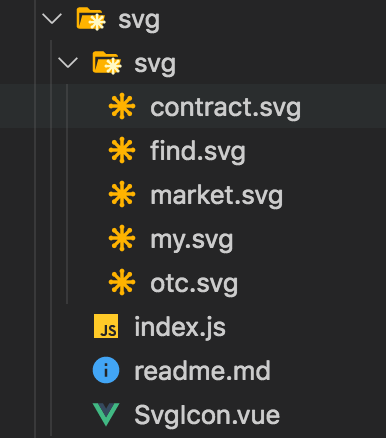
2、vuecli3 如何引入svg
- 1、SvgIcon.vue
<template>
  <div v-if="isExternal" :style="styleExternalIcon" class="svg-external-icon svg-icon" v-on="$listeners" />
  <svg v-else :class="svgClass" aria-hidden="true" v-on="$listeners">
    <use :xlink:href="iconName" />
  </svg>
</template>

<script>
function isExternal(path) {
  return /^(https?:|mailto:|tel:)/.test(path)
}

export default {
  name: 'SvgIcon',
  props: {
    iconClass: {
      type: String,
      required: true,
    },
    className: {
      type: String,
      default: '',
    },
  },
  computed: {
    isExternal() {
      return isExternal(this.iconClass)
    },
    iconName() {
      return `#icon-${this.iconClass}`
    },
    svgClass() {
      if (this.className) {
        return 'svg-icon ' + this.className
      } else {
        return 'svg-icon'
      }
    },
    styleExternalIcon() {
      return {
        mask: `url(${this.iconClass}) no-repeat 50% 50%`,
        '-webkit-mask': `url(${this.iconClass}) no-repeat 50% 50%`,
      }
    },
  },
}
</script>

<style scoped>
.svg-icon {
  width: 1em;
  height: 1em;
  vertical-align: -0.15em;
  fill: currentColor;
  overflow: hidden;
}

.svg-external-icon {
  background-color: currentColor;
  mask-size: cover !important;
  display: inline-block;
}
</style>
- 2、index.js
import Vue from 'vue'
import SvgIcon from './SvgIcon'

Vue.component('SvgIcon', SvgIcon)
const req = require.context('./svg', false, /\.svg$/)
const requireAll = requireContext => requireContext.keys().map(requireContext)
requireAll(req)
- 3、main.js
import './svg'
- 4、
npm i -D svg-sprite-loader - 5、vue.config.js
const path = require('path')
function resolve(dir) {
  // 路径可能与你的项目不同
  return path.join(__dirname, dir)
}

module.exports = {
  publicPath: '/',
  css: {
    loaderOptions: {
      postcss: {
        plugins: [
          autoprefixer(),
          pxtoviewport({
            viewportWidth: 375,
          }),
        ],
      },
    },
  },
  chainWebpack: config => {
    config.module.rule('svg').uses.clear()
    config.module
      .rule('svg1')
      .test(/\.svg$/)
      .use('svg-sprite')
      .loader('svg-sprite-loader')
      .options({
        symbolId: 'icon-[name]',
      })
      .end()
      .include.add(resolve('src/svg')) // 注意这里
      .end()
  },
}
3、如何给svg换颜色
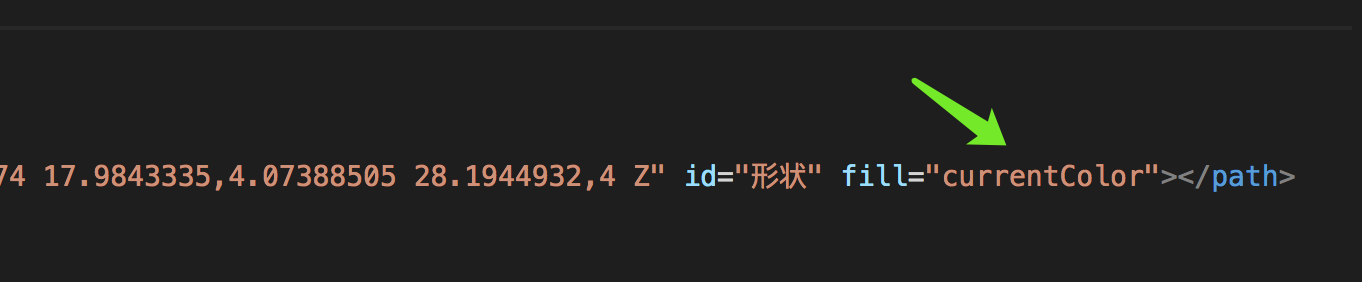
- 1、svg里面的path标签里面有fill="#D1D1D1",把这句话改为fill="currentColor"即可。
- 注意:网上说的把fill="xxx"直接删除,我试过是不行的,一定要改为fill="currentColor"
- 2、这样就可以在外层样式里面去控制svg的颜色了!当然大小也是能控制的!
- 使用:
<svg-icon icon-class="xxx" class-name="yyy"></svg-icon>
循环里面
<svg-icon :icon-class="o.svg" :class-name="o.svgCls"></svg-icon>