

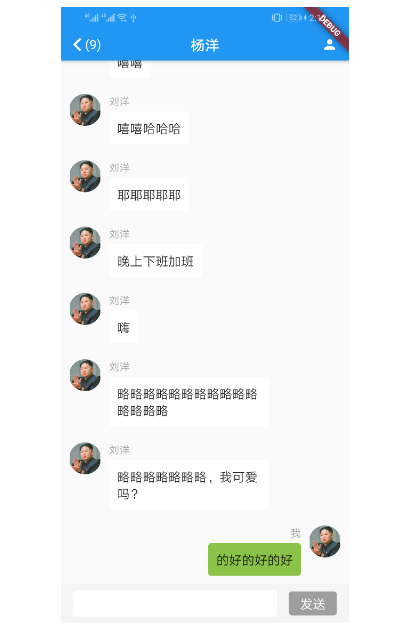
@override Widget buildWidget(BuildContext context) { // TODO: implement buildWidget controller = new ScrollController(); return new StreamBuilder( stream: bloc.stream, builder: (BuildContext context, AsyncSnapshot<List> snapshot) { return Column( mainAxisSize: MainAxisSize.max, children: [ Expanded( child: EasyRefresh.custom( firstRefresh: true, reverse: false, scrollController: controller, header: CustomBallPulseHeader(), onRefresh: () async { return Future.delayed(Duration(milliseconds: 2000), () { bloc.onLoadMore( context: context, controller: controller); }); }, slivers: [ SliverList( delegate: SliverChildBuilderDelegate( (context, index) { T item = snapshot.data[index]; return buildItem(context, item); }, childCount: snapshot.data == null ? 0 : snapshot.data.length, ), ), ]), flex: 1, ), getFooterWidget(context) ], ); }); }
getFooterWidget(BuildContext context) { // TODO: implement getFooterWidget return Container( color: Colors.grey[100], margin: EdgeInsets.only(bottom: MediaQuery.of(context).viewInsets.bottom), padding: EdgeInsets.only( left: 15.0, right: 15.0, top: 8.0, bottom: 8.0, ), child: Row( children: [ Expanded( flex: 1, child: Container( padding: EdgeInsets.only( left: 5.0, right: 5.0, top: 5.0, bottom: 5.0, ), decoration: BoxDecoration( color: Colors.white, borderRadius: BorderRadius.all(Radius.circular( 4.0, )), ), child:TextField( controller: _textEditingController, decoration: InputDecoration( contentPadding: EdgeInsets.only( top: 2.0, bottom: 2.0, ), border: InputBorder.none, ), onSubmitted: (value) { if (_textEditingController.text.isNotEmpty) { _textEditingController.text = ''; } }, ), ), ), InkWell( onTap: () { if (_textEditingController.text.isNotEmpty) { bloc.sendMessage(_textEditingController.text); _textEditingController.text = ''; } }, child: Container( height: 30.0, width: 60.0, alignment: Alignment.center, margin: EdgeInsets.only( left: 15.0, ), decoration: BoxDecoration( color: _textEditingController.text.isEmpty ? Colors.grey : Colors.green, borderRadius: BorderRadius.all(Radius.circular( 4.0, )), ), child: Text( "发送", style: TextStyle( color: Colors.white, fontSize: 16.0, ), ), ), ), ], ), ); }

