

关于懒加载众所周知,对于页面内容比较丰富的网站,dom的解析会很复杂,这样就会导致首屏加载过慢,对于图片很丰富的网站,我们知道可以使用图片懒加载来提高网站的响应速度,我在我的另外一篇文章中写过,有兴趣的点击这里。像淘宝、京东等等的首页都是经过懒加载处理的,他们会先渲染出骨架,然后懒加载的区域出现在了可视范围的时候再把骨架替换为真实的内容。
骨架: 
真实内容:
这样就避免首页一次性加载过多的内容浏览器需要渲染过多的dom导致的卡慢, 同时图片也懒加载了,避免下载图片导致的dom渲染阻塞,可谓一举而两得,那么在vue中,我们怎么做懒加载呢?这里分享下我做的项目当中,利用vue的mixin做的懒加载。
vue mixin关于vue mixin,我想大家都知道vue mixin的作用,个人觉得它最大的用处就是共享一些数据data和方法methods,从而实现代码重用。居于它的作用,我选择mixin作为实现懒加载的手段,所有需要懒加载的模块,都导入懒加载所需要的mixin。
如何实现懒加载我们知道vue的v-if可以决定是否要渲染该组件,所以我们利用v-if来控制懒加载的组件,如果这个组件不在可视区域,则将其设为false,或者让它渲染骨架,当组件出现在可视区域的时候再去渲染真实的dom。
如何判断组件出现在可视区域判断组件是否出现在可视区域有两种手段:
一、是利用元素的getBoundingClientRect方法获取元素所处的位置,然后判断top属性是否大于0到window.innerHeight之间,并且需要监听页面的scroll事件,不断进行上述判断,想要了解更多的,请阅读我开头说的图片懒加载实现方式。
二、利用新特性IntersectionObserver,这个特性不需要我们去监听滚动事件,只要元素出现在视线,就会触发可见的事件
01 02 03 04 05 06 07 08 09 10 11 12 13 14 15 16 | if ("IntersectionObserver" in window) { let lazyCompObserver = new IntersectionObserver((entries) => { entries.forEach((entry) => { // 元素可见 if (entry.intersectionRatio > 0) { // TODO 进行一些元素可见后的一些操作,同时该元素不需要被observe了 lazyCompObserver.unobserve(entry.target) } }) }) if(this.$el.nodeType === 1) { // 需要observe的元素 lazyCompObserver.observe(this.$el) }} |
实现综上所述,我们实现懒加载的mixin是这样写的
01 02 03 04 05 06 07 08 09 10 11 12 13 14 15 16 17 18 19 20 21 22 23 24 25 26 27 28 29 30 31 32 33 34 35 36 37 38 39 40 41 42 43 44 45 46 47 48 49 50 51 52 53 54 55 56 57 58 59 60 61 62 63 64 65 66 | // lazy-load mixinimport {throttle, getClientHeight} from 'tool/tool'export default { data() { return { isShow: false, _throttleFn: null } }, methods: { inViewShow() { if(this.isShow) { document.removeEventListener('scroll', this._throttleFn, false) return } // 不支持IntersectionObserver api的情况下判断图片是否出现在可视区域内 let { $el } = this const rect = $el.getBoundingClientRect() // 出现在视野的时候加载元素 if(0 < rect.top && rect.top < getClientHeight()) { this.isShow = true } } }, mounted() { // 支持IntersectionObserver的使用这个api if ("IntersectionObserver" in window) { let lazyCompObserver = new IntersectionObserver((entries) => { entries.forEach((entry) => { if (entry.intersectionRatio > 0) { this.isShow = true lazyCompObserver.unobserve(entry.target) // 当元素可见时,如果需要回调,则执行 this.onVisible && this.onVisible() } }) }) if(this.$el.nodeType === 1) { lazyCompObserver.observe(this.$el) } } else { // 不支持的使用getBoundingClientRect和scroll来判断 this.inViewShow() this._throttleFn = throttle(this.inViewShow) document.addEventListener('scroll', this._throttleFn, false) } }}// 调用<template> <li v-if="isShow"> ..... </li></template><script>import lazyLoad from 'mixins/lazy-load'export default { mixins: [lazyLoad], methods: { onVisible() { console.log('元素可见了') } }}</script> |
效果就是这样
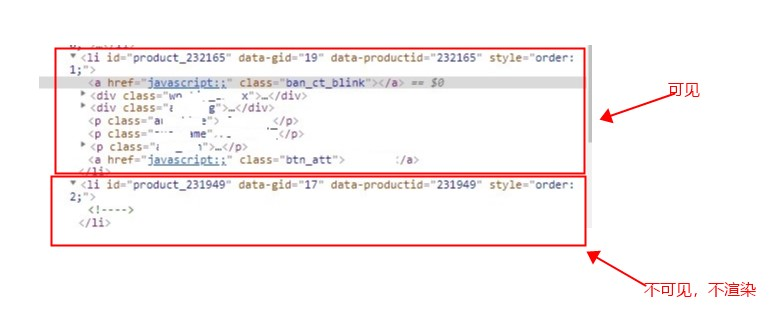 第一个li是可见的,第二个li不可见,所以不渲染。
注意:这里因为要判断元素的位置,所以需要用样式设置li的高度,如果你懒加载的是其他元素,也需要设置高度
有不对或者改正的地方,忘各位留言指正。
文章转载至:https://juejin.cn/post/6844903799279091720

