

建立一个Vue响应式系统
在本课程中,我们将使用与Vue源代码中相同的技术构建一个简单的响应式系统。这能让你对于Vue.js及其设计模式有更好地了解,也能让你更熟悉 watchers 和 Dep 类。
响应式系统
当你第一次看到Vue的响应式系统时,你会觉得它看起来像魔术一样。
举一个简单的例子:
<div id="app">
    <div>Price: ${{ price }}</div>
    <div>Total: ${{ price * quantity }}</div>
    <div>Taxes: ${{ totalPriceWithTax }}</div>
</div>
<script src="https://cdn.jsdelivr.net/npm/vue"></script>
<script>
    var vm = new Vue({
    el: '#app',
    data: {
        price: 5.00,
        quantity: 2
    },
    computed: {
        totalPriceWithTax() {
        return this.price * this.quantity * 1.03
        }
    }
    })
</script>
Vue 就很神奇地知道当 price 发生变化时,它需要做三件事。
- 在我们的网页上更新
price的值 - 重新计算
price * quantity表达式的成绩,更新页面 - 再次调用
totalPriceWithTax函数,更新页面
我知道你一定会好奇,Vue是怎么知道 price 变化之后更新哪部分,它是怎么能掌握一切事情的?
JavaScript 编程并不会那么神奇
可能看起来不是很明显,但是我们必须解决的一个大问题是:程序通常并不会总像上面的例子那样神奇。例如,如果我运行下面的程序:
    let price = 5
    let quantity = 2
    let total = price * quantity  // 10 right?
    price = 20
    console.log(`total is ${total}`)
你觉得应该输出的是什么? 因为我们没有使用 Vue ,它应该会打印出10。
>> total is 10
在 Vue 里面我们希望不管是 price 还是 quantity更新之后, total都能得到更新。我们想要的结果是:
>> total is 40
不幸的是, JavaScript 是一门过程性语言而不是响应式语言。所以在真实使用中它不会按照我们想要的进行更新。为了使得 total 变成响应式的, 我们必须再次使用 JavaScript 来让事情发生点变化。
问题
我们需要保存我们到底是如何计算 total 的, 这样当 price 或者 quantity 发生变化时我们可以重新去计算它。
解决
首先,我们需要某种方式告诉我们的应用程序:“这是我未来可能需要运行的代码,请存储它,我可能需要你在其他时间运行它。”
然后我们会先运行该代码,当 price 或者是 quantity 变量更新的时候,再次运行被存储的代码。
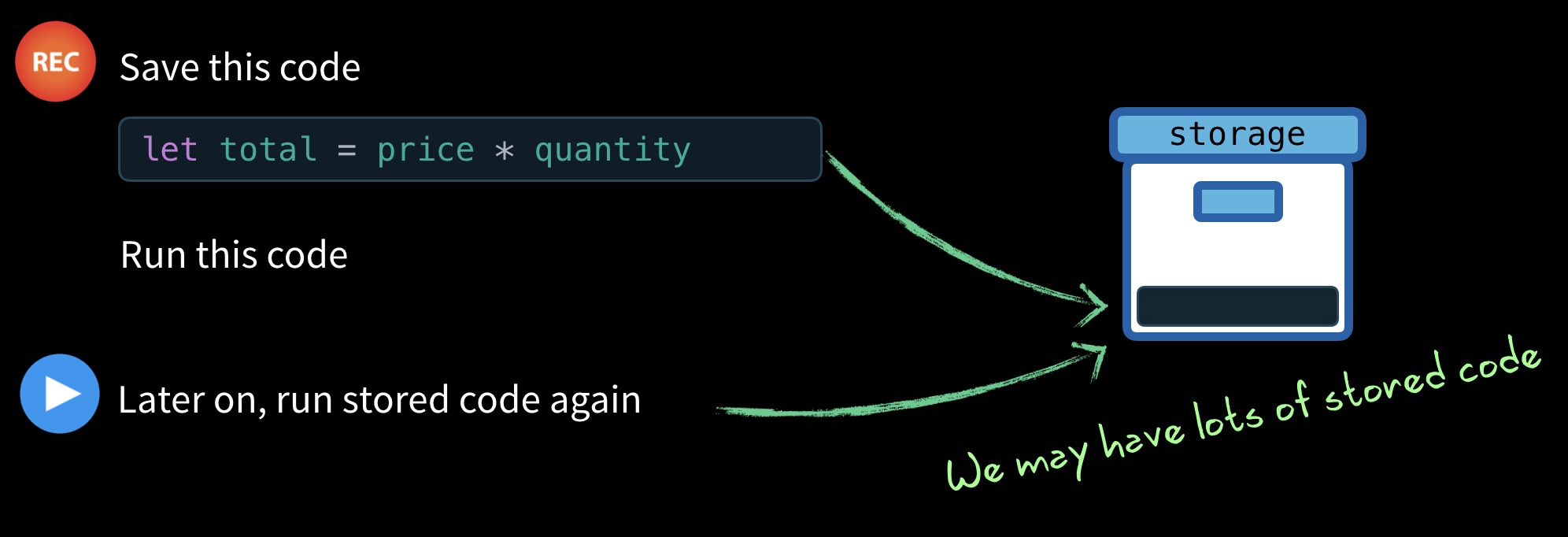
我们可能会这样做去记录函数以便未来再去运行
let price = 5
let quantity = 2
let total = 0
let target = null

target = function () {
    total = price * quantity
})

record() // Remember this in case we want to run it later
target() // Also go ahead and run it
注意,我们将匿名函数存储在 target 变量中,然后调用 record 函数。使用 ES6 箭头语法,我就可以这样写:
target = () => { total = price * quantity }
record 函数的定义也很简单:
    let storage = [] // We'll store our target functions in here

    function record () { // target = () => { total = price * quantity }
      storage.push(target)
    }
这样我们就存储了 target (在本例中为{total = price * quantity }),以便稍后可以运行它,也许还可以写一个 replay 函数去运行我们 record 下来的所有内容。
    function replay (){
      storage.forEach(run => run())
    }
replay 函数将遍历我们存储在 storage 中的所有匿名函数,并执行每个匿名函数。
然后,在我们的代码中我们就可以这样了:
    price = 20
    console.log(total) // => 10
    replay()
    console.log(total) // => 40
很简单吧?如果你需要通读并尝试再次尝试,请参见此处的完整代码。仅供参考,如果您想知道为什么,我将以一种特殊的方式对此进行编码。
    let price = 5
    let quantity = 2
    let total = 0
    let target = null
    let storage = []

    function record () {
      storage.push(target)
    } // 先记下来

    function replay () {
      storage.forEach(run => run())
    } //运行记下来的匿名函数

    target = () => { total = price * quantity }

    record()
    target()

    price = 20
    console.log(total) // => 10
    replay()
    console.log(total) // => 40
问题
我们可以根据需要继续记录 target,但是最好有一个可以随我们的应用扩展的更强大的解决方案。或许可以用一个负责维护 target 列表的类,可以直接通知我们需要重新运行 target 。
解决:A Dependency Class
解决这个问题的一种方法是将这种行为封装到自己的类中,一个 Dependency Class ,它实现了标准的编程观察者模式。
因此,如果我们创建了一个 JavaScript 类来管理我们的依赖关系(这与 Vue 处理事物的方式更接近了),它可能看起来像这样:
    class Dep { // Stands for dependency
      constructor () {
        this.subscribers = [] // The targets that are dependent, and should be
                              // run when notify() is called.
      }
      depend() {  // This replaces our record function
        if (target && !this.subscribers.includes(target)) {
          // Only if there is a target & it's not already subscribed
          this.subscribers.push(target)
        }
      }
      notify() {  // Replaces our replay function
        this.subscribers.forEach(sub => sub()) // Run our targets, or observers.
      }
    }
请注意,我们现在将匿名函数存储在 subscribers 中,而不是 storage 中 。我们不再使用 record 函数而是调用 depend。而且我们现在调用notify来代替replay。再运行此程序:ps:先使用depend把匿名函数记在subscribers中,再使用notify去依次运行匿名函数
const dep = new Dep()

    let price = 5
    let quantity = 2
    let total = 0
    let target = () => { total = price * quantity }
    dep.depend() // Add this target to our subscribers
    target()  // Run it to get the total

    console.log(total) // => 10 .. The right number
    price = 20
    console.log(total) // => 10 .. No longer the right number
    dep.notify()       // Run the subscribers
    console.log(total) // => 40  .. Now the right number
它奏效了,现在我们的代码更可重用了。唯一有点奇怪的是 target 的设置和运行。
问题
我们将为每个变量提供一个 Dep 类,这样就能很好地封装匿名函数并把匿名函数加入 subscribers。或许一个watcher函数能够去为管理这种行为。
所以不要再像下面这个调用:
    target = () => { total = price * quantity }
    dep.depend()
    target()
(这是上面的代码)
而且像这样调用:
    watcher(() => {
      total = price * quantity
    })
解决:一个 watcher 函数
在 watcher 函数的内部我们可以做这些简单的事情。ps:使用watcher完成:1 . 将匿名函数加入到订阅者数组 2. 运行匿名函数这件事情。
    function watcher(myFunc) {
      target = myFunc // Set as the active target
      dep.depend()       // Add the active target as a dependency
      target()           // Call the target
      target = null      // Reset the target
    }
我们可以看到,watcher 函数接受 myFunc 参数,将其设置为我们的全局 target 属性,调用 dep.depend() 将 target 添加到订阅者,调用 target 函数,然后重置 target。
现在我们在运行下面的代码:
    price = 20
    console.log(total)
    dep.notify()
    console.log(total)
你可能会好奇为什么我们将 target 设置为全局变量,而不是作为参数在需要时将其传递给函数。这是有充分的理由的,这将在本文结尾处你就知道了。
问题
我们只有一个 Dep 类,但我们真正想要的是每个变量都具有自己的 Dep 。让我们先将把它变成变量属性。
let data = { price: 5, quantity: 2 }
让我们先假设一下,我们的每个属性( price 和 quantity)都有自己的内部 Dep 类。
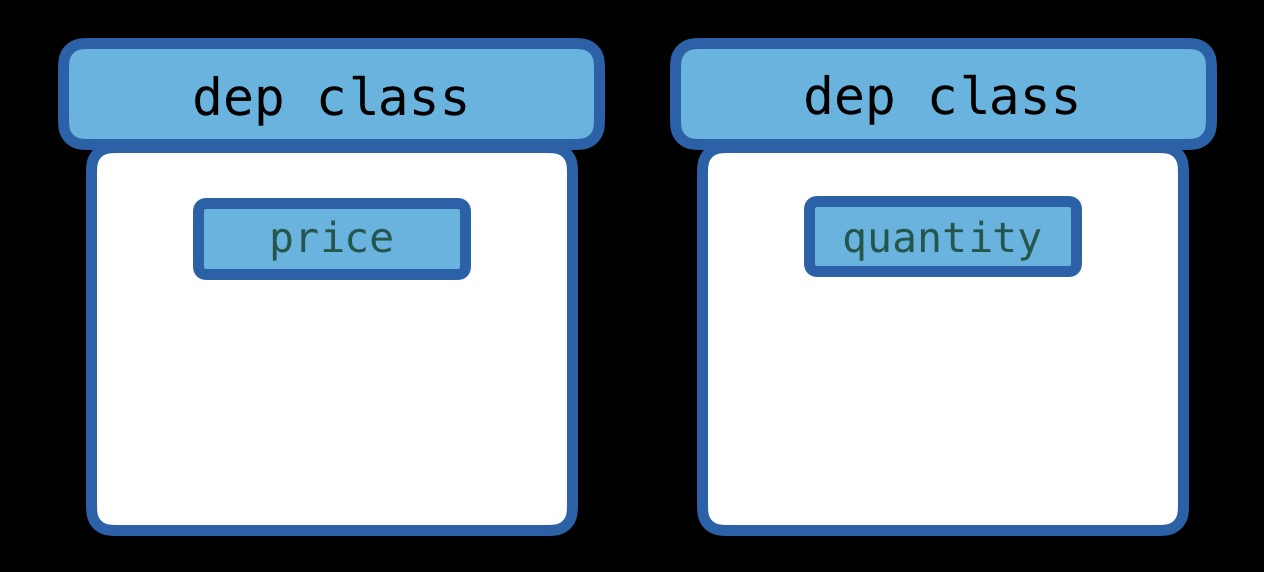
现在我们来运行:
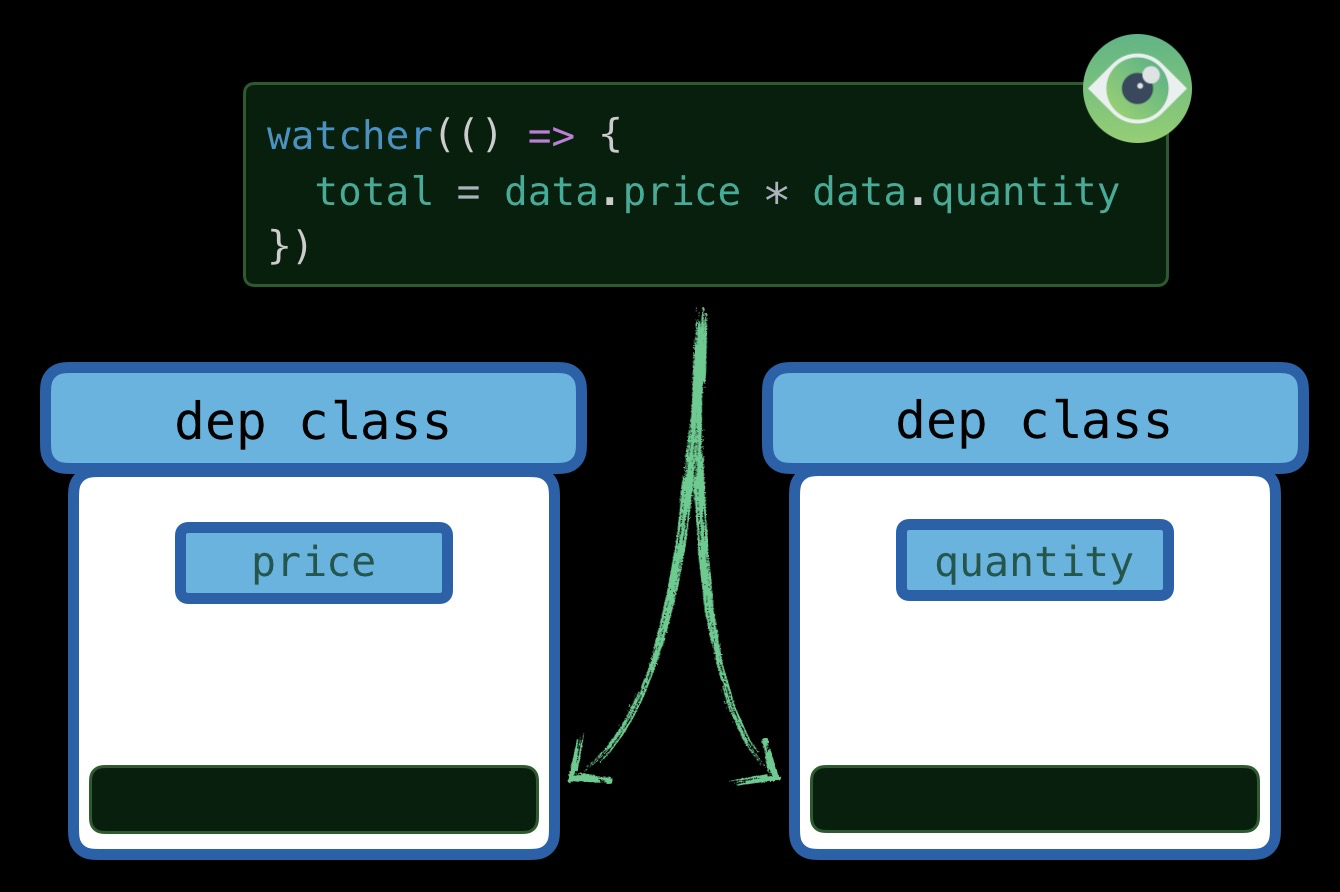
    watcher(() => {
      total = data.price * data.quantity
    })
由于 data.price 值是需要被使用的,我希望 price 属性的 Dep 类将匿名函数(存储在 target 中)推入其 subscriber 数组(通过调用 dep.depend()).由于 data.quantity 也是需要使用的,因此我还希望 quantity 属性的 Dep 类将此匿名函数(存储在target 中)推入其 subscriber 数组。
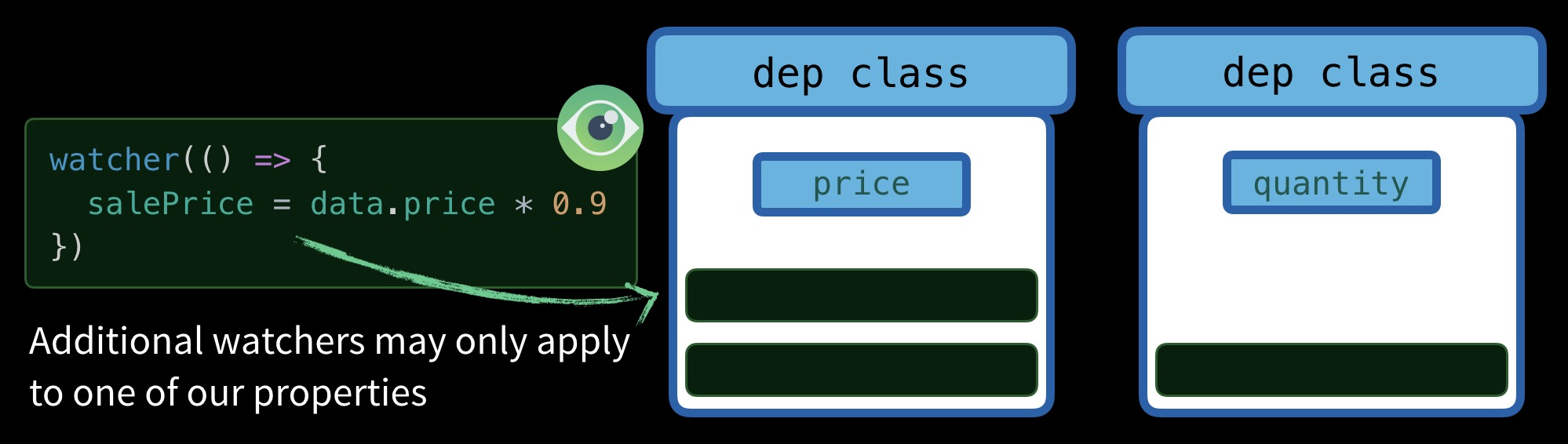
如果我还有一个仅需要访问 data.price 的匿名函数,我希望仅将其推送到 price 属性的 Dep 类中。
我在什么时候会想在 price 的订阅者上调用 dep.notify()?我希望在设定 price 时调用它们。在文章结尾,我希望能够这样输出:
>> total
10
>> price = 20  // When this gets run it will need to call notify() on the price
>> total
40
我们需要某种方法来挂钩数据属性(例如 price 或 quantity),以便在他们被访问时我们可以将 target 保存到我们的订阅者数组中,并当数据属性改变时运行存储在订阅者数组中的函数。
解决:Object.defineProperty()
我们需要了解Object.defineProperty()函数,它是普通的ES5 JavaScript。它允许我们为属性定义getter和setter函数。在展示如何将它应用到我们的 Dep 类之前,我先展示一下最基本的用法。
    let data = { price: 5, quantity: 2 }

    Object.defineProperty(data, 'price', {  // For just the price property

        get() {  // Create a get method
          console.log(`I was accessed`)
        },

        set(newVal) {  // Create a set method
          console.log(`I was changed`)
        }
    })
    data.price // This calls get()
    data.price = 20  // This calls set()
正如所见,它仅打印两行。但是,它实际上并没有获取或设置任何值,因为我们没有那样用。让我们现在重新添加.get()以期望返回一个值,而set()需要更新一个值,因此让我们添加一个 internalValue 变量来存储我们当前的 price 值。
    let data = { price: 5, quantity: 2 }

    let internalValue = data.price // Our initial value.

    Object.defineProperty(data, 'price', {  // For just the price property

        get() {  // Create a get method
          console.log(`Getting price: ${internalValue}`)
          return internalValue
        },

        set(newVal) {  // Create a set method
          console.log(`Setting price to: ${newVal}` )
          internalValue = newVal
        }
    })
    total = data.price * data.quantity  // This calls get()
    data.price = 20  // This calls set()
现在,我们的 get 和 set 都正常工作了,您认为控制台将打印出什么?

因此,当 get set 值时,我们就有一种方式来得到通知了。并且,通过递归,我们可以对数据数组中的每一个属性都加上 get 和 set,对吧?
仅供参考,Object.keys(data) 返回由对象的键组成的数组
    let data = { price: 5, quantity: 2 }

    Object.keys(data).forEach(key => { // We're running this for each item in data now
      let internalValue = data[key]
      Object.defineProperty(data, key, {
        get() {
          console.log(`Getting ${key}: ${internalValue}`)
          return internalValue
        },
        set(newVal) {
          console.log(`Setting ${key} to: ${newVal}` )
          internalValue = newVal
        }
      })
    })
    total = data.price * data.quantity
    data.price = 20
现在,所有的属性都有 getters 和 setters 了,让我们再看看控制台

把两个想法结合起来
total = data.price * data.quantity
当这样的一段代码运行并 get 了 price 的值时,我们希望 price 记住这个匿名函数( target )。这样,如果 price 被更改或被 set 为新值,它将触发该函数重新运行,因为它知道这个匿名函数依赖于 price。所以你可以这样想:
Get => 记住这个匿名函数,当我们的值改变时,我们将再次运行它。
Set => 我们的值被修改了,运行保存下来的匿名函数吧。
或是在我们的 Dep 类中
Price accessed (get) => 调用 dep.depend() 保存当前 target
Price set => price 调用 dep.notify(),重新运行所有 targets .
让我们结合这两个想法,并逐步完成最终代码。
    let data = { price: 5, quantity: 2 }
    let target = null

    // This is exactly the same Dep class
    class Dep {
      constructor () {
        this.subscribers = []
      }
      depend() {
        if (target && !this.subscribers.includes(target)) {
          // Only if there is a target & it's not already subscribed
          this.subscribers.push(target)
        }
      }
      notify() {
        this.subscribers.forEach(sub => sub())
      }
    }

    // Go through each of our data properties
    Object.keys(data).forEach(key => {
      let internalValue = data[key]

      // Each property gets a dependency instance
      const dep = new Dep()

      Object.defineProperty(data, key, {
        get() {
          dep.depend() // <-- Remember the target we're running
          return internalValue
        },
        set(newVal) {
          internalValue = newVal
          dep.notify() // <-- Re-run stored functions
        }
      })
    })

    // My watcher no longer calls dep.depend,
    // since that gets called from inside our get method.
    function watcher(myFunc) {
      target = myFunc
      target()
      target = null
    }

    watcher(() => {
      data.total = data.price * data.quantity
    })
我们现在再来看一下控制台的输出:
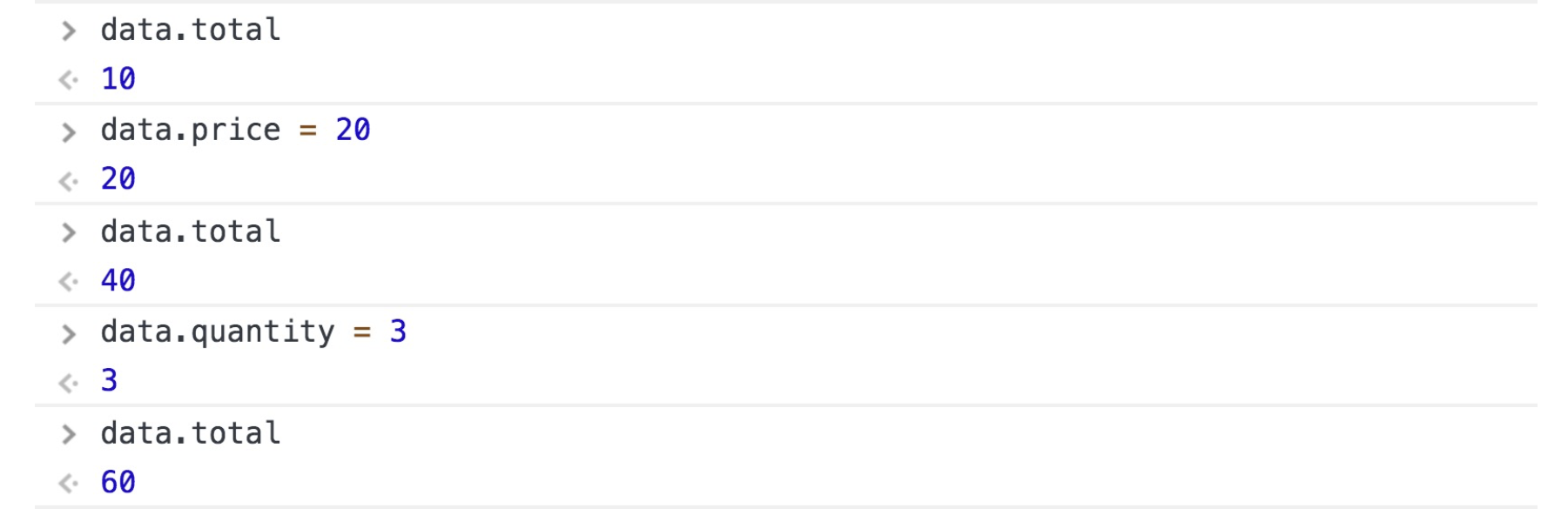
正是我们所希望的!price 和 quantity 确实是响应式的!每当price 或 quantity的值更新时,我们的代码就会重新运行。
跳到 Vue
Vue 文档中的插图现在开始变得有点意思了。
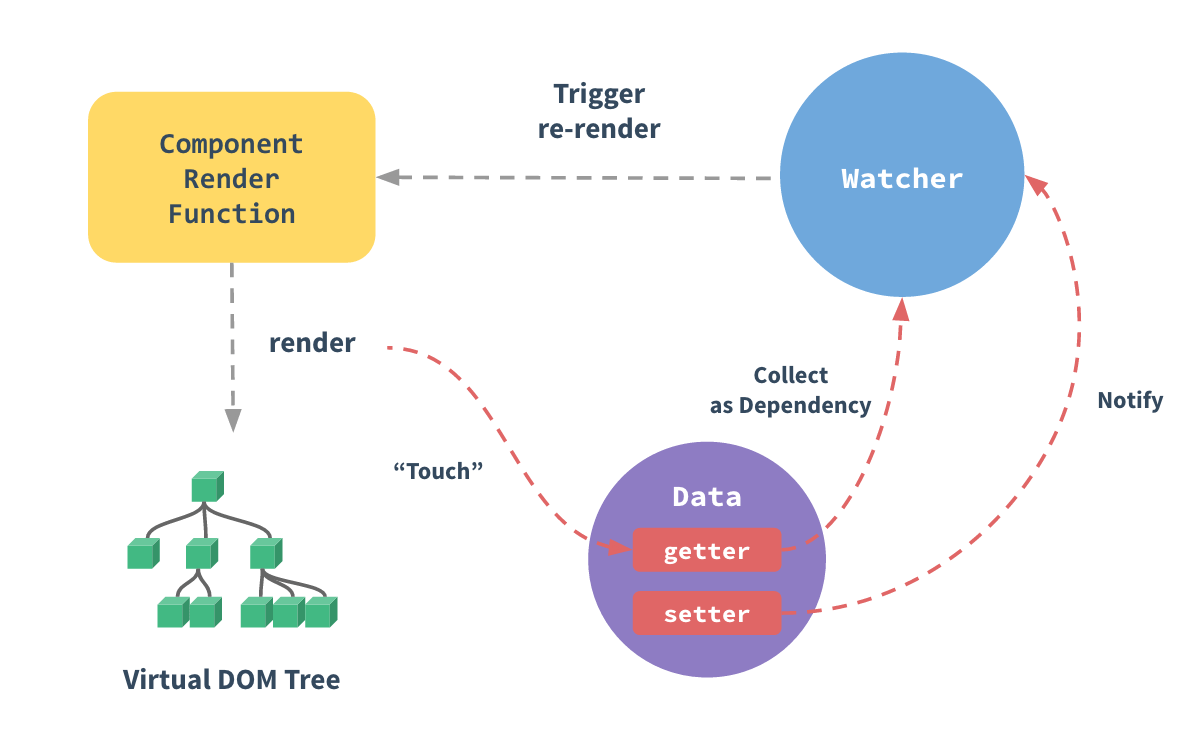
看见那个紫色的有 getters 和 setters 的 Data 圆圈了吧?是不是看起来很熟悉。 每一个组件实例都有一个 watcher 实例(蓝色的),它从 getters 中收集依赖(红色的箭头线)。当一个 setter 被调用之后,它会通知观察者,这会导致组件重新进行渲染。
下面是带有我自己的注释的图片。
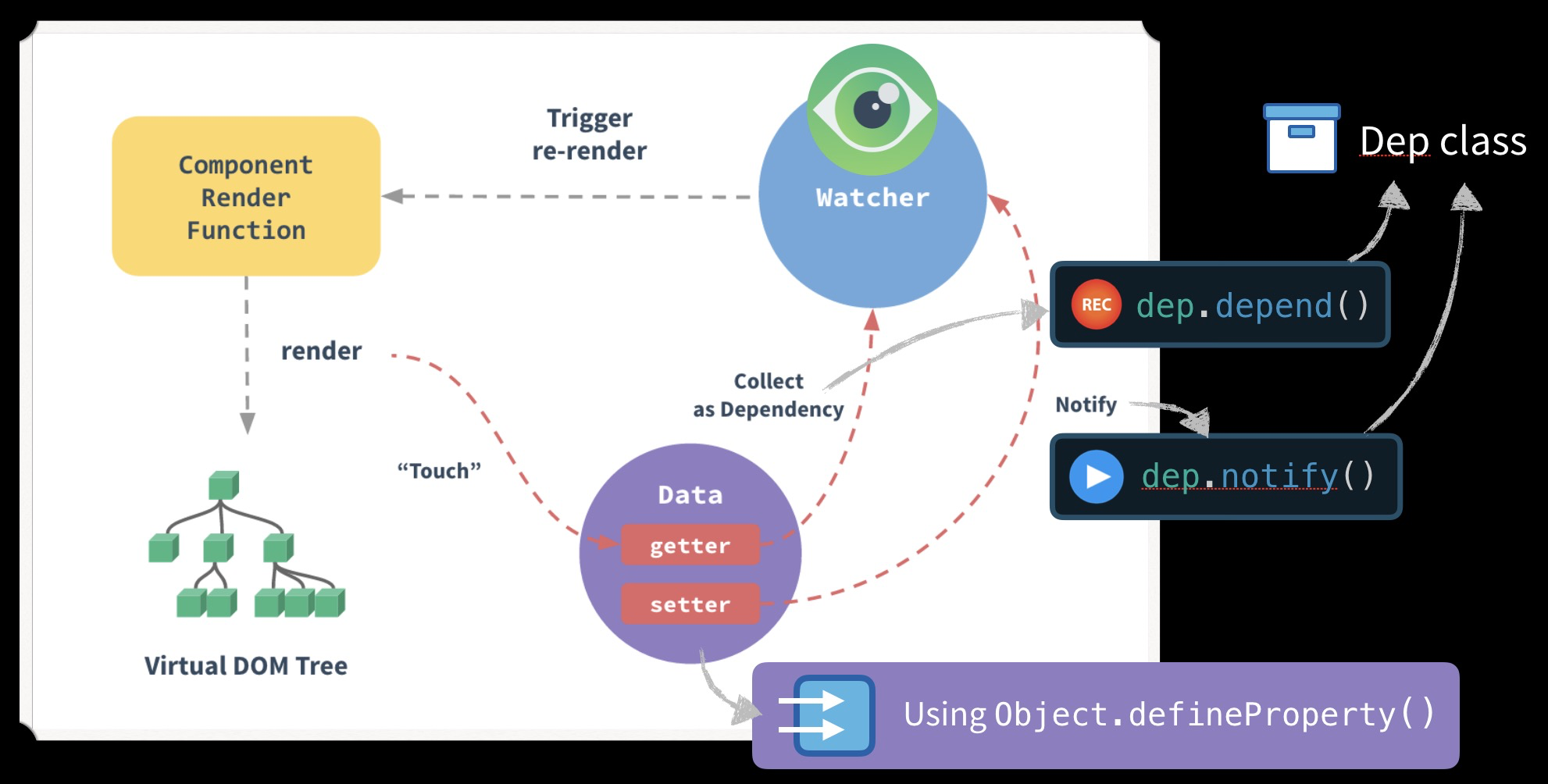
yeah,现在是不是变得更有意思了?
显然,Vue在幕后的工作方式更为复杂,但是现在已经了解了基础知识。在下一课中,我们将深入研究Vue,看看是否可以在源代码中找到这种模式。
那么我们学到了什么呢?
- 如何创建一个 Dep 类,该类收集依赖关系( depend )并重新运行所有依赖关系( notify )。
- 如何创建一个 watcher 来管理我们正在运行的代码,可能需要添加( target )依赖项。 that may need to be added (target) as a dependency.
- 如何使用 Object.defineProperty()创建 getters 和 setters 。
本文来自于Vue mastery官方文档翻译
