

Vue中$bus事件总线的使用
使用场景:可用于非关联组件之间的通信
使用案例
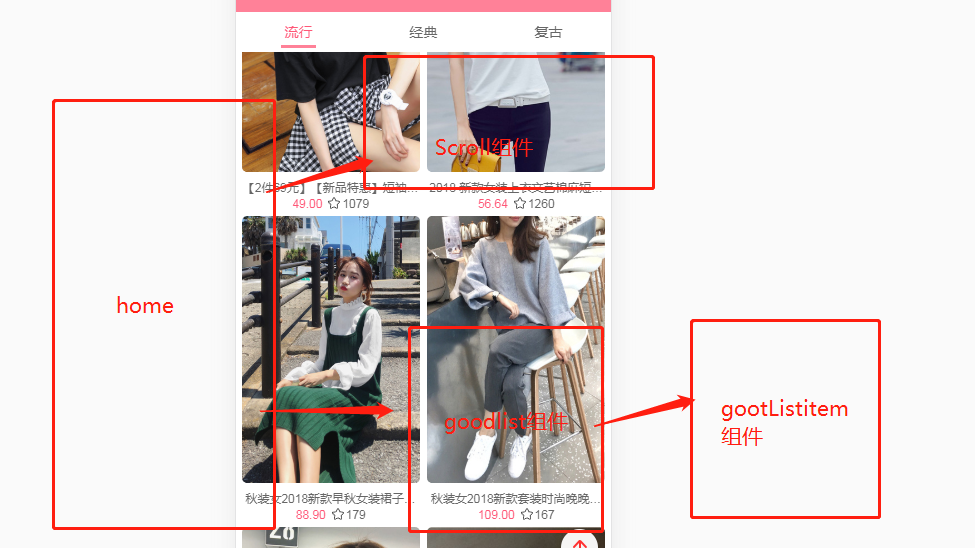
GoodListItem中的图片加载完成后,调用一下scroll组件中的refresh()方法。由于这两个组件没有直接的关系。只有一个共同的home。如果将GoodListItem中的方法一层一层的传递给home的话,会很繁琐。
所以可以使用$bus事件总线来实现
使用方法
- 先在vue的main.js入口文件中挂载一下
Vue.prototype.$bus = new Vue()
- 在
GoodListItem中监听图片的jiazai
<img v-lazy="showimages" @load="imageload" />
- 然后在
imageload方法中$emit出去
  imageload(){
          this.$bus.$emit('homeitemimagesload')
      },
- 在首页
home.vue中使用$ref来取到Scroll组件,然后在mounted函数中使用$bus.$on来接收到GoodListItem组件中$emit的homeitemimagesload
   mounted(){
     // 1.图片加载完成后的事件监听
     this.$bus.$on('homeitemimagesload',()=>{
     this.$refs.scroll.scroll.refresh()
     })
   },
完成(使用vuex也是可以实现)
更新
当多个页面使用$bus.$on的时候报错
1、c页面
this.$bus.$emit(event)
2、b页面
this.$bus.$on(event, () => {
    this.status = 'reserve'
})
3、a页面
this.$bus.$on(event, () => {
     this.status = 'buying'
})
这时
this.status是reserve而不是我们想要的buying。
正确的写法应该是
this.$bus.$off(event).$on(event, () => {
    this.status = 'reserve'
})
this.$bus.$off(event).$on(event, () => {
    this.status = 'buying'
})

