文本编辑器
线上demo
特性
- 1.在编辑时能显示行号
- 2.使用vue封装成单独组件
- 3.开箱即用
实例
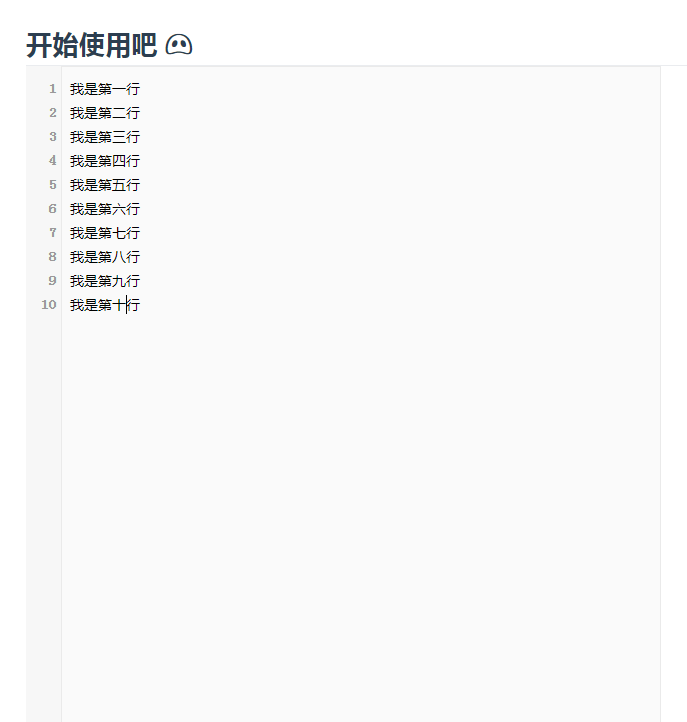
源码解析
动态显示行号
// 设置行号
line(n) {
    let num = ''
    for (let i = 1; i <= n; i++) {
    num += i + this.suffix
    }
    this.barValue = num
},
使用watch监听value的变化
// 监听变化
watch: {
    value(val) {
        let str = val
        str = str.replace(/\r/gi, '')
        str = str.split('\n')
        const n = str.length
        this.line(n)
    }
},
原理分析
其实很简单,Vue提供了双向绑定,value就是输入框的值,只要监听它的变化就可以。当用户输入了回车键,我们就把回车换成换行,同时去更新左边的行数。
完整代码 拿走不谢
<template>
  <div class="line-edit-wrapper">
    <div class="left-bar-wrapper">
      <textarea ref="barArea" v-model="barValue" class="bar-area" wrap="off" cols="2" disabled />
    </div>
    <div class="rigth-edit-wrapper">
      <textarea ref="editArea" v-model="value" class="edit-area" name="content" @scroll="syncScrollTop" />
      <!--@keyup="keyUp"-->
    </div>
  </div>
</template>
<script>
export default {
  data() {
    return {
      value: '',
      barValue: '1',
      isIE: false, // 判断浏览器是否是IE
      suffix: '\n'
    }
  },
  watch: {
    value(val) {
      let str = val
      str = str.replace(/\r/gi, '')
      str = str.split('\n')
      const n = str.length
      this.line(n)
    }
  },
  mounted() {
    this.init()
  },
  methods: {
    // 初始化
    init() {
      // 判断IE
      if (document.all) {
        this.isIE = true
        this.suffix = '\r\n'
      } else {
        console.log('不是垃圾IE')
      }
    },
    // 设置行号
    line(n) {
      let num = ''
      for (let i = 1; i <= n; i++) {
        num += i + this.suffix
      }
      this.barValue = num
      console.log(this.$refs.editArea.scrollTop, this.$refs.barArea.scrollTop)
    },
    // 同步滚动
    syncScrollTop() {
      this.$refs.barArea.scrollTop = this.$refs.editArea.scrollTop
    }
  }
}
</script>
<style type="text/css">
*{
  margin: 0;
  padding: 0;
}
html,body{
  height: 100%;
  margin: 0;
  padding: 0;
  font: 12px/1.5 tahoma, arial, 'hiragino sans gb', 'microsoft yahei', sans-serif;
  -webkit-font-smoothing: antialiased;
}
.line-edit-wrapper{
  width:640px;
  height:800px;
}
.left-bar-wrapper{
  background:#ecf0f5;
  width:35px; height:100%;
  text-align:left;
  float: left;
}
.rigth-edit-wrapper {
  height:100%;
}
.edit-area{
  border:1px solid #eaeaea;
  outline:none;
  width:600px;
  height:100%;
  resize: none;
  background: rgb(250,250,250);
  line-height: 24px;
  font-size: 14px;
  float: left;
  padding:10px 8px;
  color: black;
  font-family: inherit;
  box-sizing: border-box;
}
.bar-area{
  height:100%;
  width: 100%;
  resize: none;
  outline:none;
  overflow-y: hidden;
  overflow-x: hidden; border: 0;
  background: rgb(247,247,247);
  color: #999;
  line-height: 24px;
  font-size: 14px;
  padding:10px 4px;
  text-align: right;
  font-weight: bold;
  box-sizing: border-box;
}
</style>
写在后面
欢迎大家回复,热烈讨论。
我是小呆,追逐技术的那个呆子。