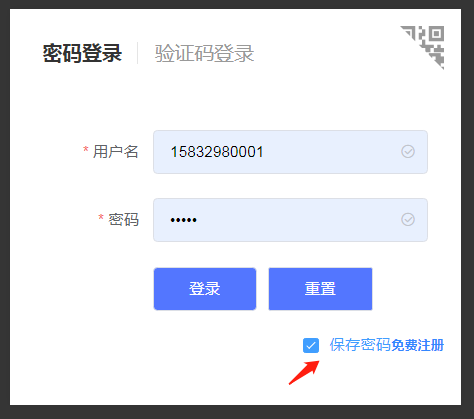
-
vue:2.6
-
typescript:3.6.4
核心原理:
使用浏览器cookie,保存当前用户信息;
-
在template中,我们使用checkbox来标记是否保存密码:
<el-checkbox class="save-password" v-model="checked">保存密码</el-checkbox> -
在submitForm提交表单的时候,去判断是否使用cookie保存当前用户信息,或者清除已经保存的用户信息;
<el-button :loading="isLoading" class="btn confirm" @click="submitForm('ruleForm')">登录</el-button> -
在script 中,根据 checked为true或者false;去执行设置cookie,清除cookie的操作;
-
设置cookie;
/** * @description: 设置cookie; * */ public setCookie(username:string| number,tempPassword:string|number,days:number):void{ let exdate=new Date(); // 获取时间; exdate.setTime(exdate.getTime() + 24 * 60 * 60 * 1000 * days); //保存的天数 //字符串拼接cookie // @ts-ignore window.document.cookie = "username" + "=" + username + ";path=/;expires=" + exdate.toUTCString(); // @ts-ignore window.document.cookie = "tempPassword" + "=" + tempPassword + ";path=/;expires=" + exdate.toUTCString(); } -
获取cookie:
/** * @description :获取cookie * */ public getCookie():void { console.log(document.cookie); if (document.cookie.length > 0) { var arr = document.cookie.split("; "); for (var i = 0; i < arr.length; i++) { var arr2 = arr[i].split("="); //再次切割 //判断查找相对应的值 if (arr2[0] == "username") { this.ruleForm.username = arr2[1]; //保存到保存数据的地方 } else if (arr2[0] == "tempPassword") { this.ruleForm.password = arr2[1]; } } this.checked=true; } } -
清除cookie:
    /**
   * @description :清除cookie
   * */

  clearCookie():void {
      this.setCookie("", "", -1); //修改2值都为空,天数为负1天就好了
  }
-
-
每当vue挂载的时候,去获取cookie,并给form信息赋值:
mounted() {

    //
    this.getCookie();
}