目标:
本地开发完push到 git 仓库,服务端自动部署应用,不用人工登录服务器处理
技能要求
- nodejs 搭建服务
- shell 脚本编写
两种方式:
nodejs 直接执行 shell 脚本,也可使用 shelljs,直接用 js 编写 shell 脚本
思路分析
流程概述:
开发完成执行npm run push即可自动打包推送 git 仓库,服务端接收到git push请求会自动拉取代码
关于前端框架的打包编译是放在客户端还是直接由服务端处理,网上各执一词,本人是本地打包后,推到服务器
自己不想在服务端执行
npm install,npm run build,毕竟浏览器问服务器要的也只是html+css+js
- 创建 webhook:github,gitee 等都会提供
- 编写 shell 脚本实现 git 相关操作
- nodejs 起一个服务监听请求
webhook 创建
请求地址必选项
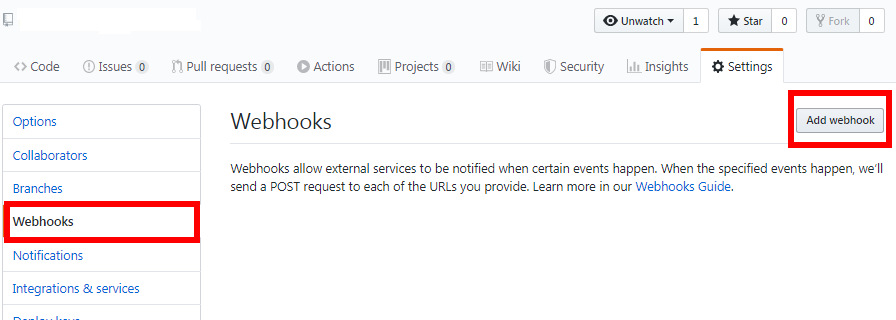
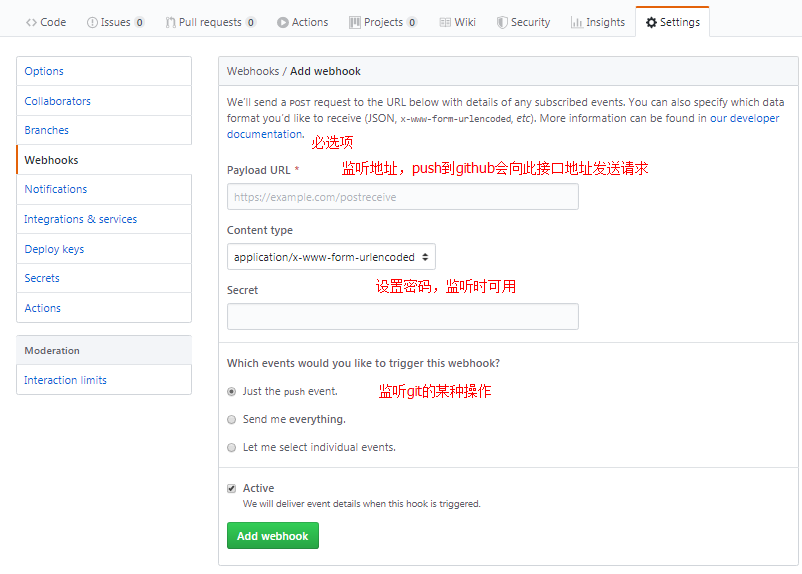
shell 脚本,git push后执行
# deploy.sh
#! /bin/bash
# 确保脚本抛出遇到的错误
set -e

cd /home/kaka-vue-admin

git reset --hard origin/master
git clean -f
git pull
git checkout master
nodejs 开启服务
监听 github(gitee) 发过来的请求,以便执行下一步操作
- github=>github-webhook-handler
- gitee=>gitee-webhook-handler
以下为针对 gitee 编写,github 与此基本一致
// app.js
const http = require('http')
const { spawn } = require('child_process')

const createHandler = require('gitee-webhook-handler')
// git仓库创建webhook的接口地址,以及密码
const handler = createHandler({ path: '/webhook', secret: '123456' })

const PORT = 3010

http
  .createServer((req, res) => {
    console.log('listen ' + PORT)
    handler(req, res, () => {
      res.statusCode = 404
      res.end('no such location')
    })
  })
  .listen(PORT)

handler.on('error', err => {
  console.error('Error:', err.message)
})

// 监听到push事件的时候执行我们的自动化脚本
handler.on('Push Hook', event => {
  console.log(
    'Received a push event for %s to %s',
    event.payload.repository.name,
    event.payload.ref
  )

  // push请求且为master执行shell脚本
  event.payload.ref === 'refs/heads/master' && runCommand('sh', ['./deploy.sh'], console.log)
})

handler.on('Issue Hook', function(event) {
  console.log(
    'Received an issue event for %s action=%s: #%d %s',
    event.payload.repository.name,
    event.payload.action,
    event.payload.issue.number,
    event.payload.issue.title
  )
})

function runCommand(cmd, args, callback) {
  let response = ''
  const child = spawn(cmd, args)
  child.stdout.on('data', buffer => {
    response += buffer.toString()
  })
  child.stdout.on('end', () => callback(response))
}
前端 vue 项目 push 也可以用脚本自动处理
开发完成执行
npm run push即可自动打包推送 git 仓库,服务端接收到git push请求会自动拉取代码
npm命令
// package.json
"scripts": {
  "push": "bash ./commit-push.sh"
}
commit-push.sh编写
#! /bin/bash
# 确保脚本抛出遇到的错误
set -e

echo "git auto push start..."

# date
start=$(date +%s)

# cd .

# build
npm run build

end=$(date +%s)

dateNow=$(date +%T)
difference=$(( end - start ))

# push
git add .
git add .
git commit -m ":ok_hand: build at ${dateNow}"
git push origin master


echo "git auto push end..."
echo "build: used ${difference} s,now: ${dateNow}"