一、为什么要做一个算起来特别简单的纯JavaScript的效果呢?
起因:
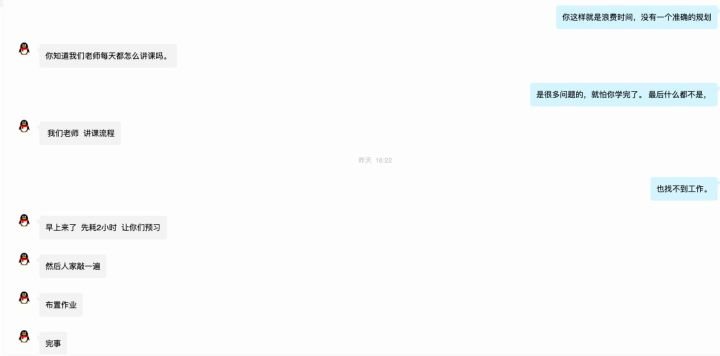

这是一个培训机构的学生,联系到了我,大概意思就是他在学校,学不到东西,要考试了,他们60多个学生根本都不会,连思路都不知道怎么做,我只能录制成视频,帮助他们度过难关,当然我也告诉他们怎么把Js可以学好,提供了很多的思路,我不是帮他们写作业,我是想帮助他们提升。最后也祝愿他们都可以取得好成绩,在web前端道路上能找到自己的方向。
二、案例效果代码
<!DOCTYPE html>
<html>
<head>
	<title></title>
	<style type="text/css">
	*{margin:0;padding:0}
	.main{
		width:400px;
		margin: 200px auto;
	}
	#btn{
		width:400px;
		height: 50px;
		border:1px solid #eee;
	}
	.container{
		width:360px;
		box-shadow: 0 0 2px 2px #eee;
		margin-bottom:40px;
		padding:20px;
	}
	.img{
		position: relative;
	}
	.min{
		position: absolute;
		left:0;
		top:0;
	}
	.line{
		width: 360px;
		height: 40px;
		background: blue;
		opacity: .4;
		border-radius: 20px;
		margin-top:20px;
		position: relative;
	}
	.line>p{
		width:50px;
		height: 50px;
		position: absolute;
		left:0;
		top:-5px;
		border-radius: 100%;
		background: #fff;
		box-shadow: 0 0 2px 2px #eee;
	}
	</style>
</head>
<body>

<div class='main'>

	<div class='container' id='container'>

		<button>换一张</button>

		<div class='img'>
			<img src="3max.png" id='max'>
			<img src="3min.png" class='min' id='min'>
		</div>

		<div class='line' id='line'>
			<p id='oDiv'></p>
		</div>

	</div>
	<button id='btn'>点击按钮进行验证</button>
</div>

<script type="text/javascript">
var _x,
arrTop = [59,65,65],
arrLeft = [80,164,115];

function ranDomNum(){
	var ranDomNum = Math.ceil(Math.random()*3);
	return ranDomNum;
}
var num = ranDomNum();
max.src = num+'max.png';
min.src = num+'min.png';
min.style.top = arrTop[num-1]+"px";

window.onmousedown = function(e){
	//起始点
	var x = e.pageX;

	window.onmousemove=function(e){
		//终点
		_x = e.pageX-x;
		if(_x<0){
			_x=0;
		}
		if(_x>line.offsetWidth - oDiv.offsetWidth){
			_x=line.offsetWidth - oDiv.offsetWidth;
		}
		min.style.left = _x+'px';
		oDiv.style.left = _x+'px';
	}
}
window.onmouseup=function(){

	if(_x>=arrLeft[num-1] && _x<=arrLeft[num-1]+3){
		btn.innerHTML = '验证成功';
		container.style.display='none';
	}else{

		num = ranDomNum();
		max.src = num+'max.png';
		min.src = num+'min.png';
		min.style.top = arrTop[num-1]+"px";

		min.style.left = 0;
		oDiv.style.left = 0;
	}
	window.onmousemove=null;
}

</script>
</body>
</html>
很多代码地方没有写的特别深,也没做优化,写太多他们看不懂,他们刚开始学js。
效果图:

三、如果想看视频版和下载完成代码(包括图片)
视频链接:www.3mooc.com/front/couin…
价格是一分钱