需要的基本环境
先说vue-cli3的整套流程
- 把src换成examples,用来展示实例
- 在根目录创建vue.config.js,更换路径
module.exports = {
    // 修改 src 为 examples路径更换
    pages: {
      index: {
        entry: 'examples/main.js',
        template: 'public/index.html',
        filename: 'index.html'
      }
    },
    // 扩展 webpack 配置,使 packages 加入编译
    chainWebpack: config => {
      config.module
        .rule('js')
        .include
          .add('/packages')
          .end()
        .use('babel')
          .loader('babel-loader')
          .tap(options => {
            // 修改它的选项...
            return options
          })
    }
  }
- 新增packages目录,用来开发组件
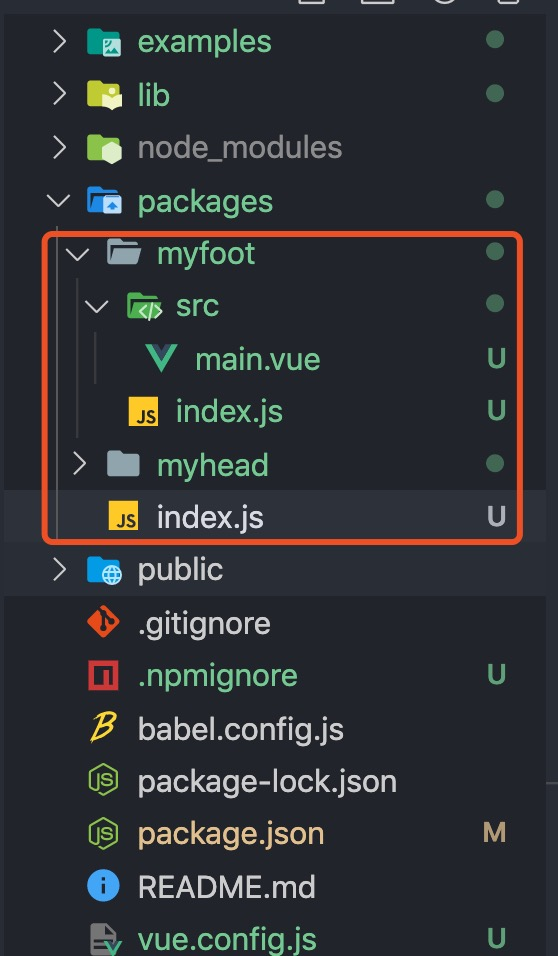
4. packages底下的index.js
// packages / index.js

// 导入单个组件
import Myhead from './myhead/index'
import Myfoot from './myfoot/index'
// 以数组的结构保存组件,便于遍历
const components = [
    Myhead,
    Myfoot
]

// 定义 install 方法
const install = function (Vue) {
    if (install.installed) return
    install.installed = true
    // 遍历并注册全局组件
    components.map(component => {
        Vue.component(component.name, component)
    })
}

if (typeof window !== 'undefined' && window.Vue) {
    install(window.Vue)
}

export default {
    // 导出的对象必须具备一个 install 方法
    install,
    // 组件列表
    ...components
}
- 单个组件中的index.js
// packages/Myfoot/index.js

// 导入组件,组件必须声明 name
import Myfoot from './src/main.vue'

// 为组件添加 install 方法,用于按需引入
Myfoot.install = function (Vue) {
    Vue.component(Myfoot.name, Myfoot)
}

export default Myfoot
- 新增 .npmignore文件过滤不用上传到npm的文件
examples/
packages/
public/
vue.config.js
babel.config.js
*.map
- 配置package.js
"keyword": "vfoot vhead",
  "name": "vue-upnpm",
  "version": "0.1.4",
  "private": false,
  "main":"lib/myhead.umd.min.js",
  "author":"yangzhenyuan",
  "license":"MIT",
  "scripts": {
    "serve": "vue-cli-service serve",
    "build": "vue-cli-service build",
    "lib": "vue-cli-service build --target lib --name myhead --dest lib packages/index.js"
  },
- 然后执行npm run lib 生成lib文件用于上传
- 执行发布命令,发布组件到 npm
npm publish
sinopia的部署和使用
- 安装sinopia
npm install -g sinopia 或者 yarn global add sinopia
- 运行
sinopia
//如果要杀死进程需要找到父进程
ps -ef|grep id名
然后kill -9 父进程ID
- 使用pm2运行
pm2 start which sinopia


