前提:
之前是点击保存将图片文件和其他参数一起传回,图片过大时接口响应太慢,要求优化。
需求:
1.图片上传完成之后调用后端接口,点击保存将图片id和其他参数一起传回。
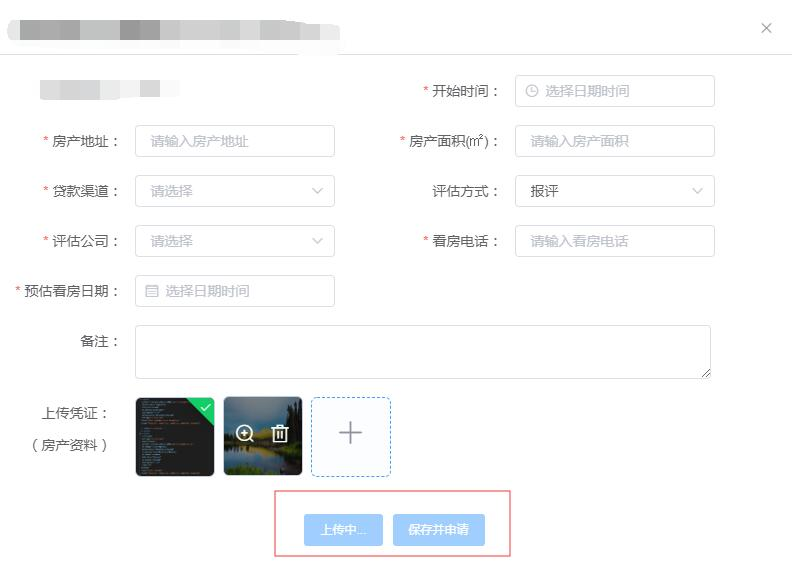
2.图片未上传成功时不可点击保存按钮
3.单次最多上传10张,可删除
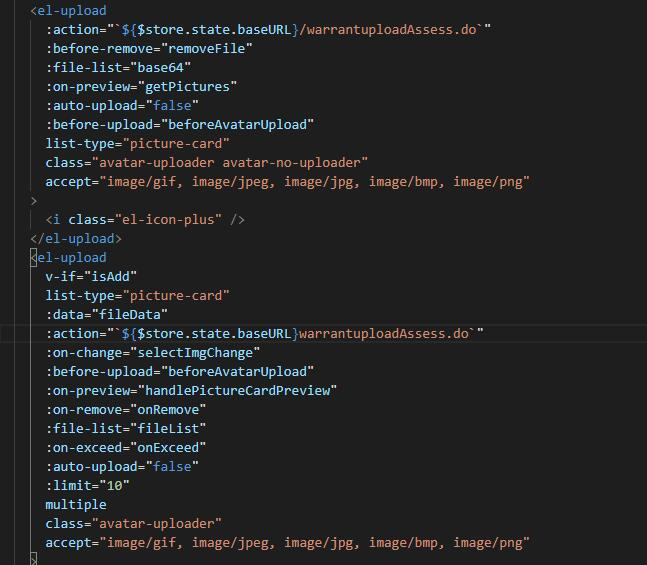
第一个组件纯展示图片,第二个为添加图片组件
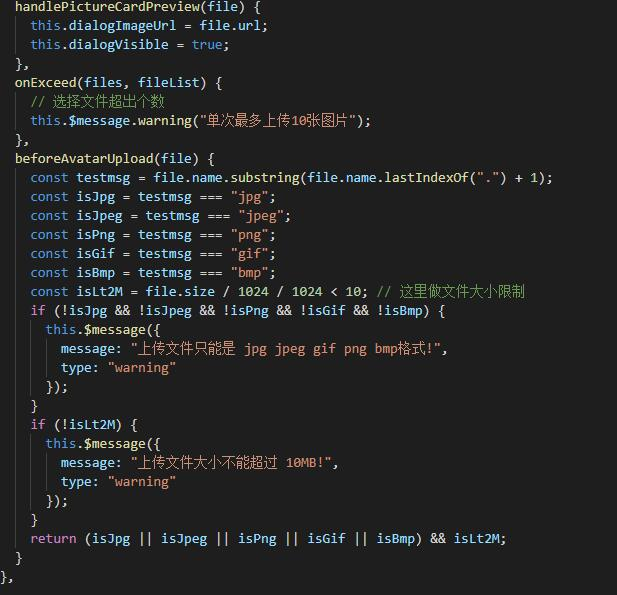
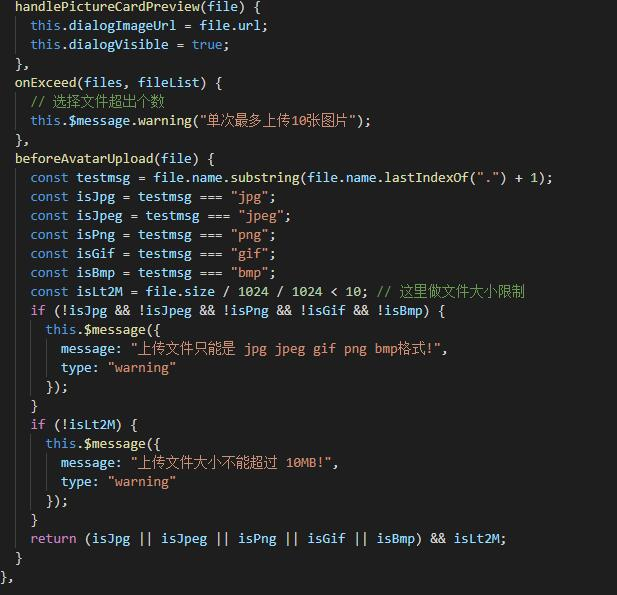
在:before-upload="beforeAvatarUpload"事件里限制图片格式大小
:on-exceed="onExceed"事件里限制图片上传数量
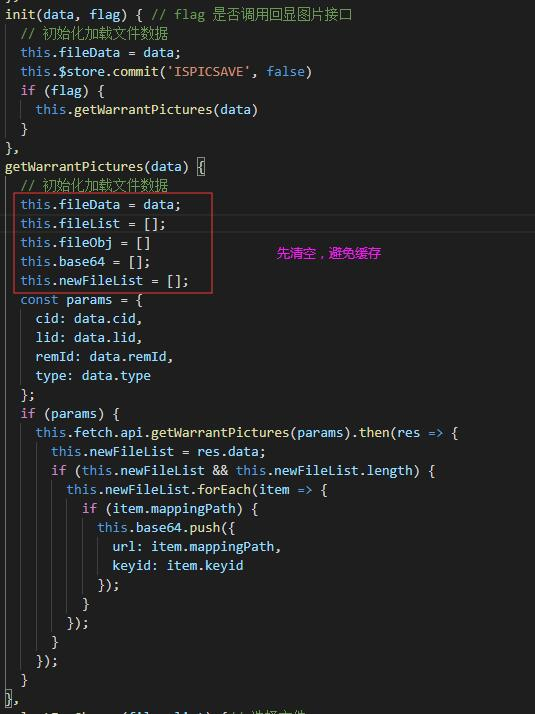
在父组件里使用nexttick调用此组件的init方法
flag为父组件传入的状态,如果为true则调用图片回显接口
用vuex状态控制保存按钮,初始化时,按钮不禁用
:disabled="false"
this.$store.commit('ISPICSAVE', false)
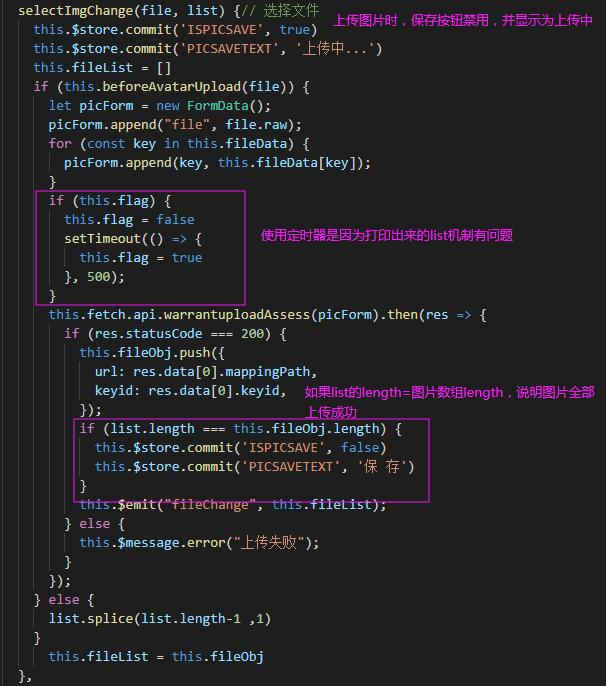
上传图片时调用:on-change="selectImgChange"
图片开始上传,就将父组件的保存按钮禁用,并展示为上传中
先使用:before-upload="beforeAvatarUpload"验证图片大小、格式是否正确
使用formdata传图片
因为在这里打印list的length有问题,接口也是一张一张的调用,所以使用了settimeout
判断list的length==图片数组的length说明图片全部上传成功(之前是第一张上传成功vuex的状态就变成了true)
再将该list子传父
父组件的按钮使用vuex状态控制

接收子组件传入的图片数组

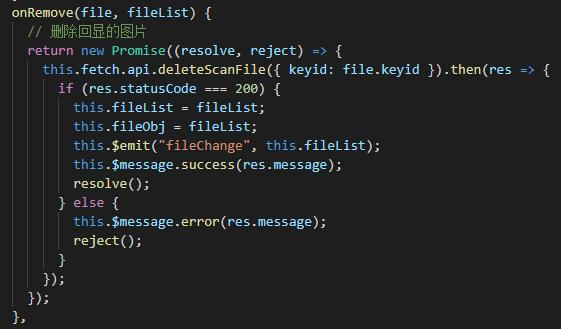
删除图片时调用接口,将最新的图片数组子传父,保证id正确

<template> <el-upload :action="`${$store.state.baseURL}/warrantuploadAssess.do`" :before-remove="removeFile" :file-list="base64" :on-preview="getPictures" :auto-upload="false" :before-upload="beforeAvatarUpload" list-type="picture-card" class="avatar-uploader avatar-no-uploader" accept="image/gif, image/jpeg, image/jpg, image/bmp, image/png" > <i class="el-icon-plus" /> </el-upload> <el-upload v-if="isAdd" list-type="picture-card" :data="fileData" :action="`${$store.state.baseURL}warrantuploadAssess.do`" :on-change="selectImgChange" :before-upload="beforeAvatarUpload" :on-preview="handlePictureCardPreview" :on-remove="onRemove" :file-list="fileList" :on-exceed="onExceed" :auto-upload="false" :limit="10" multiple class="avatar-uploader" accept="image/gif, image/jpeg, image/jpg, image/bmp, image/png" > <i class="el-icon-plus" /> </el-upload> <el-dialog :visible.sync="dialogVisible" title="预览" append-to-body> <img width="100%" :src="dialogImageUrl" alt /> </el-dialog></template><script>export default { data() { return { dialogImageUrl: "", dialogVisible: false, fileList: [], newFileList: [], base64: [], isAdd: true, fileObj: [], fileData: {}, // 父组件传入的值 flag: true }; }, computed: { isClose() { return this.$store.state.closeBox; }, imgIsAdd() { return this.$store.state.imgIsAdd; } }, watch: { isClose(newVal) { this.closeBox(); }, imgIsAdd(newVal) { this.isAdd = newVal; } }, methods: { deletePic() { this.fileList = []; }, getPictures(flie) { // 预览图片 let index; this.base64.some((item, i) => { if (item.uid === flie.uid) { index = i; } }); this.$nextTick(() => { this.$refs.getpic.init(flie, index, this.base64); }); }, closeBox() { // 关闭弹窗时清空图片列表 this.fileObj = [] this.fileList = []; this.base64 = []; this.newFileList = []; }, init(data, flag) { // flag 是否调用回显图片接口 // 初始化加载文件数据 this.fileData = data; this.$store.commit('ISPICSAVE', false) if (flag) { this.getWarrantPictures(data) } }, getWarrantPictures(data) { // 初始化加载文件数据 this.fileData = data; this.fileList = []; this.fileObj = [] this.base64 = []; this.newFileList = []; const params = { cid: data.cid, lid: data.lid, remId: data.remId, type: data.type }; if (params) { this.fetch.api.getWarrantPictures(params).then(res => { this.newFileList = res.data; if (this.newFileList && this.newFileList.length) { this.newFileList.forEach(item => { if (item.mappingPath) { this.base64.push({ url: item.mappingPath, keyid: item.keyid }); } }); } }); } }, selectImgChange(file, list) {// 选择文件 this.$store.commit('ISPICSAVE', true) this.$store.commit('PICSAVETEXT', '上传中...') this.fileList = [] if (this.beforeAvatarUpload(file)) { let picForm = new FormData(); picForm.append("file", file.raw); for (const key in this.fileData) { picForm.append(key, this.fileData[key]); } if (this.flag) { this.flag = false setTimeout(() => { this.flag = true }, 500); } this.fetch.api.warrantuploadAssess(picForm).then(res => { if (res.statusCode === 200) { this.fileObj.push({ url: res.data[0].mappingPath, keyid: res.data[0].keyid, }); if (list.length === this.fileObj.length) { this.$store.commit('ISPICSAVE', false) this.$store.commit('PICSAVETEXT', '保 存') } this.$emit("fileChange", this.fileList); } else { this.$message.error("上传失败"); } }); } else { list.splice(list.length-1 ,1) } this.fileList = this.fileObj }, removeFile(file, fileList) { // 删除回显的图片 return new Promise((resolve, reject) => { this.fetch.api.deleteScanFile({ keyid: file.keyid }).then(res => { if (res.statusCode === 200) { this.$message.success(res.message); resolve(); } else { this.$message.error(res.message); reject(); } }); }); }, onRemove(file, fileList) { // 删除回显的图片 return new Promise((resolve, reject) => { this.fetch.api.deleteScanFile({ keyid: file.keyid }).then(res => { if (res.statusCode === 200) { this.fileList = fileList; this.fileObj = fileList; this.$emit("fileChange", this.fileList); this.$message.success(res.message); resolve(); } else { this.$message.error(res.message); reject(); } }); }); }, handlePictureCardPreview(file) { this.dialogImageUrl = file.url; this.dialogVisible = true; }, onExceed(files, fileList) { // 选择文件超出个数 this.$message.warning("单次最多上传10张图片"); }, beforeAvatarUpload(file) { const testmsg = file.name.substring(file.name.lastIndexOf(".") + 1); const isJpg = testmsg === "jpg"; const isJpeg = testmsg === "jpeg"; const isPng = testmsg === "png"; const isGif = testmsg === "gif"; const isBmp = testmsg === "bmp"; const isLt2M = file.size / 1024 / 1024 < 10; // 这里做文件大小限制 if (!isJpg && !isJpeg && !isPng && !isGif && !isBmp) { this.$message({ message: "上传文件只能是 jpg jpeg gif png bmp格式!", type: "warning" }); } if (!isLt2M) { this.$message({ message: "上传文件大小不能超过 10MB!", type: "warning" }); } return (isJpg || isJpeg || isPng || isGif || isBmp) && isLt2M; } }, }</script>