

centos7 下安装 ElasticSearch 6.8.4
下载相应的安装包
elasticsearch
wget https://artifacts.elastic.co/downloads/elasticsearch/elasticsearch-6.8.4.tar.gz
kibana
wget https://artifacts.elastic.co/downloads/kibana/kibana-6.8.4-linux-x86_64.tar.gz
插件elasticsearch-analysis-ik
可选插件
wget https://github.com/medcl/elasticsearch-analysis-ik/releases/download/v6.8.4/elasticsearch-analysis-ik-6.8.4.zip
JDK1.8
jdk-8u201-linux-x64.tar.gz
安装
tar -zxvf ...tar.gz解压相应的压缩包
[root@centos local]# ls
elasticsearch-6.8.4  jdk1.8.0_201  kibana-6.8.4-linux-x86_64
JDK安装
配置JDK环境变量,编辑/etc/profile,追加
export JAVA_HOME=/usr/local/jdk1.8.0_201
export CLASSPATH=.:$JAVA_HOME/lib/dt.jar:$JAVA_HOME/lib/tools.jar
export PATH=$JAVA_HOME/bin:$PATH
保存之后,是环境变量生效
source /etc/profile
安装elasticsearch
es不允许root启动,所以新建用户用于启动es
创建es用户
useradd es
调整es kibana目录权限
chown -R es:es elasticsearch-6.8.4
chown -R es:es kibana-6.8.4-linux-x86_64
系统配置调整
调整每个进程最大同时打开文件数,最大线程个数
修改/etc/security/limits.conf文件,增加配置, 需要重新进行登录才能生效
*  soft  nofile  65536
*  hard  nofile  65536
*  soft  nproc  4096
*  hard  nproc  4096
修改/etc/sysctl.conf文件,增加配置
vm.max_map_count=262144
sysctl -p执行命令生效
否则可能会出现以下错误
ERROR: [3] bootstrap checks failed
[1]: max file descriptors [4096] for elasticsearch process is too low, increase to at least [65535]
[2]: max number of threads [3796] for user [es] is too low, increase to at least [4096]
[3]: max virtual memory areas vm.max_map_count [65530] is too low, increase to at least [262144]
调整es启动内存
vim elasticsearch-6.8.4/config/jvm.options
根据自己机器配置,设置jvm内存
-Xms256m
-Xmx256m
调整es启动配置
vim elasticsearch-6.8.4/config/elasticsearch.yml
有需要的话可以调整该配置文件
# ---------------------------------- Network -----------------------------------
#
# Set the bind address to a specific IP (IPv4 or IPv6):
#
network.host: 192.168.1.130
#
# Set a custom port for HTTP:
#
http.port: 9200
启动
切换es用户,su es,执行命令
elasticsearch-6.8.4/bin/elasticsearch
后台启动
elasticsearch-6.8.4/bin/elasticsearch -d
验证是否启动
浏览器输入http://192.168.1.130:9200
能够输出如下信息,表示启动成功
{
name: "vsSQQTr",
cluster_name: "elasticsearch",
cluster_uuid: "2ah6hJ_WQLC9XoNvo0wJtg",
version: {
number: "6.8.4",
    build_flavor: "default",
    build_type: "tar",
    build_hash: "bca0c8d",
    build_date: "2019-10-16T06:19:49.319352Z",
    build_snapshot: false,
    lucene_version: "7.7.2",
    minimum_wire_compatibility_version: "5.6.0",
    minimum_index_compatibility_version: "5.0.0"
},
tagline: "You Know, for Search"
}
到此, 单机版安装就完成了
开启权限认证
elasticsearch 6.8以后集成了x-pack,不需要再安装x-pack插件,直接启用即可
修改配置文件vim elasticsearch-6.8.4/config/elasticsearch.yml增加以下配置
xpack.security.enabled: true
xpack.security.transport.ssl.enabled: true
启动es elasticsearch-6.8.4/bin/elasticsearch
新开一个ssh窗口,执行
elasticsearch-6.8.4/bin/elasticsearch-setup-passwords interactive
设置相关密码
[es@vmcentos bin]$ ./elasticsearch-setup-passwords interactive
Initiating the setup of passwords for reserved users elastic,apm_system,kibana,logstash_system,beats_system,remote_monitoring_user.
You will be prompted to enter passwords as the process progresses.
Please confirm that you would like to continue [y/N]y


Enter password for [elastic]:
Reenter password for [elastic]:
Enter password for [apm_system]:
Reenter password for [apm_system]:
Enter password for [kibana]:
Reenter password for [kibana]:
Enter password for [logstash_system]:
Reenter password for [logstash_system]:
Enter password for [beats_system]:
Reenter password for [beats_system]:
Enter password for [remote_monitoring_user]:
Reenter password for [remote_monitoring_user]:
Changed password for user [apm_system]
Changed password for user [kibana]
Changed password for user [logstash_system]
Changed password for user [beats_system]
Changed password for user [remote_monitoring_user]
Changed password for user [elastic]
安装Kibana
修改kibana-6.8.4-linux-x86_64/config/kibana.yml 配置
server.host: "192.168.1.130"
elasticsearch.hosts: ["http://192.168.1.130:9200"]
# 上一步生成的elastic账号密码
elasticsearch.username: "elastic"
elasticsearch.password: "123456"
启动Kibana
kibana-6.8.4-linux-x86_64/bin/kibana
访问http://192.168.1.130:5601
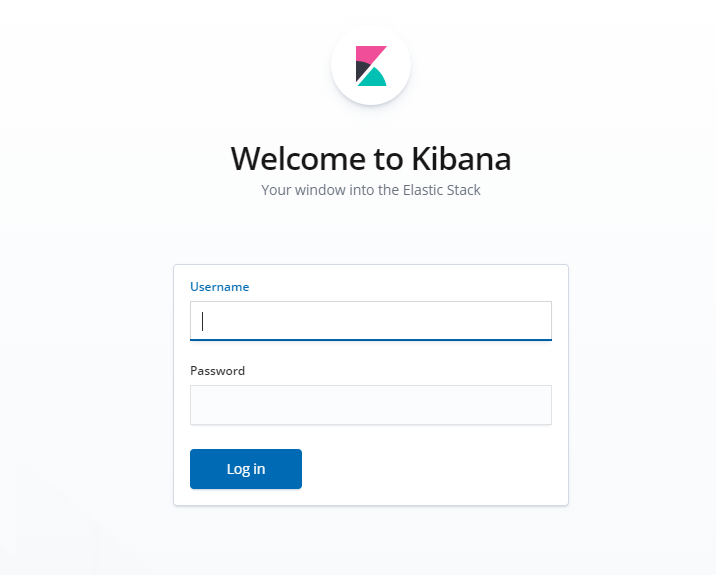
如果希望Kibana界面使用中文,调整多语言配置,编辑kibana-6.8.4-linux-x86_64/config/kibana.yml
# 多语言设置为中文
i18n.locale: "zh-CN"
分享一个kibana后台启动的命令
mkdir kibana-6.2.2-linux-x86_64/logs
mkdir kibana-6.2.2-linux-x86_64/pid
nohup kibana-6.2.2-linux-x86_64/bin/kibana >> kibana-6.2.2-linux-x86_64/logs/kibana.log 2>&1 & echo $! > /kibana-6.2.2-linux-x86_64/pid/kibana.pid
到此,Kibana安装结束
elasticsearch + x-pack + Kibana 6.8版本安装结束
安装分词插件
#离线
wget https://github.com/medcl/elasticsearch-analysis-ik/releases/download/v6.8.4/elasticsearch-analysis-ik-6.8.4.zip
#./elasticsearch-plugin install file://ik的文件路径
./elasticsearch-plugin install file:///usr/local/elasticsearch-analysis-ik-6.8.4.zip
#在线
./bin/elasticsearch-plugin install https://github.com/medcl/elasticsearch-analysis-ik/releases/download/v6.8.4/elasticsearch-analysis-ik-6.8.4.zip
安装日志信息
[es@centos bin]$ ./elasticsearch-plugin install file:///usr/local/elasticsearch-analysis-ik-6.8.4.zip
-> Downloading file:///usr/local/elasticsearch-analysis-ik-6.8.4.zip
[=================================================] 100%
@@@@@@@@@@@@@@@@@@@@@@@@@@@@@@@@@@@@@@@@@@@@@@@@@@@@@@@@@@@
@     WARNING: plugin requires additional permissions     @
@@@@@@@@@@@@@@@@@@@@@@@@@@@@@@@@@@@@@@@@@@@@@@@@@@@@@@@@@@@
* java.net.SocketPermission * connect,resolve
See http://docs.oracle.com/javase/8/docs/technotes/guides/security/permissions.html
for descriptions of what these permissions allow and the associated risks.

Continue with installation? [y/N]y
-> Installed analysis-ik
移除插件
#elasticsearch-plugin remove [pluginname]
elasticsearch-plugin remove analysis-ik
重启es、kibana
