前言
转眼,从接触react到现在,有一年多的时间了. 从一开始cv,学习语法,到现在自己写功能组件,封装. 分享一些心得.
1. Component
react中组件的开始.先分析下这个
    //生命周期的接口
    interface Component<P = {}, S = {}, SS = any> extends ComponentLifecycle<P, S, SS> { }
    class Component<P, S> {

        //构造函数
        constructor(props: Readonly<P>);
        constructor(props: P, context?: any);
        //我们更新组件的setState
        setState<K extends keyof S>(
            state: ((prevState: Readonly<S>, props: Readonly<P>) => (Pick<S, K> | S | null)) | (Pick<S, K> | S | null),
            callback?: () => void
        ): void;

        forceUpdate(callBack?: () => void): void;
        //组件的逻辑
        render(): ReactNode;
        readonly props: Readonly<{ children?: ReactNode }> & Readonly<P>;
        //state对象
        state: Readonly<S>;
        context: any;
        //组件引用
        refs: {
            [key: string]: ReactInstance
        };
    }
平常写组件,常用到的就4个
render state setState refs
有人会说,还有constructor呢.
实际上,我这个几乎没用到.
constructor
早期的react,常规应该是这样的:
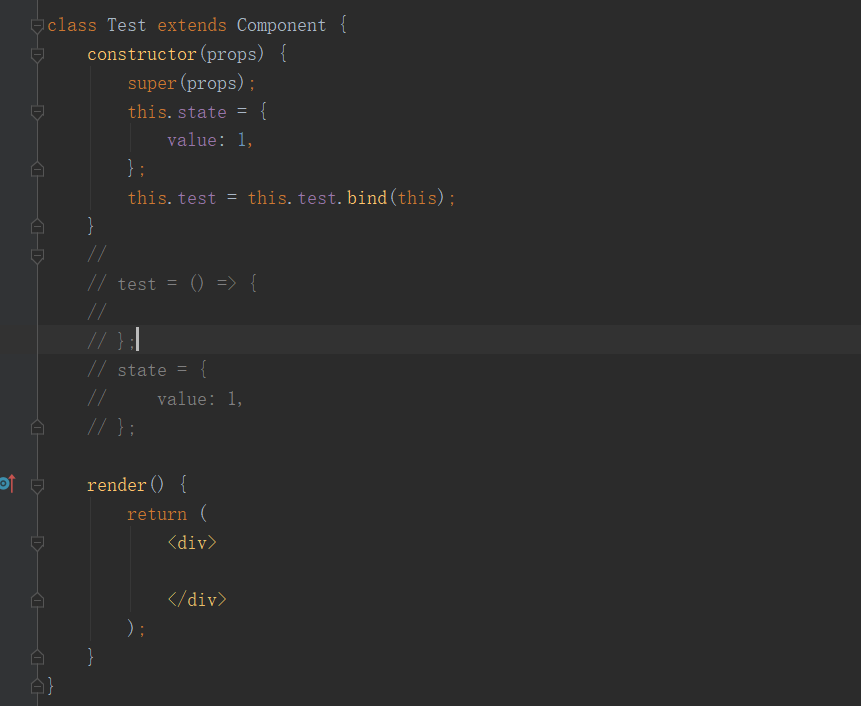
state的定义,函数的定义,都在constructor里面. 现在依然看到许多人这样写.其实也没啥毛病.
但我觉得react,JSX,es6不错的地方.都让js更像编译语言,而不是脚本语言. 说直接点.非常像java之类的语言
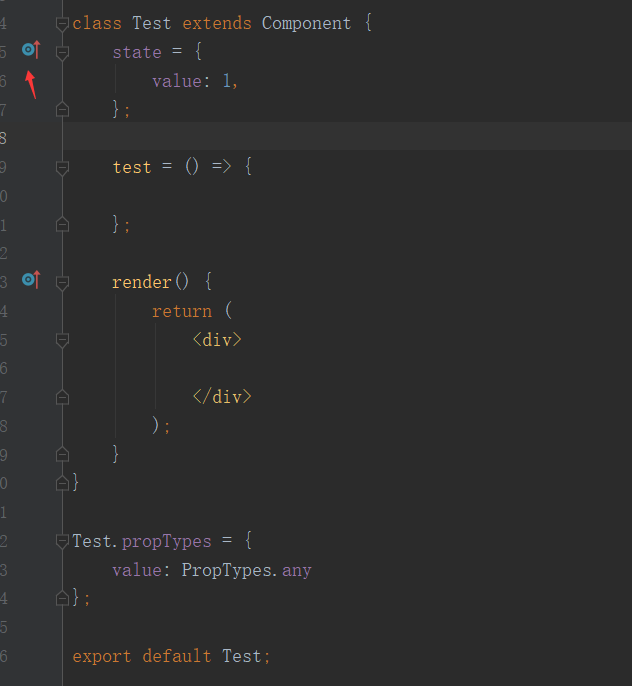
作为一个写了几年java的人,我个人觉得这样看起来舒服很多.哈哈.

这个标志也是继承,复写的意思.
正题:
其实不管什么语言, 开发设计都应该遵循六大设计原则:
单一职责原则(SRP):一个组件只做一件事
里氏替换原则(LSP): 继承
依赖倒转原则(DIP):多态
接口隔离原则(ISP):不要滥用接口(别继承没用的)
迪米特法则(LOD): 耦合
开闭原则(OCP):扩展性强(逻辑写好了别瞎JB改.要让人能扩展)
原理并不难,但真的要做好,还是很需要技术的(废话).
最实用的:
单一职责原则 里氏替换原则 开闭原则
从我在交流群,还有看到的代码来说,包括我自己. 这3个是最常用,却最容易被忽略.
不扯犊子了.
实例.写一个定时的内容切换
首先,想好一个需求(单一指责),尽量不要太复杂.不要想太多.
一.分析需求.定义参数:
参数:
1.间隔时间
2.当前展示内容(单个,或者多个)
3.开始,暂停
回调:
每次切换的回调
定义:
/**
 * 定时切换
 */
class Test extends Component {
    state = {

    };

    render() {
        const { time, open, children } = this.props;
        return (
            <div>

            </div>
        );
    }
}

Test.propTypes = {
    // 间隔时间
    time: PropTypes.number,
    // 是否启动
    open: PropTypes.bool,
};

export default Test;
二.展示内容
有人会问,为什么展示内容的参数没定义.
这就涉及react中.children这个参数了.
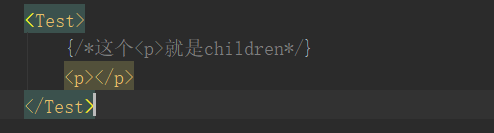
也就是我们封装的组件下,包含的组件,就会在这个children里面
debug看一下
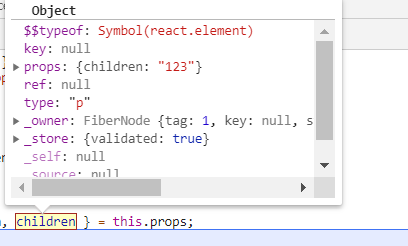
所以展示内容,就不需要特意再去写一个参数了. 初始化
    componentDidMount() {
        this.notifyContent();
    }

    componentDidUpdate(prevProps, prevState, snapshot) {
        if (this.props.children !== prevProps.children) {
            this.notifyContent();
        }
    }

    notifyContent = () => {
        const { children } = this.props;
        const content = Array.isArray(children) ? children : [children];
        this.setState({
            content,
        });
    };
三.写定时循环
这里就用setTimeout递归写了.
    componentDidMount() {

        this.loop();
    }

    componentDidUpdate(prevProps, prevState, snapshot) {
        if (this.props.open !== prevProps.open) {
            this.loop();
        }
    }
    loop = () => {
        const { time = 1000, open = false } = this.props;
        //如果没开就关闭
        if (!open) {
            return;
        }
        setTimeout(() => {
            const { content, index } = this.state;
            const newIndex = index + 1;
            this.setState({
                index: newIndex >= content.length ? 0 : newIndex
            });
            this.loop();
        }, time);
    };
四.切换时的回调
把loop改造一下,中间添加change方法
    loop = () => {
        const { time = 1000, open = false } = this.props;
        if (!open) {
            return;
        }
        setTimeout(() => {
            const { content, index } = this.state;
            this.change(index, content[index]);

            const newIndex = index + 1;
            this.setState({
                index: newIndex >= content.length ? 0 : newIndex
            });
            this.loop();
        }, time);
    };

    change = (index, content) => {
        const { onChange, change } = this.props;
        if (onChange) { //antd的form表单,默认会设置.
            onChange(index, content);
        }
        if (change) {//所以一般写2个.
            change(index, content);
        }
    };
五.如果我想添加扩展?
    getItem = (index) => {
        const { wrapper } = this.props;
        const item = this.state.content[index];
        if (wrapper) {
            return wrapper(item, index);
        }
        return item;
    };
最终
import React, { Component } from 'react';
import PropTypes from 'prop-types';

/**
 * 定时切换
 */
class Test extends Component {
    state = {
        index: 0,
        content: [],
    };

    componentDidMount() {
        this.notifyContent();
        this.loop();
    }

    componentDidUpdate(prevProps, prevState, snapshot) {
        if (this.props.open !== prevProps.open) {
            this.loop();
        }
        if (this.props.children !== prevProps.children) {
            this.notifyContent();
        }
    }
    //更新,保存主内容引用
    notifyContent = () => {
        const { children } = this.props;
        const content = Array.isArray(children) ? children : [children];
        this.setState({
            content,
        });
    };
    // 定时循环
    loop = () => {
        const { time = 1000, open = false } = this.props;
        if (!open) {
            return;
        }
        setTimeout(() => {
            const { content, index } = this.state;
            this.change(index, content[index]);

            const newIndex = index + 1;
            this.setState({
                index: newIndex >= content.length ? 0 : newIndex
            });
            this.loop();
        }, time);
    };
    // 改变回调
    change = (index, content) => {
        const { onChange, change } = this.props;
        if (onChange) { //antd的form表单,默认会设置.
            onChange(index, content);
        }
        if (change) {//所以一般写2个.
            change(index, content);
        }
    };
    // 获取展示内容
    getItem = (index) => {
        const { wrapper } = this.props;
        const item = this.state.content[index];
        if (wrapper) {
            return wrapper(item, index);
        }
        return item;
    };

    render() {
        const { index } = this.state;
        return (
            <div>
                {this.getItem(index)}
            </div>
        );
    }
}

Test.propTypes = {
    time: PropTypes.number,
    open: PropTypes.bool,
    wrapper: PropTypes.func,
    change: PropTypes.func,
};

export default Test;
使用
    <Test
      open={true}
      time={5000}
      change={(i, item) => {
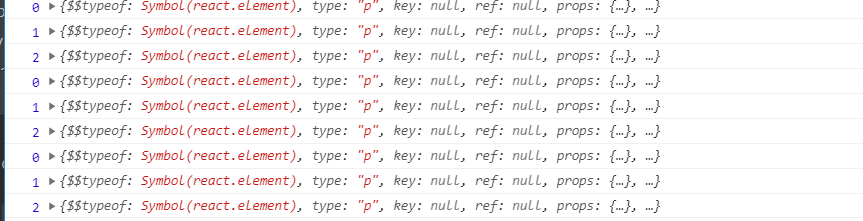
         console.log(i, item);
      }}>
      <p>1</p>
      <p>2</p>
      <p>3</p>
    </Test>
结语
是不是很简单.
propTypes是个好东西,一定要用 (如果你想让的你代码好维护的话)
效果就不贴了,做gif有点费事,有兴趣直接复制跑一下就完了.
欢迎大家点赞,留言交流