

我们已经可以用 SVG 绘制任意图案了,但是光只有图案还是有点单调的,我们还可以让图形动起来。
在 SVG 中,我们可以直接使用 CSS 来编写样式,语法与 HTML 中的 CSS 几乎一样。可以直接在标签上使用 style 属性来指定 CSS 代码,也可以在 SVG 中内嵌 <style> 标签。
在使用 CSS 的时候,有时 SVG 中的标签会和 HTML 冲突,比如,在 SVG 中也存在 <a> 标签,实际用途也是创造一个“链接”,只不过在 SVG 中的 <a> 标签可以嵌套任意图形。
<svg
     xmlns="http://www.w3.org/2000/svg"
     viewBox="0 0 100 100"
     width="100"
     height="100"
     style="border: 1px solid red"
>
  <style>
    a {
      animation: svg-rotate linear 1s infinite;
      transform-origin: center;
    }
    @keyframes svg-rotate {
      from {
        transform: rotate(0deg);
      }
      to {
        transform: rotate(360deg);
      }
    }
  </style>
  <a href="/">
    <path
          d="M20,20L40,50l-10 10V80H90v-16h-4"
          fill="none"
          stroke="green"
    />
  </a>
</svg>
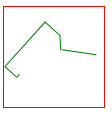
display 属性为 block 或是 inline-block 的 HTML 的 <a> 标签的话,就会出现问题——
<!DOCTYPE html>
<style>
  a {
    display: inline-block;
  }
</style>
<svg
     xmlns="http://www.w3.org/2000/svg"
     viewBox="0 0 100 100"
     width="100"
     height="100"
     style="border: 1px solid red"
>
  <style>
    a {
      animation: svg-rotate linear 1s infinite;
      transform-origin: center;
    }
    @keyframes svg-rotate {
      from {
        transform: rotate(0deg);
      }
      to {
        transform: rotate(360deg);
      }
    }
  </style>
  <a href="/">
    <path
          d="M20,20L40,50l-10 10V80H90v-16h-4"
          fill="none"
          stroke="green"
    />
  </a>
</svg>
<a href="/">link</a>
HTML 中的 <a> 也转起来了!
这是因为页面中的 style 样式不论是在哪里定义都会对整个 HTML 文档生效的,而在这里,HTML 中的 <a> 标签与 SVG 中的冲突了。
为了解决这个问题,在 CSS 中有了命名空间的概念,你可以使用 @namespace 来定义一个属于 SVG 的命名空间,然后在这个命名空间下的样式就不会影响到 HTML 了。
<style>
  @namespace svg url(http://www.w3.org/2000/svg);

  svg|a {
    animation: svg-rotate linear 1s infinite;
    transform-origin: center;
  }

  @keyframes svg-rotate {
    from {
      transform: rotate(0deg);
    }

    to {
      transform: rotate(360deg);
    }
  }
</style>
中间的那个 url 实际上就是 SVG 的命名空间。
除了使用 CSS 来制作动画以外,我们还可以使用 SVG 提供的标签来制作动画。
<svg
     xmlns="http://www.w3.org/2000/svg"
     viewBox="0 0 10 20"
     width="100"
     height="200"
     style="border: 1px solid red"
>
  <rect width="10" height="20">
    <animate attributeName="rx" values="0;5;0" dur="5s" repeatCount="indefinite" />
    <animate attributeName="ry" values="0;10;0" dur="5s" repeatCount="indefinite" />
  </rect>
</svg>
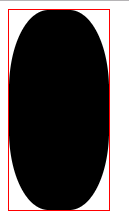
<rect> 标签创建了一个矩形,在 <rect> 标签上,我们可以通过使用 rx 与 ry 属性来设置圆角。但是我们这里默认没有设置圆角,而是在 <rect> 标签下面创建了两个 <animate> 标签,这个标签是用来创建类似于 CSS 中 keyframes 补间动画的,其中 attributeName 是指要将动画应用到哪个属性上,values 是指动画变化的值,这里指定了一个起始值、一个中间值和一个结束值,dur 属性是设置动画持续时间的,repeatCount 是指定重复次数,indefinite 是指无限重复。
为了实现更灵活的动画,SVG 还提供了 <animateMotion> 标签,可以要求指定图形按照指定路径进行运动。
<svg
     xmlns="http://www.w3.org/2000/svg"
     viewBox="0 0 200 100"
     width="200"
     height="100"
     style="border: 1px solid red"
>
  <path
        fill="none"
        stroke="lightgrey"
        d="M20,50 C20,-50 180,150 180,50 C180-50 20,150 20,50z"
  />
  <circle r="5" fill="red">
    <animateMotion
                   dur="10s"
                   repeatCount="indefinite"
                   path="M20,50 C20,-50 180,150 180,50 C180-50 20,150 20,50z"
    />
  </circle>
</svg>
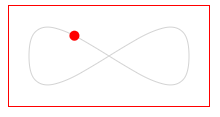
<animateMotion> 除了接受 dur 属性和 repeatCount 属性外,还接受一个 path 属性,与 <path> 标签的 d 属性一样,使用指令指定一条运动路径。
类似于 CSS 中的 transform 变换,SVG 也提供了类似的动画标签 <animateTransform>:
<svg
     xmlns="http://www.w3.org/2000/svg"
     viewBox="0 0 100 100"
     width="100"
     height="100"
     style="border: 1px solid red"
>
  <a href="/">
    <path
          d="M20,20L40,50l-10 10V80H90v-16h-4"
          fill="none"
          stroke="green"
          origin="center"
    >
      <animateTransform
                        attributeName="transform"
                        type="rotate"
                        from="0 50 50"
                        to="360 50 50"
                        dur="1s"
                        repeatCount="indefinite"
      />
    </path>
  </a>
</svg>
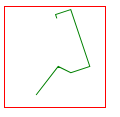
attributeName、dur 和 repeatCount 参数与 <animate> 一样,指定要创建动画的属性、动画时长和重复次数,type 参数可以指定具体的变化参数类型,from 和 to 指定具体的变化值,类似于 CSS 中 keyframes 的 from 和 to,这里三个值第一个是指定角度,后面两个是指定旋转中心。
SVG 在动画方面提供了可以超越 CSS3 的能力,并且可以通过 JavaScript 来进行控制,也可以像控制 DOM 一样控制 SVG 的节点。
并不是说 SVG 能实现的就坚决不用 CSS 来实现,在不同的情况下,使用最适合的工具,才是最好的。
