文章来源: 陶老师运维笔记- 微信公众号

安装及TNS:no listener连接等问题处理
Q1: 安装oracle图形界面出不来,出错DISPLAY environment variable not set!。
A1: 可能要export DISPLAY=:0.0。
root登录一个窗口,运行一下语句。
#export DISPLAY=:0.0
echo 'export DISPLAY=:0.0'>>/etc/profile
source /etc/profile
#xhost +
#su - oracle
然后就在这个窗口运行oracle的安装程序。
Q2: runInstaller出错,错误Linux PRVF-0002 : Could not retrieve local nodename
A2: runInstaller 出错,可能是要配置/etc/hosts。
1. ifconfig 得到ip 192.168.56.103
2. hostname得到名字db01。
$ hostname
db01
3. 然后设置 自己的 地址:vim /etc/hosts 。为hostname相应的地址
#当前的ip 和hostname
192.168.56.103 db01
4. 继续安装
Q3: 监听器没有启动,连接oracle失败。
A3:启动lsnrctl start即可。
1. su oracle
2. lsnrctl start
#停止监听器命令
3. lsnrctl stop
#查看监听器命令.
4. lsnrctl status
Q4: 远程访问oracle,出错 ORA-12541: TNS:no listener
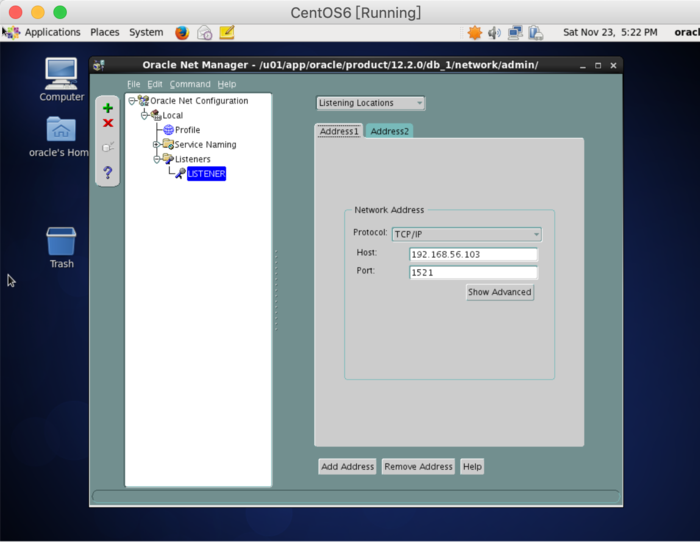
A4: 很可能是 listener.ora配置只配置了hostname,即把db01名字,改为ip。 (ADDRESS = (PROTOCOL = TCP)(HOST = 192.168.56.103)(PORT = 1521))
su - oracle
cd /u01/app/oracle/product/12.2.0/db_1/network/admin
cp listener.ora listener.ora.backup
#配置listener 增加IP。开始是hostname
vim listener.ora
#
LISTENER =
  (DESCRIPTION_LIST =
    (DESCRIPTION =
      (ADDRESS = (PROTOCOL = TCP)(HOST = 192.168.56.103)(PORT = 1521))
      (ADDRESS = (PROTOCOL = IPC)(KEY = EXTPROC1521))
    )
  )
重启lsnrctl:
#重启
lsnrctl stop
lsnrctl start
lsnrctl status
Q5: 远程访问oracle,出错 ORA-12541: TNS:no listener
A5:若listener.ora配置正确,也可能是tnsnames.ora配置不正确。
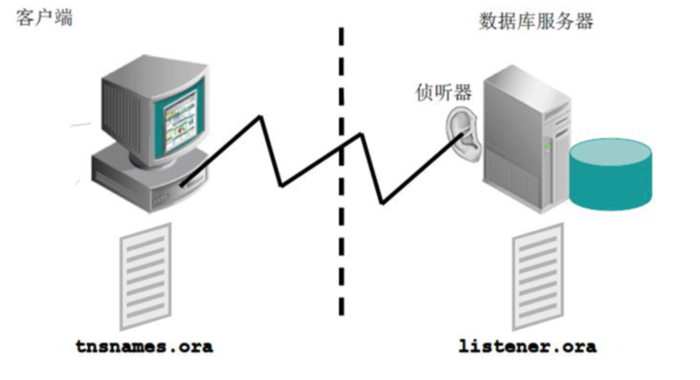
$nc -z 192.168.56.103 1521
$tnsping ORCL
$tnsping ORCL@192.168.56.103

##正确的配置类似.
cat tnsnames.ora
LISTENER_ORCL =
  (ADDRESS = (PROTOCOL = TCP)(HOST = 192.168.56.103)(PORT = 1521))
ORCL =
  (DESCRIPTION =
    (ADDRESS = (PROTOCOL = TCP)(HOST = 192.168.56.103)(PORT = 1521))
    (CONNECT_DATA =
      (SERVER = DEDICATED)
      (SERVICE_NAME = orcl)
    )
  )
也可以用netmgr图形化配置。
su - oracle
netmgr
Q6: 连接oracle,出错ORA-27101: shared memory realm does not exist
A6: 原因常是非正常关停oracle引起,如直接断电关机引起。可尝试强制startup force。
$sqlplus / as sysdba
SQL> startup force
Total System Global Area 1610612736 bytes
Fixed Size                  8621232 bytes
Variable Size            1006633808 bytes
Database Buffers          587202560 bytes
Redo Buffers                8155136 bytes
Database mounted.
Database opened.
Q7: 执行请求的操作时遇到错误: IO 错误: The Network Adapter could not establish the connection 供应商代码 17002.
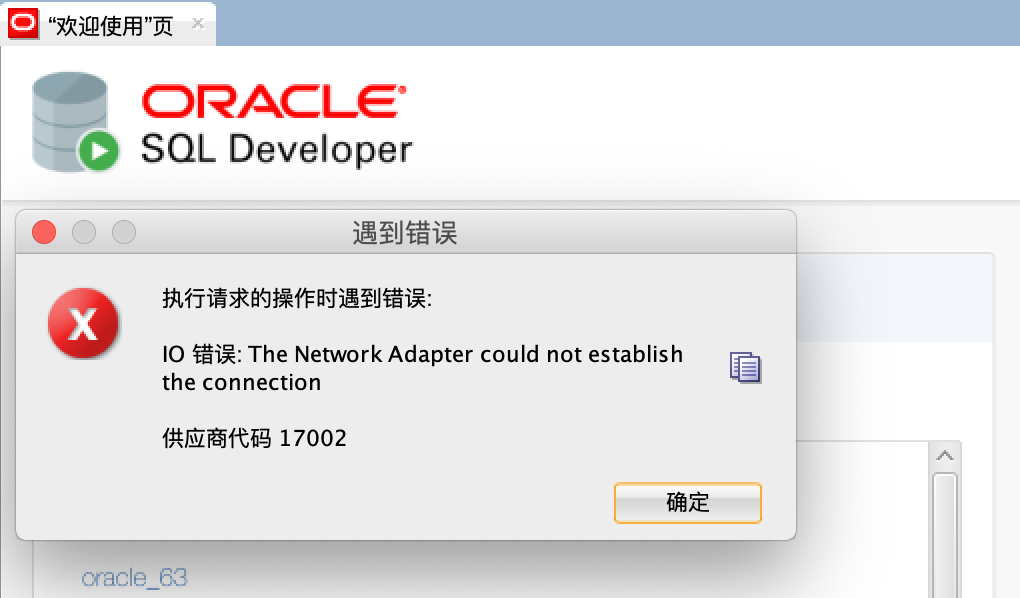
A7: 可能原因:
1、Oracle的服务都开了没啊?2、防火墙有没有关啊?3、试试把监听程序重新配置配置?。
本人遇到的是iptable相关,关停oracle机器上的iptable就好了。
snrctl start
lsnrctl status
#iptable
$iptables -L
$iptables -F
$/etc/init.d/iptables stop
iptables -L
cat  /etc/sysconfig/iptables
iptables-save > /etc/sysconfig/iptables

#永久关闭防火墙
service iptables stop
chkconfig iptables off
service ip6tables stop
chkconfig ip6tables off
##centos7
systemctl stop firewalld
systemctl disable firewalld
#检查
nc -z 192.168.56.103 1521
Connection to 192.168.56.103 port 1521 [tcp/ncube-lm] succeeded!