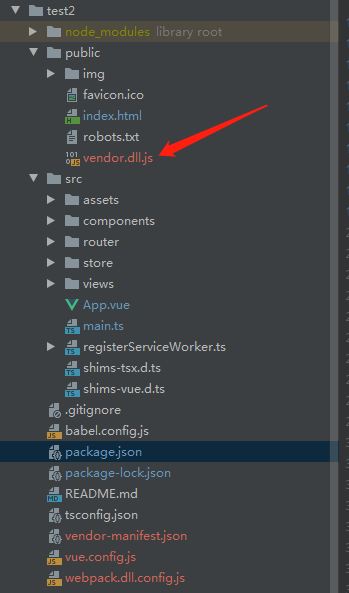
根目录创建文件 webpack.dll.config.js
var path = require("path");
var webpack = require("webpack");
module.exports = {
      entry: {
          vendor: ['vue/dist/vue.esm.js', 'vuex', 'vue-router'] // 你想要打包的模块的数组
      },
      output: {
            path: path.join(__dirname, './public'),// 打包后文件输出的位置
            filename: '[name].dll.js',
             library: '[name]_library'
             // vendor.dll.js中暴露出的全局变量名。
             // 主要是给DllPlugin中的name使用,
            // 故这里需要和webpack.DllPlugin中的name: '[name]_library'`保持一致。
    },
    plugins: [
            new webpack.DllPlugin({
                path: path.join(__dirname, '.', '[name]-manifest.json'),
                name: '[name]_library', context: __dirname
            }),
]};
命令行 webpack --config ./webpack.dll.config.js
在public生成引用文件vendor.dll.js
根目录生成vendor-manifest.json
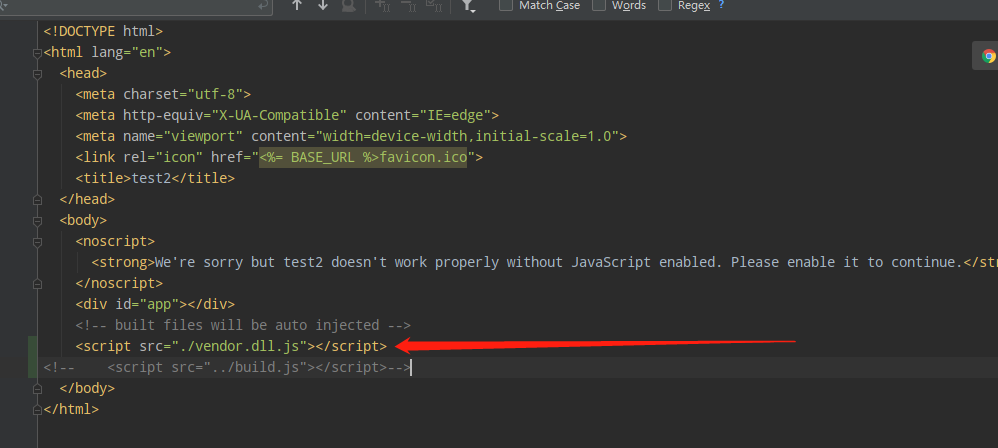
在模板index.html里引入
在vue.config.js里添加映射
const webpack = require('webpack');
module.exports={
     publicPath:"./",
     configureWebpack:{
         plugins:[
               new webpack.DllReferencePlugin({
               context: __dirname,
               manifest: require('./vendor-manifest.json')
          })
         ]
    }
}