前言
小编这边分享一下自己对axios的一个总结,基本方法介绍、一个完整的数据发送请求小demo.
定义
概念
Axios 是一个基于 promise 的 HTTP 库,可以用在浏览器和 node.js 中.
常用方法
- get请求
axios.get(url) .then(res => { console.log(res); }) .catch(err => { console.log(err); }) - post请求与之类似
- 执行多个并发
function getName() {
    return axios.get(url);
}
function getAge() {
    return axios.get(url);
}
axios.all([getName(), getAge()])
.then(axios.spread(function (acct, perms) {
  //两个请求现已完成
}));
创建axios实例
// 以create方法创建一个axios实例对象
var instance = axios.create({
  baseURL: '',
  timeout: 1000,
  headers: {'X-Custom-Header': 'foobar'}
});
拦截器
当我们要在请求或者响应之前做一些什么事情的话(实战之中类似于loading动效)添加拦截器
// 以axios对象为例
// 请求拦截器
axios.interceptors.request.use(function(config) {
        //在发送请求之前做某事
        return config;
   }

// 响应拦截器
axios.interceptors.response.use(function(response){
        //对响应数据做些事
        return response;
   }
案例实现
这边因为只是实现了简单的一个提交功能所以就直接将axios挂载在vue原型上面直接通过this调用
Vue.prototype.axios = axios;
做一个简单的提交文本框,提交触发post请求提交填写数据

<template>
    <div class="post">
        <input type="text" placeholder="请输入用户名" v-model="content">
        <input type="submit" value="提交" @click="submit">
    </div>
</template>
<script>
export default {
    name: 'post',
    data() {
        return {
            content:''
        }
    },
    methods: {
        submit() {
            let _this = this;
            this.axios.post('/api/checklogin', {
                content: _this.content
            })
            .then(res => {
                console.log('接受数据发送给后端响应');
            })
            .catch(err => {
                console.log(err);
            })
        }
    }
}
</script>
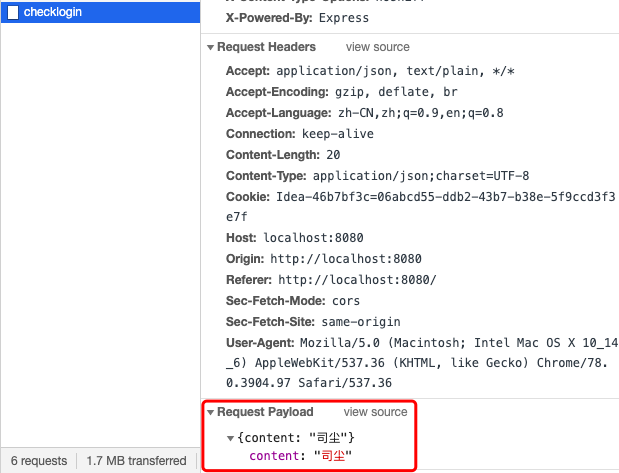
因为没有部署接受端所以我们直接去控制台network中查看发送数据情况
ending...