HTML 表单标签
form 标签
-
action属性 表单提交的地址
-
target 行为类似a标签的target(_blank,_self)
-
method 表单提交方式
- get
- post
-
enctype
input 标签
-
文本
<input type="text" value="inputyourname"> <!-- 框内有可编辑的文字inputyourname --> -
input type="password" 密码 -
复选框`
-
以name相同分组
-
checked属性表示默认选中
    like:
    <input type="checkbox" name="like" value="apple">apple
    <input type="checkbox" name="like" value="orange">orange
    <input type="checkbox" name="like" value="pear">pear
-
-
单选框-
属性同checkbox
gender:
  <input type="radio" name="gender" value="男">男
  <input type="radio" name="gender" value="女">女
-
-
选择文件标签
avatar <input type="file" accept=".png, .jpg , .gif" mutiple>
<!-- 推荐选择这些格式的文件 但可以手动选择所有文件 mutiple可以选择多文件 -->
<!-- accept支持media type image/* 所有图片 image/jpeg image/png text/html text/stylesheet application/exeutable-->

-
hidden属性
- 隐藏输入域
- value设置值
- name设置名字
-
type为一下四个值时,都表现为按钮的样式,按钮上的文字需要用value属性来设置。
<input type="button" value="click me"> <input type="submit" value="submit"> <input type="reset" value="reset"> <input type="image" (alt width height) src="xxx.png" value="click me"> <!--submit和reset 不加value默认值是submit和reset--> -
<input type="number">只能输入数字 -
<input type="email">只能输入合法邮箱地址 -
<input type="date">选择日期 -
<input type="datetime-local">选择本地时区的时间 -
``
选择时间 -
<input type="week">选择周 -
<input type="mouth">选择月 -
<input type="url">输入地址 -
<input type="tel">选择电话 -
<input type="range" value="500" min="-5" max="1000" step="5">只能加减五 范围内选择 默认0-100 修改成-5到1000 光标放在500 -
<input type="color">选择颜色 -
==type填了不能识别的值,当做text来处理==
input的其他属性
-
value
-
为按钮形态时设置上面的文字
-
为输入框设置里面的默认内容
-
datetime-local
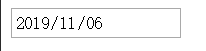
<input type="date" value="2019-11-06">```
-
-
disabled
- 无值的属性
- 禁用这个输入域
-
required 设置为必填项
-
maxlength 和 minlength 文本输入框设置输入的最大、小长度
-
placeholder 占位符 提示性文字,一旦输入内容就会消失
-
autofocus 自动获得焦点,即页面加载。完后光标自动在这个元素内
-
tabindex 按tab键在不同输入域之间跳转时的顺序 会往更大的元素跳 为-1的话会跳过这个值
-
name 很重要,表单提交时使用。同时,在radio和checkboc阵列里,name相同的元素被分在同一组里。
Name: <input type="text" name="username"><br> Password:<input type="password" name="password"> <br> age:<input type="text" name="age"><br> <button>Submit</button> <!-- file:///C:/Users/%E8%8D%86%E7%BA%AC%E5%AE%B8/Desktop/test.html?username=Tim&password=fdsasd&age=23 --> <input type="checkbox" name="fruit">apple <input type="checkbox" name="fruit">banana <button>Submit</button> <!-- test.html?fruit=on&fruit=on --> <input type="checkbox" name="fruit" value="apple">apple <input type="checkbox" name="fruit" value="banana">banana <button>Submit</button> <!-- test.html?fruit=apple&fruit=banana --> 同上radio也一样 <input type="hidden" name="a" value="b"> <button>Submit</button> <!-- test.html?a=b --> -
实现百度搜索
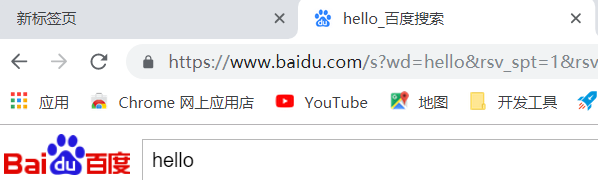
<form action="https://www.baidu.com/s">
  <input type="text" name="wd">
  <button>百度一下</button>
</form>
button 标签
- 不写type默认为submit
		<button>百度一下</button>
    <button type="reset">百度一下</button>
    <button type="button">hello</button>
    <!-- type=button 没有效果 -->
- 与input=button相比 里面可以嵌套标签
<input type="button" value="he">
<button type="button">hello <font color="red" size="40">你好</font></button>
label 标签
- 一般与checkbox和radio一起使用,扩大两个标签的可点击区域,提升用户体验。
<label>
	 <input type="checkbox" name="like" value="apple">apple
</label>
<label>
  <input type="file" hidden> 选择文件
</label>
<input type="file" id="file-select">
<label for="file-select">
 选择文件
</label>
select标签
  <form action="">
    <select name="city" id="">
      <option selected hidden>请选择</option>
      <optgroup label="一线城市">
        <option value="0571">杭州</option>
        <option disabled>深圳</option>
        <!-- 不写value,把标签内的值作为value city=深圳 -->
      </optgroup>
      <optgroup label="十八线城市">
        <option value="">三里屯</option>
        <option value="">十八里屯</option>
      </optgroup>
    </select>
  </form>
- multiple 无值属性 可以多选 多选就不是下拉的样式了,不同系统样式差别很大。很难被css控制。对ui要求高的网站用其他元素模拟下拉框。
textarea 多行文本输入框
- 多行文本输入框
- 两个特殊属性 rows=“3” cols=“20” 不常用。一般都用css来控制了。
fieldset标签
-
放一组输入域
-
fieldset有个dissabled属性,如果它有了这个属性,其内的所有输入域都将被禁用。
-
legend
-
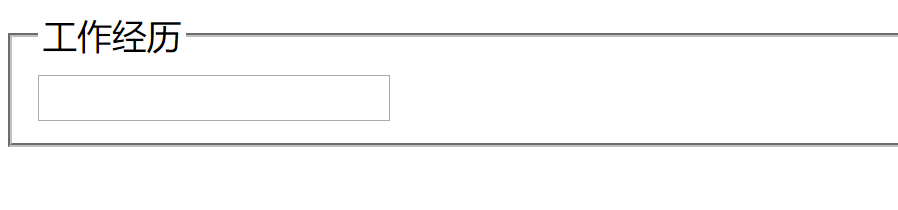
只能作为fieldset的子元素,用来标识这组输入域的名字。有了css后,这个标签基本也没有用武之地了。
<form action="">
    <fieldset>
      <legend>工作经历</legend>
      <input type="text">
    </fieldset>
  </form>
快捷输入
-
ul>li*5>a>img+p
-
lorem 生成假文字 lorem100 生成100个假文字
-
div#d 生成id为d的div
-
div.a.b.c 生成一个class是a b c 的div
table 标签
  <table border="1">
    <!-- 表格默认没有线 加border -->
    <caption>成绩单</caption>
    <!-- 居中显示表名 -->
    <thead>
      <tr>
        <th>name</th>
        <th colspan="2">score</th>
        <th rowspan="2">number</th>
        <!-- 表头居中加粗 -->
        <!-- <th rowspan="2">number</th> 跨行无效不能跳出 thead -->
      </tr>
      <tr>
      </tr>
      <!-- 下面存在行才能跨过去 -->
    </thead>
    <tbody>
      <tr>
        <td>aaa</td>
        <td rowspan="2" colspan="2">bbb</td>
        <td>ccc</td>
      </tr>
      <tr>
        <td>1</td>
        <td>2</td>
        <td>3</td>
      </tr>
    </tbody>
    <tfoot>
      <th>name</th>
      <th>score</th>
      <th>number</th>
    </tfoot>
    <!-- thead tbody tfoot 加上 打印时每一页都有表头表尾 而且三块内容顺序无所谓-->
    <tbody>
      <tr>
        <td>yyy</td>
        <td>xxx</td>
        <td>zzz</td>
      </tr>
    </tbody>
  </table>
-
thead 只能有一个,只有一个即使出现在tbody的后面,内容也会显示在tbody的前面。如果写了多个,第一个以外的会当做tbody处理。
-
th的id会被td元素引用表示td所属的标题是哪一个
-
td标签
- headers属性,值为某th的id。
-
<table border="1" cellspacing=0> <!-- 合并线 --> <colgroup> <col width=100px bgcolor="magenta"> <!-- 第一列 --> <col bgcolor="maroon" span=“2”> <!-- 第二列 --> </colgroup> <tr> <th>姓名</th> <th>学号</th> <th id="score">成绩</th> </tr> <tr bgcolor="red"> <th>张三</th> <td>1</td> <td bgcolor="grenn">100</td> </tr> <tr> <th id="stu2">李四</th> <td>2</td> <td headers="score stu2">100</td> <!-- 告诉读屏软件 100的表头是score和stu2 id里不能带空格 --> </tr> <tr> <th>王五</th> <td>3</td> <td>100</td> </tr> <tr> <th>赵六</th> <td>4</td> <td>100</td> </tr> </table> -
col/colgroup标签
- colgroup 用来分组col标签
- 用来分组col标签
- span属性,表示选择多列表格
- 有span时,不可能再有子的col元素
- col 设置列的属性和样式
- span属性 默认为1
- 必须出现在caption后面 thead/tbody前面
- colgroup 用来分组col标签
  <table border="1">
    <tr>
      <td></td>
      <td></td>
      <td></td>
      <td></td>
      <td></td>
    </tr>
    <tr>
      <td></td>
      <td rowspan="3"></td>
      <td colspan="2"></td>
      <td></td>

    </tr>
    <tr>
      <td></td>
      <td></td>
      <td rowspan="3"></td>
      <td></td>

    </tr>
    <tr>
      <td></td>
      <td></td>
      <td></td>
    </tr>
    <tr>
      <td colspan="3"></td>
      <td></td>
    </tr>
    <tr>
      <td></td>
      <td></td>
      <td></td>
      <td></td>
      <td></td>
    </tr>
  </table>
-
spacing属性
<table border=1 cellspacing=0> 双重线表格线重合成一条。 -
tr或者td or th不能与其他标签并列
map标签
- name属性,如果设置id属性的话,id 跟name属性值必须一样。
- area标签,必须作为map的子元素
- href
- target
- alt
- shape
- rect(angle) x1,y1,x2,y2
- circle cx,cy,r
- poly 至少六个值
- coords 写坐标
<img
    src="https://img.alicdn.com/imgextra/i3/2262012740/TB2K2kqljihSKJjy0FeXXbJtpXa_!!2262012740-0-beehive-scenes.jpg_460x460xz.jpg"
    usemap="#imglmap" alt="">

  <map name="imglmap">
    <area shape="circle" coords="211,103,55" href="" alt="" title="face">
    <area shape="rect" coords="42,241,112,337" href="" alt="" title="book">
    <area shape="poly" coords="156,64,163,364,71,335,115,463,248,461,389,399,317,172,300,96,281,12" href="" alt=""
      title="body">
  </map>
iframe
  <a href="https://www.baidu.com/" target="foo">baidu</a>
  <!-- 在名为foo的iframe里  打开百度 -->
  <iframe src="https://taobao.com/" frameborder="0" name="foo"></iframe>
  <!-- 由于安全原因,某些网页拒绝嵌入其他页面 -->
  <a href="https://www.baidu.com/" target="foo">baidu</a>
  <!-- 没有名为foo的iframe 创建一个foo标签 -->
  <a href="https://www.mi.com/" target="foo">mi</a>
  <!-- 点击mi会在百度的foo标签打开 -->
  <iframe src="https://taobao.com/" frameborder="0" name="xfoo"></iframe>
<iframe src="iframe-b.html">
  <p>您的浏览器不支持iframe</p>
</iframe>
- iframe跳转记录也会存在于浏览器的前进后退记录里面
frame和frameset
<frameset cols="30,*,100">
  <!-- 左面一个30像素,右面一个100像素,中间用其他的 rows-->
  <frame src="https://www.baidu.com">
    <frame src="https://www.baidu.com">
      <frame src="https://www.baidu.com">
</frameset>
<frameset rows="30,*">
  <frame src=" https://www.baidu.com/" />
  <frameset cols="100,*">
    <frame src="https://www.baidu.com/" />
    <frame src="https://www.baidu.com/" />
  </frameset>
</frameset>
<noframes>
  您的浏览器不支持frameset
</noframes>
<script>
</script>
<noscript>
  浏览器不支持js,请升级
</noscript>
<canvas>
  <p>no supported</p>
</canvas>
<iframe>
  <p>no supported</p>
</iframe>
- script,frameset正常使用标签里有东西,frame里面没东西。所以frame可以写里面。
- fallback 退化方案 degrade 降级方案 backdrop 备用方案
HTML5新增的一些语义标签
-
article 文章
-
section
-
aside
-
header
-
footer
-
nav
-
main
-
template 模板 用户看不见
<template>
  <div>{{导演}}</div>
  <div>{{主演}}</div>
</template>
常见标签
-
sub 下标
-
sup 上标
-
code 标签专门放代码,常与pre标签连用
-
script标签 两种方法
<script> console.log(2) </script> <script src="a.js"></script> -
style 标签 两种方法
<link rel="stylesheet" href="a,css"> <style> pre { color:red; } </style> -
video标签
<video src="a.mp4" controls autoplay loops preload></video> <video contrals> <source src="a.mp4"> <source src="a.m3u8"> <source src="a.mkv"> <source src="a.webm"> </video> <!-- 浏览器尝试播放一个视频的各种格式,直到一个支持的格式 --> -
audio标签
<audio src="a.mp3/wmv/wav"></audio>
<!-- 也可以像视频一样写成多个 -->
object标签
-
嵌入一个外部的资源
<object data="https://www.baidu.com/" type=""></object>- type属性
MIME Type image/png, video/webm, application/pdf
- iframe,pdf,svg,img,flash。初始大小300*150 跟iframe一样
画布标签
- canvas
progress标签
<progress value="88" max="100"></progress>
<!-- 默认值是0-1 value不能是负的 因为是进度条-->
role与aria
-
读屏软件可以识别
<div role="tabs" aria-open="ture/false">

</div>
<!-- 读屏软件 -->