EventBus是一个消息订阅/发布的开源框架。
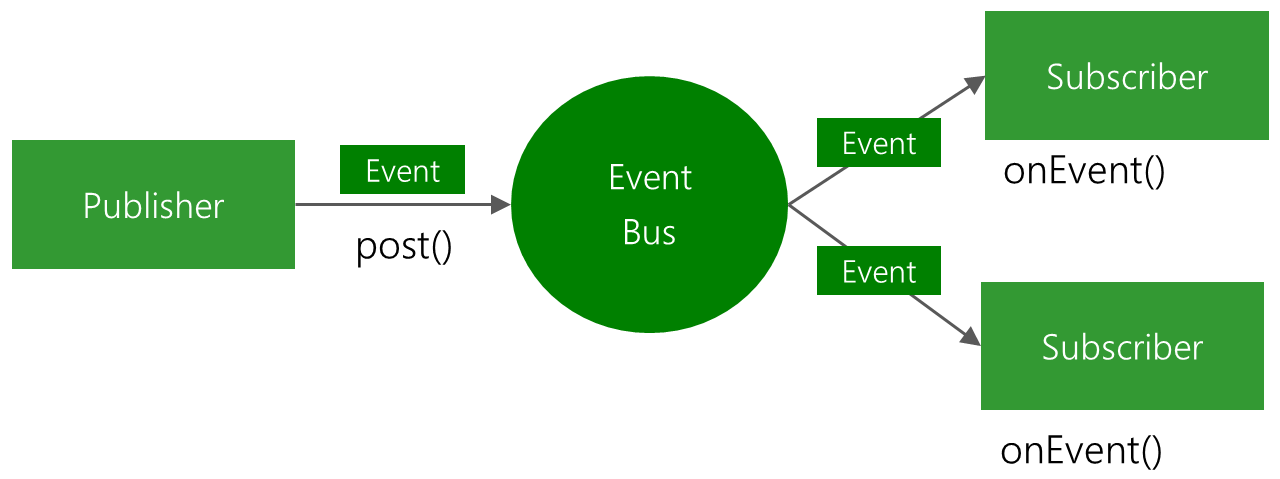
如上图所示 , EventBus框架中主要有2个角色 :
- Publisher : 发布消息的, 被观察者
- Subscriber : 接收消息的 , 观察者
Publisher(被观察者) 通过 post() 将一个事件/消息(Event) 发送到事件的集中地,也就是图中的 EventBus ,EventBus 再将事件/消息(Event)发给Subcriber观察者。
使用这样的框架,能够使Activity/Fragment等组件之间的通信简化 , 不用再像以前一直使用 intent 来传送数据 , 从而提升开发效率。
1.配置依赖
在app层的 build.gradle 中添加 :
implementation 'org.greenrobot:eventbus:3.1.1'
2.初步使用
根据官方文档 , 首先要定义一个Event(消息)的POJO类 :
public class MessageEvent {

    private  String message ;

    public MessageEvent(String message) {
        this.message = message;
    }


    public String getMessage() {
        return message;
    }

    public void setMessage(String message) {
        this.message = message;
    }
}
然后 , 我们要明确哪个组件是 Subsriber(观察者), 哪个组件是Publisher(被观察者) , 在这里 , 我们通过EventBus演示一个传送消息的demo。
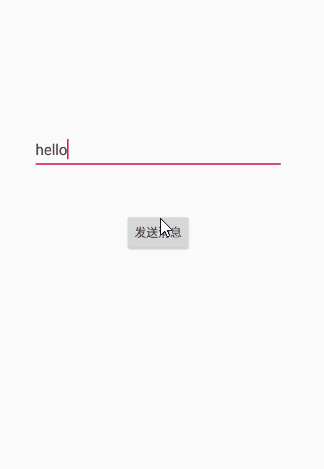
首先 , 观察者要注册EventBus , 在这里 因为当前活动就是接收消息的,所以当前活动就是 观察者(接收事件的一方) ,
并且用 @Subscribe 注解定义一个处理接收事件的方法 , 这里我们简单地把收到的事件内容用Toast弹出。
public class ToastActivity extends AppCompatActivity {

    @Override
    protected void onCreate(Bundle savedInstanceState) {
        super.onCreate(savedInstanceState);
        setContentView(R.layout.activity_toast);
        //注册
        EventBus.getDefault().register(this);

    }

    @Override
    protected void onDestroy() {
        //解除注册
        EventBus.getDefault().unregister(this);
        super.onDestroy();
    }

     /**
     * 接收事件
     * @param msg
     */
    @Subscribe
    public void onMessageEvent(Message msg) {
        Toast.makeText(this, msg.getMessage(), Toast.LENGTH_SHORT).show();
    }
}
最后 , 我们要实现点击按钮,通过EventBus发送事件 , 所以当前活动也作为被 观察者(发送事件的一方) , 发送消息通过 post() 即可。
public class ToastActivity extends AppCompatActivity {

    EditText mMsgEt;

    @Override
    protected void onCreate(Bundle savedInstanceState) {
        super.onCreate(savedInstanceState);
        setContentView(R.layout.activity_toast);

        EventBus.getDefault().register(this);

        mMsgEt = (EditText) findViewById(R.id.message_et);

        findViewById(R.id.send_msg_btn).setOnClickListener(new View.OnClickListener() {
            @Override
            public void onClick(View v) {
                //发送事件
                EventBus.getDefault().post(new Message(mMsgEt.getText().toString()));
            }
        });
    }

    /**
     * 接收事件
     * @param msg
     */
    @Subscribe
    public void onMessageEvent(Message msg) {
        Toast.makeText(this, msg.getMessage(), Toast.LENGTH_SHORT).show();
    }

    @Override
    protected void onDestroy() {
        EventBus.getDefault().unregister(this);
        super.onDestroy();
    }
}
3.ThreadMode
在EventBus中, 我们可以设置观察者处理接收到消息的函数所在的线程。
1.ThreadMode.POSTING
@Subscribe(threadMode = ThreadMode.POSTING)
public void onMessage(MessageEvent event) {
    log(event.message);
}
这是eventBus的默认模式 , 接收消息的函数会在发送消息所在的线程中被调用。这种模式下避免了发送事件和处理事件间的线程切换,开销最小。
但是当发送事件在主线程时,应避免处理事件的函数发生堵塞,否则会引起卡顿。
2.ThreadMode.MAIN
@Subscribe(threadMode = ThreadMode.MAIN)
public void onMessage(MessageEvent event) {
    log(event.message);
}
这种模式下处理事件的函数将在主线程中执行 , 所以也应该避免在处理函数中发生堵塞。
3.ThreadMode.MAIN_ORDERED
@Subscribe(threadMode = ThreadMode.MAIN_ORDERED)
public void onMessage(MessageEvent event) {
    log(event.message);
}
这种模式下 , 事件的处理函数不仅在主线程 , 当有被观察者发送了多个事件的时候 , 事件将按照发送的顺序依次被处理 , 保证了事件之间的顺序性。
4.TheadMode.BACKGROUND
@Subscribe(threadMode = ThreadMode.BACKGROUND)
public void onMessage(MessageEvent event) {
    log(event.message);
}
-
当发送事件所在线程是子线程 , 则事件也在统一子线程处理。
-
当发送事件所在线程是主线车工 , 则eventBus会在后台新开一个线程调用事件处理函数。
5.ThreadMode.ASYNC
@Subscribe(threadMode = ThreadMode.ASYNC)
public void onMessage(MessageEvent event) {
    log(event.message);
}
在此模式下 , 事件处理函数始终在与发送事件所在线程之外的子线程中执行 , 也就是两者所在线程相互独立。
4.粘性事件
普通的事件需要接收方先注册,发送方再发送消息,才能完成消息的发送和处理。
而粘性事件的作用就是,发送方可以先发送事件 , 接收方在之后进行注册时再完成消息的处理。
1.简单使用
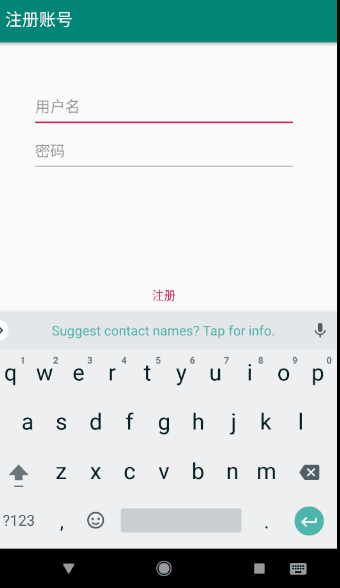
现在我们做一个注册->登陆流程的demo ,我们想要实现 :
用户首先在注册页面填写账号&密码信息 , 再进入登陆页面时, 就不用再重复输入账号密码了。
效果图 :
代码 :
注册页面 :
public class RegisterActivity extends AppCompatActivity {

    EditText mUsernameEditText;//用户名编辑框
    EditText mPasswordEditText;//密码编辑框

    @Override
    protected void onCreate(Bundle savedInstanceState) {
        super.onCreate(savedInstanceState);
        setContentView(R.layout.activity_register);

        mUsernameEditText = (EditText) findViewById(R.id.register_username_text_input_layout);
        mPasswordEditText = (EditText) findViewById(R.id.register_activity_password_et);
        //点击注册
        findViewById(R.id.register_btn).setOnClickListener(new View.OnClickListener() {
            @Override
            public void onClick(View v) {
                String username = mUsernameEditText.getText().toString();
                String password = mPasswordEditText.getText().toString();
                Toast.makeText(RegisterActivity.this, "注册成功 , 快去登陆~", Toast.LENGTH_SHORT).show();
                //发送粘性事件
                EventBus.getDefault().postSticky(new MessageEvent(username,password));
                startActivity(new Intent(RegisterActivity.this, LoginActivity.class));
            }
        });

    }
}
通过 postSticky() 发送一个粘性事件。
登陆页面 :
public class LoginActivity extends AppCompatActivity {

    EditText mUsernameEd;//用户名编辑框
    EditText mPasswordEd;//密码编辑框

    @Override
    protected void onCreate(Bundle savedInstanceState) {
        super.onCreate(savedInstanceState);
        setContentView(R.layout.activity_login);
        EventBus.getDefault().register(this);

        mUsernameEd = (EditText)findViewById(R.id.login_username_text_input_layout);
        mPasswordEd = (EditText)findViewById(R.id.login_password_editText);

    }

    //接收粘性事件 , 将注册页面的信息赋值到编辑框中
    @Subscribe(sticky = true)
    public void onEvent(MessageEvent event) {
        mUsernameEd.setText(event.getUsername());
        mPasswordEd.setText(event.getPassword());
    }

    @Override
    protected void onDestroy() {
        EventBus.getDefault().unregister(this);
        super.onDestroy();
    }
}
2. 获取/移除粘性消息
当我们发送了一个粘性消息 , 但这个消息尚未被订阅者接收处理时 , 我们可以通过 getStickyEvent() 拿到这个消息。
//获取已经发送的但未处理的粘性消息
MessageEvent stickyEvent = EventBus.getDefault().getStickyEvent(MessageEvent.class);
并且可以通过 removeStickyEvent() 移除这个事件 , 这样之后订阅之注册之后也不会收到这个事件。
//移除消息
EventBus.getDefault().removeStickyEvent(stickyEvent);
现在试验一下, 我们在前面的demo中进行修改 , 在注册页面点击注册按钮时 , 移除粘性事件。
public class RegisterActivity extends AppCompatActivity {

    ...

    @Override
    protected void onCreate(Bundle savedInstanceState) {
        super.onCreate(savedInstanceState);
        setContentView(R.layout.activity_register);
        ...
        findViewById(R.id.register_btn).setOnClickListener(new View.OnClickListener() {
            @Override
            public void onClick(View v) {
                String username = mUsernameEditText.getText().toString();
                String password = mPasswordEditText.getText().toString();
                //发送粘性消息
                EventBus.getDefault().postSticky(new MessageEvent(username, password));
                //获取已经发送的但未处理的粘性消息
                MessageEvent stickyEvent = EventBus.getDefault().getStickyEvent(MessageEvent.class);
                if (stickyEvent != null) {
                    //移除消息
                    EventBus.getDefault().removeStickyEvent(stickyEvent);
                }
                startActivity(new Intent(RegisterActivity.this, LoginActivity.class));
            }
        });

    }
}
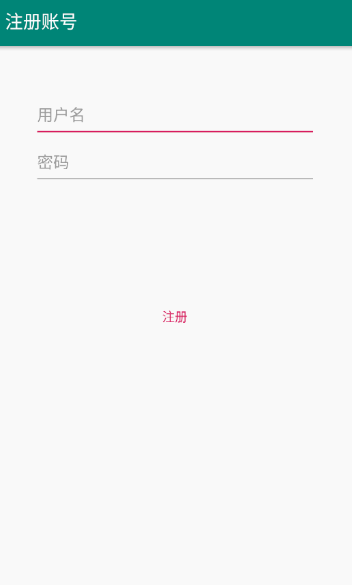
这样 , 在跳转到登陆页面时 , 自动填充用户名&密码的效果就消失了。
5.源码学习
在看EventBus源码之前 , 要先想清楚我们想要得到什么反馈 , 看源码能弄明白什么问题。
- EventBus是如何实现订阅者在事件到来时执行对应方法的 , 在register(),post()时发生了什么?
EventBus.getDefault().register(this);
1.register() :
    public void register(Object subscriber) {
        //1.获得订阅者(Activity,fragment)的Class对象
        Class<?> subscriberClass = subscriber.getClass();
        //2.根据订阅者的Class对象查找它用@Subcribe注解的方法集合 , 对于SubcriberMethodFinder的类暂时先不用管
        List<SubscriberMethod> subscriberMethods = subscriberMethodFinder.findSubscriberMethods(subscriberClass);

        synchronized (this) {
            //3.将Class对象与它里面的@Subcribe方法进行注册绑定
            for (SubscriberMethod subscriberMethod : subscriberMethods) {
                subscribe(subscriber, subscriberMethod);
            }
        }
    }
register()方法中做了3件事情 :
- 获得订阅者(Activity,fragment)的Class对象
- 根据订阅者的Class对象查找它用@Subcribe注解的方法集合
- 将Class对象与它里面的@Subcribe方法进行注册绑定
##subcribe()方法 : 在注释中已经写清楚代码的作用 , 按照顺序阅读应该很容易理解。
    /**
     * @param subscriber       订阅者(Activity,fragment等组件)的Class对象
     * @param subscriberMethod 订阅者中用@Subcribe注解的方法
     */
    private void subscribe(Object subscriber, SubscriberMethod subscriberMethod) {
        //1.获得订阅方法所对应的Event类型
        Class<?> eventType = subscriberMethod.eventType;
        //2.将订阅者和订阅方法打包到一个包装类
        Subscription newSubscription = new Subscription(subscriber, subscriberMethod);
        //3.获得这个Event所有的<订阅者,订阅方法>集合,集合中也可能包含参数中订阅者以外的订阅者
        CopyOnWriteArrayList<Subscription> subscriptions = subscriptionsByEventType.get(eventType);
        //4.若<订阅者,订阅方法>集合为空 , 说明接收该Event的若干组件还未调用register()
        if (subscriptions == null) {
            subscriptions = new CopyOnWriteArrayList<>();
            subscriptionsByEventType.put(eventType, subscriptions);
        } else {
            //5.如果这个Event对应的的<订阅者,订阅方法>集合中已经包含了当前这个<订阅者,订阅方法>,则说明当前组件重复调用register()了.
            if (subscriptions.contains(newSubscription)) {
                throw new EventBusException("Subscriber " + subscriber.getClass() + " already registered to event "
                        + eventType);
            }
        }

        int size = subscriptions.size();
        //6.将订阅方法按照优先级大小排序
        for (int i = 0; i <= size; i++) {
            if (i == size || subscriberMethod.priority > subscriptions.get(i).subscriberMethod.priority) {
                subscriptions.add(i, newSubscription);
                break;
            }
        }
        //7.获取这个订阅者订阅的所有Event集合
        List<Class<?>> subscribedEvents = typesBySubscriber.get(subscriber);
        if (subscribedEvents == null) {
            subscribedEvents = new ArrayList<>();
            typesBySubscriber.put(subscriber, subscribedEvents);
        }
        //8.将当前@Subcribe方法的Event类型添加到这个订阅者的Event集合中
        subscribedEvents.add(eventType);

        //9.如果@Subcribe()方法中sticky = true ,则获得这个粘性事件
        //注意如果当前事件是普通事件 , 则不做任何处理。
        if (subscriberMethod.sticky) {
            if (eventInheritance) {
                Set<Map.Entry<Class<?>, Object>> entries = stickyEvents.entrySet();
                for (Map.Entry<Class<?>, Object> entry : entries) {
                    //先获得粘性事件Event的Class对象
                    Class<?> candidateEventType = entry.getKey();
                    //找到当前Subscribe()方法订阅的粘性事件
                    if (eventType.isAssignableFrom(candidateEventType)) {
                        //得到粘性事件
                        Object stickyEvent = entry.getValue();

                        checkPostStickyEventToSubscription(newSubscription, stickyEvent);
                    }
                }
            } else {
                Object stickyEvent = stickyEvents.get(eventType);
                //10.对sticky事件判空,并执行订阅方法
                checkPostStickyEventToSubscription(newSubscription, stickyEvent);
            }
        }
    }
看一下第10步的方法 checkPostStickyEventToSubsctiption() :
    /**
     * 对事件进行判空
     * @param newSubscription (订阅者,订阅方法)
     * @param stickyEvent 粘性事件
     */
    private void checkPostStickyEventToSubscription(Subscription newSubscription, Object stickyEvent) {
        if (stickyEvent != null) {
            // If the subscriber is trying to abort the event, it will fail (event is not tracked in posting state)
            // --> Strange corner case, which we don't take care of here.
            postToSubscription(newSubscription, stickyEvent, isMainThread());
        }
    }
##postToSubscription() :
    private void postToSubscription(Subscription subscription, Object event, boolean isMainThread) {
        //根据对应的ThreadMode,在对应的线程中执行
        switch (subscription.subscriberMethod.threadMode) {
            case POSTING:
                invokeSubscriber(subscription, event);
                break;
            case MAIN:
                if (isMainThread) {
                    invokeSubscriber(subscription, event);
                } else {
                    mainThreadPoster.enqueue(subscription, event);
                }
                break;
            case MAIN_ORDERED:
                if (mainThreadPoster != null) {
                    mainThreadPoster.enqueue(subscription, event);
                } else {
                    // temporary: technically not correct as poster not decoupled from subscriber
                    invokeSubscriber(subscription, event);
                }
                break;
            case BACKGROUND:
                if (isMainThread) {
                    backgroundPoster.enqueue(subscription, event);
                } else {
                    invokeSubscriber(subscription, event);
                }
                break;
            case ASYNC:
                asyncPoster.enqueue(subscription, event);
                break;
            default:
                throw new IllegalStateException("Unknown thread mode: " + subscription.subscriberMethod.threadMode);
        }
    }
这个方法根据对应的ThreadMode,在对应的线程中调用 invokeSubcriber() 方法 , 这个方法就是让粘性事件的@Subcriber注解的方法执行的地方 :
##invokeSubcriber() :
    /**
     * 通过反射调用订阅者中的@Subcribe方法
     * @param subscription
     * @param event
     */
    void invokeSubscriber(Subscription subscription, Object event) {
        try {
            //
            subscription.subscriberMethod.method.invoke(subscription.subscriber, event);
        } catch (InvocationTargetException e) {
            handleSubscriberException(subscription, event, e.getCause());
        } catch (IllegalAccessException e) {
            throw new IllegalStateException("Unexpected exception", e);
        }
    }
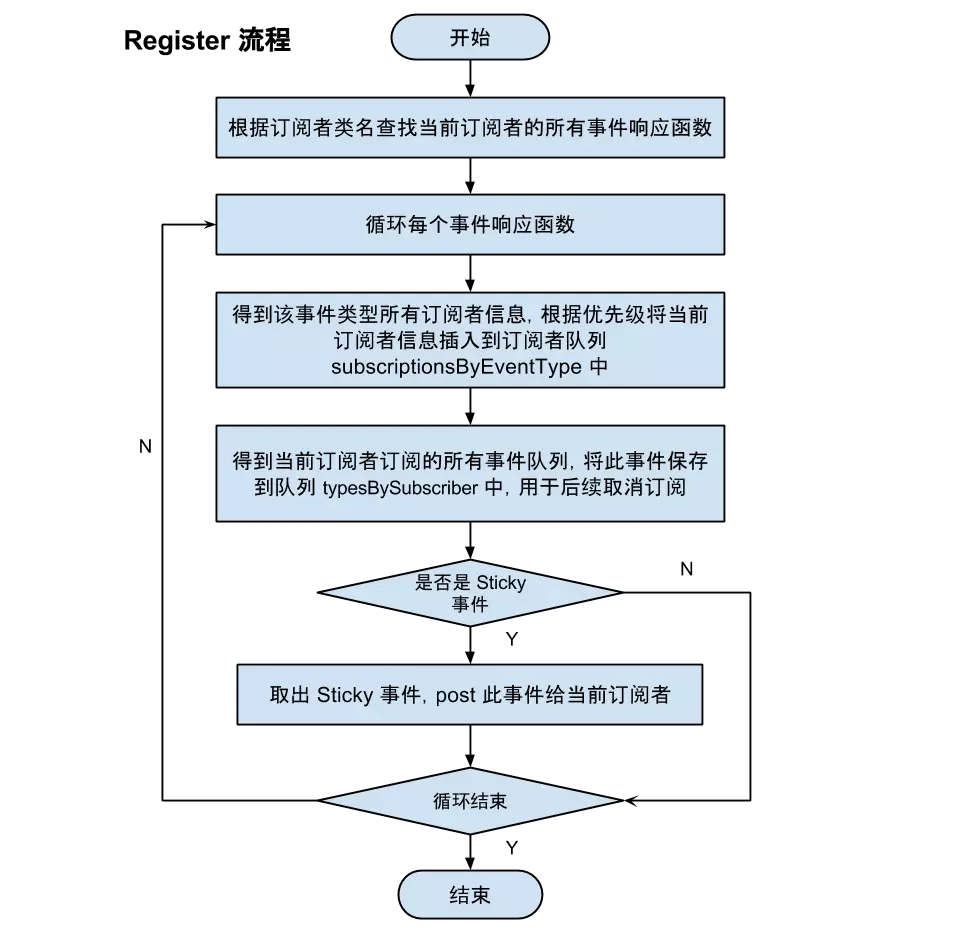
从以上流程可以看出 订阅者调用了 register() 之后 ,对粘性事件的处理情况 , 流程图如下 :
那么普通事件是如何处理的呢 ?
我们看一下 post() 方法做了什么 :
2.post()
/**
     * Posts the given event to the event bus.
     */
public void post(Object event) {
    //获取当前线程的发送状态
    PostingThreadState postingState = currentPostingThreadState.get();
    //获取当前线程的事件序列
    List<Object> eventQueue = postingState.eventQueue;
    //把事件添加到序列中
    eventQueue.add(event);
    //如果当前线程尚未处于发送状态
    if (!postingState.isPosting) {
        postingState.isMainThread = isMainThread();
        //标志当前线程处于发送事件状态
        postingState.isPosting = true;
        //正处于发送状态时是不能取消的
        if (postingState.canceled) {
            throw new EventBusException("Internal error. Abort state was not reset");
        }
        try {
            //将事件序列中的事件挨个发送
            while (!eventQueue.isEmpty()) {
                postSingleEvent(eventQueue.remove(0), postingState);
            }
        } finally {
            postingState.isPosting = false;
            postingState.isMainThread = false;
        }
    }
}
EventBus中用ThreadLocal存储了每个线程的发送状态 ,
    private final ThreadLocal<PostingThreadState> currentPostingThreadState = new ThreadLocal<PostingThreadState>() {
        @Override
        protected PostingThreadState initialValue() {
            return new PostingThreadState();
        }
    };
ThreadLocal这个类是线程独立的 , 能够保证每个线程之间的发送状态互不干扰。
进入最后发送事件的函数 postSingleEvent() :
    private void postSingleEvent(Object event, PostingThreadState postingState) throws Error {
        Class<?> eventClass = event.getClass();
        boolean subscriptionFound = false;
        //是否开启了事件继承
        if (eventInheritance) {
            //寻找当前事件类的素有父类,接口
            List<Class<?>> eventTypes = lookupAllEventTypes(eventClass);
            int countTypes = eventTypes.size();
            for (int h = 0; h < countTypes; h++) {
                Class<?> clazz = eventTypes.get(h);
                //有多个订阅者时,只要有一个发送成功,则左边为true
                subscriptionFound |= postSingleEventForEventType(event, postingState, clazz);
            }
        } else {
            //发送单个事件
            subscriptionFound = postSingleEventForEventType(event, postingState, eventClass);
        }
        //如果当前事件还没有订阅者订阅
        if (!subscriptionFound) {
            if (logNoSubscriberMessages) {
                logger.log(Level.FINE, "No subscribers registered for event " + eventClass);
            }
            if (sendNoSubscriberEvent && eventClass != NoSubscriberEvent.class &&
                    eventClass != SubscriberExceptionEvent.class) {
                //发送一个没有订阅者的事件,这个事件可以由我们来接收
                post(new NoSubscriberEvent(this, event));
            }
        }
    }
进入 postSingleEventForEventType() :
    private boolean postSingleEventForEventType(Object event, PostingThreadState postingState, Class<?> eventClass) {
        CopyOnWriteArrayList<Subscription> subscriptions;
        //获取订阅了这个事件的<订阅者,订阅方法>列表
        synchronized (this) {
            subscriptions = subscriptionsByEventType.get(eventClass);
        }
        //如果这个事件有订阅者
        if (subscriptions != null && !subscriptions.isEmpty()) {
            for (Subscription subscription : subscriptions) {
                postingState.event = event;
                postingState.subscription = subscription;
                boolean aborted = false;
                try {
                    //将事件分发给订阅者 , 在分析register()时分析过。
                    postToSubscription(subscription, event, postingState.isMainThread);
                    aborted = postingState.canceled;
                } finally {
                    postingState.event = null;
                    postingState.subscription = null;
                    postingState.canceled = false;
                }
                if (aborted) {
                    break;
                }
            }
            return true;
        }
        return false;
    }
可以看到,最后的把事件发送给订阅者的函数 postToSubcription() 与 register() 流程中最后发送粘性事件给订阅者的一样 , 这里就不介绍了。
    private void postToSubscription(Subscription subscription, Object event, boolean isMainThread) {
        //根据对应的ThreadMode,在对应的线程中执行
        switch (subscription.subscriberMethod.threadMode) {
            case POSTING:
                invokeSubscriber(subscription, event);
                break;
            case MAIN:
                if (isMainThread) {
                    invokeSubscriber(subscription, event);
                } else {
                    mainThreadPoster.enqueue(subscription, event);
                }
                break;
            case MAIN_ORDERED:
                if (mainThreadPoster != null) {
                    mainThreadPoster.enqueue(subscription, event);
                } else {
                    // temporary: technically not correct as poster not decoupled from subscriber
                    invokeSubscriber(subscription, event);
                }
                break;
            case BACKGROUND:
                if (isMainThread) {
                    backgroundPoster.enqueue(subscription, event);
                } else {
                    invokeSubscriber(subscription, event);
                }
                break;
            case ASYNC:
                asyncPoster.enqueue(subscription, event);
                break;
            default:
                throw new IllegalStateException("Unknown thread mode: " + subscription.subscriberMethod.threadMode);
        }
    }
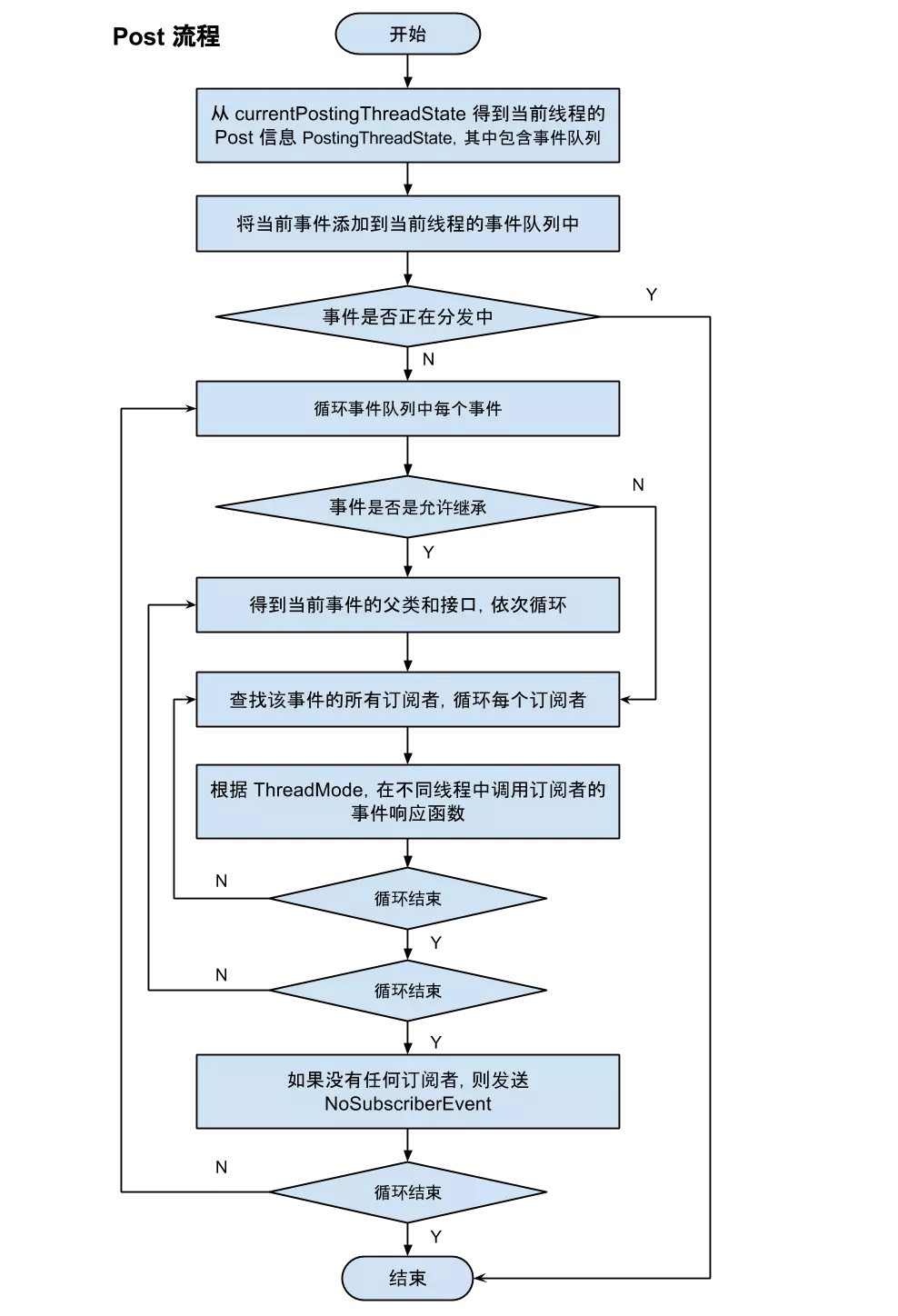
post() 的总体流程图如下 :
References :