

显示文本的控件一共有两种,Text与RichText。其中前者就是TextView而后者相当于Android中的spannableString。 Text的属性如下
const Text(
  this.data, {
  Key key,
  this.style,
  this.strutStyle,
  this.textAlign,
  this.textDirection,
  this.locale,
  this.softWrap,
  this.overflow,
  this.textScaleFactor,
  this.maxLines,
  this.semanticsLabel,
  this.textWidthBasis,
}) : assert(
       data != null,
       'A non-null String must be provided to a Text widget.',
     ),
     textSpan = null,
     super(key: key);
基本常用的属性如下: data Text显示的文本,必填参数 String textAlign 文本的对齐方式,可以选择左对齐、右对齐还是居中对齐 TextAlign maxLines 文本显示的最大行数 int overflow 文本显示的截断方式 TextOverflow textScaleFactor 文本的缩放比例 double style 用于指定文本显示的样式如颜色、字体、粗细、背景等
而RichText的属性如下
RichText({
  Key key,
  @required this.text,
  this.textAlign = TextAlign.start,
  this.textDirection,
  this.softWrap = true,
  this.overflow = TextOverflow.clip,
  this.textScaleFactor = 1.0,
  this.maxLines,
  this.locale,
  this.strutStyle,
  this.textWidthBasis = TextWidthBasis.parent,
}) : assert(text != null),
     assert(textAlign != null),
     assert(softWrap != null),
     assert(overflow != null),
     assert(textScaleFactor != null),
     assert(maxLines == null || maxLines > 0),
     assert(textWidthBasis != null),
     super(key: key, children: _extractChildren(text));
其中的text我们一般采用TextSpan,textSpan的属性如下
const TextSpan({
  this.text,
  this.children,
  TextStyle style,
  this.recognizer,
  this.semanticsLabel,
}) : super(style: style,);
其中的text为String,children则为List(我们一般也采用TextSpan(因为他是InlineSpan的子类),这里面当text与children均不为空时,text总是在children前面 比如我要实现如下效果,
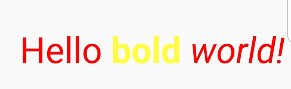
class TextDemo extends StatefulWidget {
  _Demo createState() => _Demo();
}

class _Demo extends State<TextDemo> {
  int index = 0;
  Duration timer = new Duration(minutes: 50);
String tab1="bold";

  @override
  Widget build(BuildContext context) {
    return new Scaffold(
      body: Center(
        child: Row(
          children: <Widget>[
            Padding(
              padding: EdgeInsets.only(left: 30, right: 30),
              child: Text(
                "i'm a text",
                style: TextStyle(),
              ),
            ),
            RichText(
              text: TextSpan(
                text: 'Hello ',
                style: TextStyle(
                    color: Color.fromARGB(255, 255, 0, 0), fontSize: 32),
                children: <TextSpan>[
                  TextSpan(
                      text: tab1,
                      recognizer:TapGestureRecognizer()..onTap=(){
                        print("text = "+tab1);
                      } ,
                      style: TextStyle(
                          fontSize: 32,
                          fontWeight: FontWeight.bold,
                          color: Color(0xfffffc42))),
                  TextSpan(
                      text: ' world!',
                      style: TextStyle(fontStyle: FontStyle.italic)),
                ],
              ),
            )
          ],
        ),
      ),
    );
  }
}
这里的TapGestureRecognizer应该在外部创建,而且在StatefulWidget中的dispose方法中我们应该调用其dispose方法来释放资源

