

如果使用了ivew组件库,vue-router都要升级到3
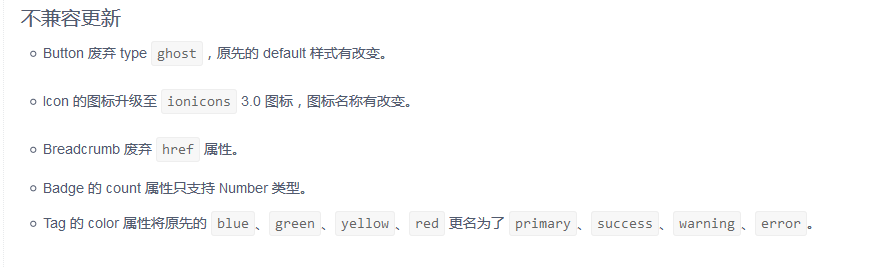
其中iview2到3有不兼容更新:
二、安装依赖
"@types/axios": "^0.14.0",
"@types/echarts": "^4.1.1", (如果未使用echarts可不安装)
"@types/jquery": "^3.2.18", (如果未使用jquery可不安装)
"@types/node": "^9.6.36",
"@types/vue": "^2.0.0",
"@types/vue-router": "^2.0.0",(如果未使用vue-router可不安装)
"@types/webpack-env": "^1.13.6",
"ts-loader": "^3.2.0",
"tslint-config-standard": "^7.0.0",
"typescript": "^3.1.6",
"iview": "^3.1.4", (如果未使用可不安装)
"vue-router": "^3.0.1",(如果未使用可不安装)
"vue-class-component": "^6.3.2",
"vue-property-decorator": "^6.0.0",
"vuex-class": "^0.3.1",(如果未使用vuex可不安装)
"vuex-ts-decorators": "^0.0.7",(如果未使用vuex可不安装)
三、项目根目录添加ts配置文件: tsconfig.json
{ "compilerOptions": { /* Basic Options */ "target": "es5", /* Specify ECMAScript target version: 'ES3' (default), 'ES5', 'ES2015', 'ES2016', 'ES2017', or 'ESNEXT'. */ "module": "ESNext", /* Specify module code generation: 'none', 'commonjs', 'amd', 'system', 'umd', 'es2015', or 'ESNext'. */ "allowJs": true, /* Allow javascript files to be compiled. */ "strict": true, /* Enable all strict type-checking options. */ "strictFunctionTypes": true, /* Enable strict checking of function types. */ "moduleResolution": "node", /* Specify module resolution strategy: 'node' (Node.js) or 'classic' (TypeScript pre-1.6). */ "allowSyntheticDefaultImports": true, /* Allow default imports from modules with no default export. This does not affect code emit, just typechecking. */ "emitDecoratorMetadata": true, "lib": [ "es2017", "dom", "scripthost" ], "types": [ "webpack-env" ], "experimentalDecorators": true /* Enables experimental support for ES7 decorators. */ }, "include": [ "src/**/*.ts", "src/**/*.tsx", "src/**/*.vue" ], "exclude": [ "node_modules" ]}四、修改webpack.base.config.js
1. entry: mian.js => main.ts
2. module.rules 加入
{
test: /\.(ts|tsx)?$/,
loader: 'ts-loader',
exclude: /node_modules/,
include: path.resolve(__dirname, 'src/'),
options: {
appendTsSuffixTo: [/\.vue$/]
}
}
五、src文件夹下添加 shim-vue.d.ts
declare module "*.vue" { import Vue from "vue"; export default Vue;}declare module "ReportInteraction" { import Vue from "vue"; export default Vue;}import { VueConstructor } from 'vue'import {ModalInstance, Message} from 'iview'import Axios from '@types/axios';declare module 'vue/types/vue' { interface Vue { $Modal: ModalInstance, $Message: Message, validate: Function, $axios: Axios, $util: Axios, $ajax: Axios, $bus: any } interface VueConstructor { $Modal: ModalInstance, $Message: Message, validate: Function, $axios: Axios, $util: Axios, $ajax: Axios, $bus: any }}可以根据自己需要注册全局变量让ts识别,例如$bus,以及iview的$Message等,用不到的可以去掉
六、修改main.ts
如果引入了jquery、lodash,echarts等第三方插件,需要全局注册,好让ts识别
import $ from 'jquery';const _ = require('expose-loader?$!lodash');const E = require('expose-loader?$!echarts');// import iquery from 'jquery';declare global { interface Window { $: any; _: any; E: any; }} window.$ = $;window._ = _;window.E = E;其他的就根据ts语法来修改,添加变量或者方法、方法参数的数据类型
七、修改.vue文件
- 声明语言是ts:
<script lang="ts">
- 引入插件
import {Component, Emit, Prop, Vue, Watch} from 'vue-property-decorator';
- 创建一个类 export default {} 改为:
@Component
export default class Example extends Vue { }
- 声明data变量:
private Example : string = "Hello";
- 声明prop变量
@Prop({
type: String,
default: 'Default Value'
}) Example : string;
- 声明计算变量computed
get Example () {
return ‘啊啊啊啊’;
}
- 引入自定义指令和子组件
@Component({
directives: {
colorDirective(自定义指令)
},
components: {
ChildComp(子组件)
}
})
export default class Example extends Vue { }
使用自定义指令:
<h1 v-colorDirective="{color: 'red', backgroundColor: 'blue'}">{{ message }}</h1>
- watch监听
@Watch('Example ', {deep: true})
watchExample (newVal, oldVal) {
console.log("newVal", newVal, "oldVal", oldVal)
}
- vuex
import { Getter, Action} from 'vuex-class';
声明:@Action('getMenuList')
doGetExample () {};
调用:this.doGetExample();
@Getter('listenExample ') getExample : any;
