

前言
基于上一篇文字,讲到了我们怎么在word或者wps里面开发com加载项。即在word里面插入我们自己的菜单,自己的功能。无非就是一些格式化,样式的方面的东西。提高一个团队在写指定文档时的效率。现在我们来看看C#怎么设置word 和wps样式。
一、了解word对象模型
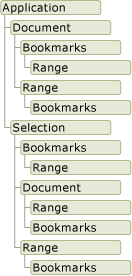
这些都是Microsoft Office提供给我们的接口,我们通过调用这些对象的方法,或者设置其属性,来实现程序操作word文档。 按照字面意思来理解就行:
- Application 你打开的word应用
- Document 表示你的word应用里面打开的所有的文档
- Range 和 Selection表示一段范围或者内容
若要深入理解,请查看word对象模型介绍
一、厘清document 和 applicaton之间的关系
在用C#开发com加载项插件的时候,我们能看到主要的入口文件里这么些的
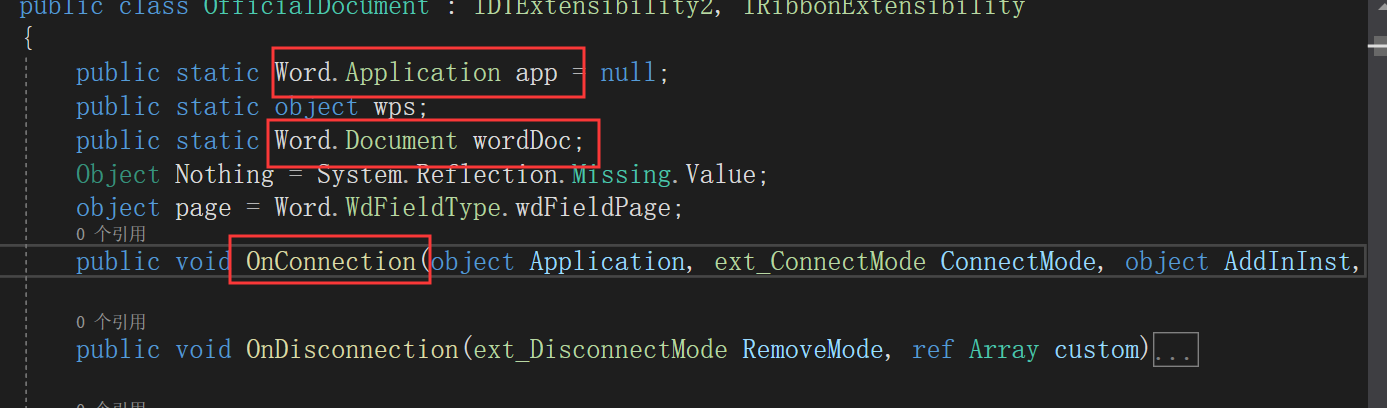
    public static Word.Application app = null;
    public static object wps;
    public static Word.Document wordDoc;
    public void OnConnection(object Application, ext_ConnectMode ConnectMode, object AddInInst, ref Array custom)
    {
        wps = Application;
        app = wps as Word.Application;
        wordDoc = app.ActiveDocument;
    }
由此代买可以看到,Word.Document 是 Word.Application 子类。 如果要设置版面信息,插入表格、线条、图片扽一定要使用Word.Document实例。因为这些都是针对某个特定,必须要指定到document文档的。其他的情况下,设置字体段落间距什么的,可以使用 Word.Application对象。
二、弄清楚单位
样式设置里面,有的用磅,有的使用厘米。比如字号 28 是多大?三号 小三字体是多大?厘米跟磅的对应关系怎样呢?答案如下:
- 1磅约等于0.3572mm
- 16磅的字体对应三号字体
每次换来换去,也麻烦。这个时候,我们可以调用系统的方法
object app = new Word.Application();
app.CentimetersToPoints(18.4f);//将厘米转换成磅
三、常见样式设置
有些地方我只列出一种,其他的可以查看word官方api
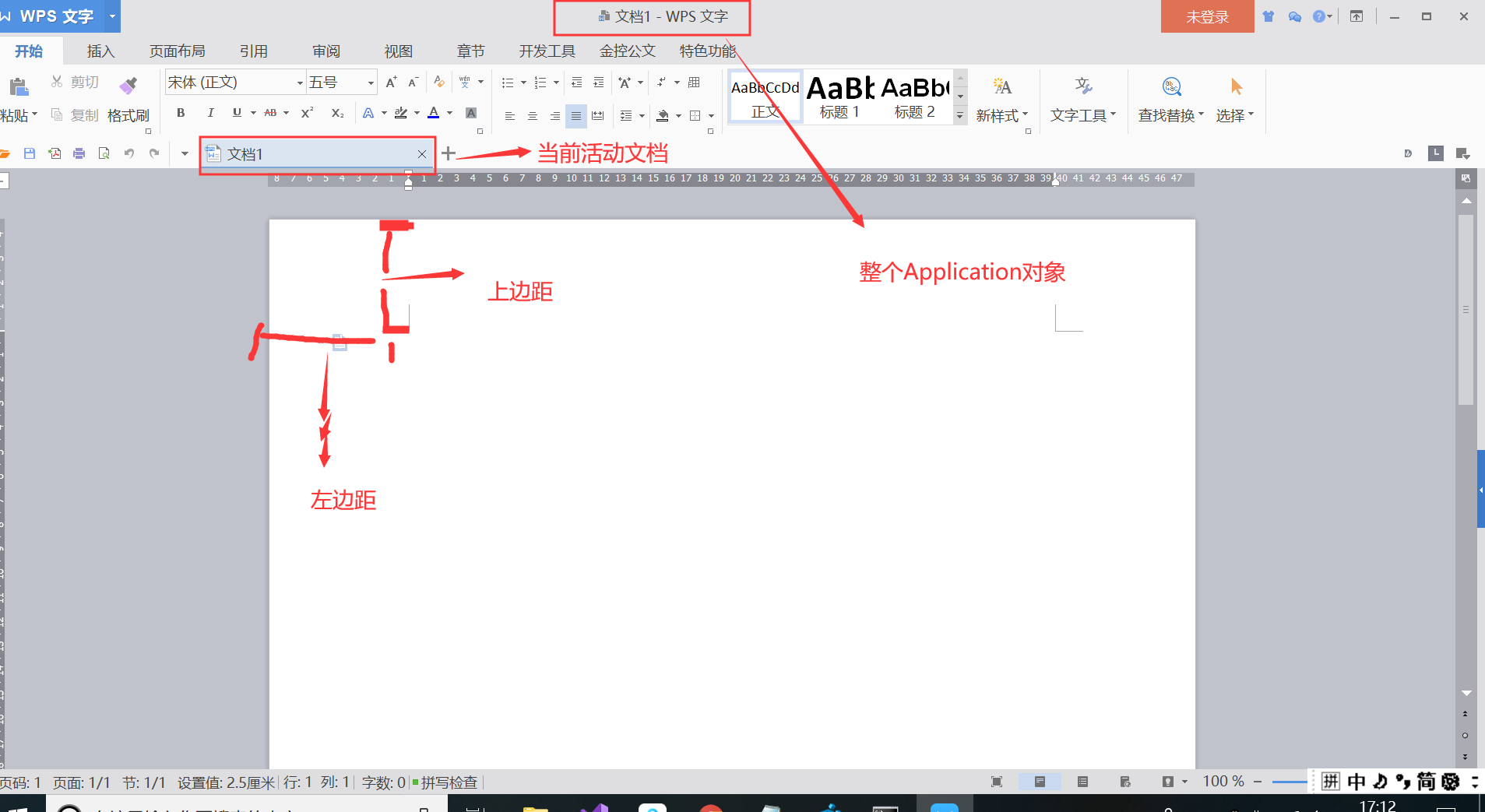
设置版面信息,版心边距
wordDoc = app.ActiveDocument; // 定位到当前活动文档
wordDoc.PageSetup.PaperSize = Word.WdPaperSize.wdPaperA4; // 版面大小类型
//wordDoc.PageSetup.TopMargin = 104.9f; // 37mm,对应104.9磅(1磅约等于0.3572mm)
wordDoc.PageSetup.TopMargin = app.CentimetersToPoints(3.7f); // 37mm,对应104.9磅(1磅约等于0.3572mm)
wordDoc.PageSetup.BottomMargin = app.CentimetersToPoints(3.5f);
wordDoc.PageSetup.LeftMargin = app.CentimetersToPoints(2.8f);
wordDoc.PageSetup.RightMargin = app.CentimetersToPoints(2.7f);
设置字体,中文楷体,其他的默认都是Times New Roman。一行文字中,你随意输入,遇到中文则自动转开题,英文数字字符等就是Times New Roman
    app.Selection.Font.NameAscii = "Times New Roman";
    app.Selection.Font.NameOther = "Times New Roman";
    app.Selection.Font.Name = "Times New Roman";
    app.Selection.Font.NameFarEast = "楷体_GB2312";
水平对其设置(其他对其可以查看api)
app.Selection.Range.ParagraphFormat.Alignment = Word.WdParagraphAlignment.wdAlignParagraphCenter; // 居中
app.Selection.ParagraphFormat.Alignment = Word.WdParagraphAlignment.wdAlignParagraphLeft; // left
换行
app.Selection.TypeParagraph();
画线条
    wordDoc = app.ActiveDocument;
    Word.Shape hLine;
    object anchor = app.Selection.Range;
    float lineLeft = app.CentimetersToPoints(left);
    float lineTop = app.CentimetersToPoints(top);
    float lineWidth = app.CentimetersToPoints(width);
    hLine = wordDoc.Shapes.AddLine(lineLeft, lineTop, lineWidth, lineTop, ref anchor);
    hLine.Line.ForeColor.RGB = color;
    hLine.Line.Weight = weight;
插入页码
    wordDoc.ActiveWindow.ActivePane.View.SeekView = Word.WdSeekView.wdSeekCurrentPageFooter; //激活页脚的编辑
    app.Selection.ParagraphFormat.Alignment = Word.WdParagraphAlignment.wdAlignParagraphCenter;
    app.Selection.Font.Name = "仿宋_GB2312";
    app.Selection.Font.Size = 14f;
    app.Selection.TypeText("-");
    app.Selection.Fields.Add(app.Selection.Range, ref page, ref Nothing, ref Nothing);
    app.Selection.TypeText("-");
行距设置
app.Selection.ParagraphFormat.LineSpacingRule = Word.WdLineSpacing.wdLineSpace1pt5;// 1.5倍行距
首行缩进
app.Selection.Paragraphs.FirstLineIndent = 0; // 首行缩进重置
字符间距
app.Selection.Font.Spacing = 0.3f;
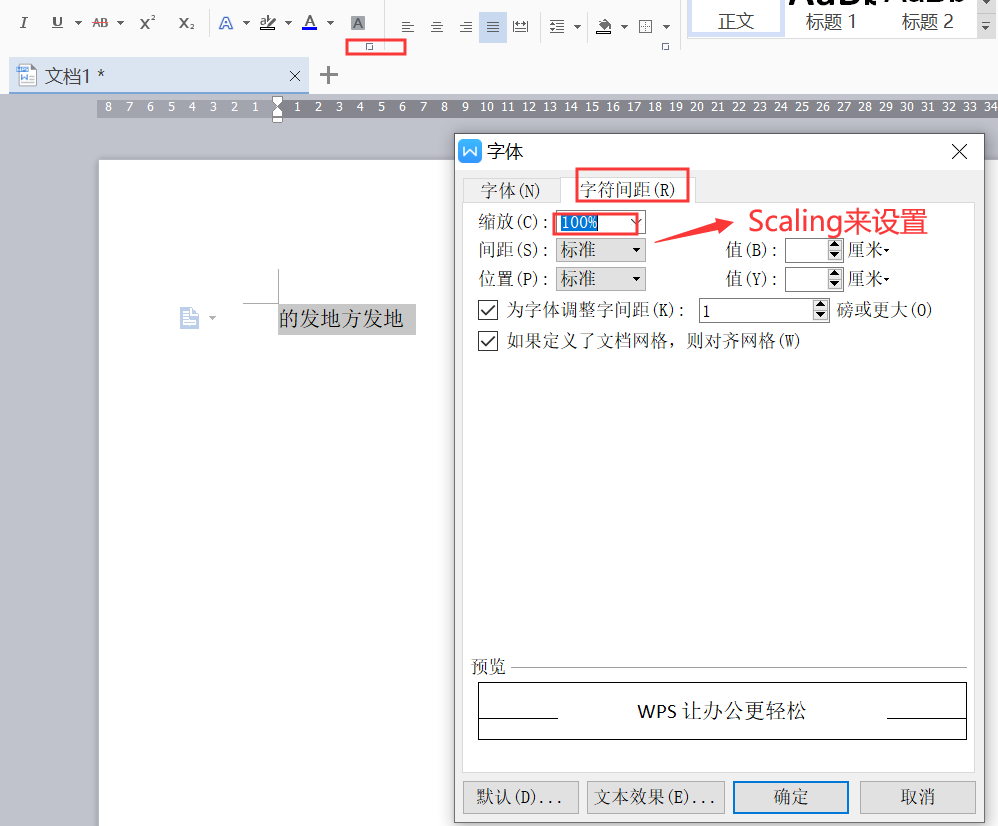
设置应用于字体的缩放百分比。 本属性以当前字体大小的百分比水平拉长或压缩文字(缩放范围从 1 到 600)
app.Selection.Font.Scaling = 100; // 表示100%,不缩放
文档网格设置
 app.Selection.Paragraphs.DisableLineHeightGrid = -1; // 行距设置中,不勾选“如果定义了文档网格,则于网格对齐”
 app.Selection.Paragraphs.AutoAdjustRightIndent = -1; // 行距设置中,不勾选“如果定义了文档网格,则自动调整右缩进”
四、同一行文字,不用字体(或不同其他样式设置)
- 先设置号字体样式
- app.Selection.TypeText("同一行字体1111");
- 再设置字体样式
- app.Selection.TypeText("同一行字体2222");
这样“字体1111”和 “字体2222”虽然再同一行,但是样式不同。
    app.Selection.Font.Size = 16f;
    app.Selection.Font.NameFarEast = "黑体";
    app.Selection.Font.Color = Word.WdColor.wdColorBlack;
    app.Selection.Paragraphs.FirstLineIndent = 0;
    app.Selection.TypeText("附件");
    app.Selection.TypeParagraph();
    app.Selection.TypeParagraph();
    string attachTitle = "附件标题xxxx";
    app.Selection.Font.NameFarEast = "方正小标宋简体";
    app.Selection.Font.Size = 22f;
    app.Selection.ParagraphFormat.Alignment = Word.WdParagraphAlignment.wdAlignParagraphCenter;
    app.Selection.TypeText(attachTitle);
    app.Selection.ParagraphFormat.LineSpacingRule = Word.WdLineSpacing.wdLineSpace1pt5;
    app.Selection.TypeParagraph();
    string content = "附件主体内容文字模板,首行空两格字符,1.5倍行间距;附件主体内容文字模板,首行空两格字符,1.5倍行间距.附件主体内容文字模板,首行空两格字符,1.5倍行间距.";
    app.Selection.Font.NameFarEast = "仿宋_GB2312";
    app.Selection.Font.NameAscii = "Times New Roman";
    app.Selection.Font.NameOther = "Times New Roman";
    app.Selection.Font.Name = "Times New Roman";
    app.Selection.Font.Size = 16f;
    app.Selection.Paragraphs.FirstLineIndent = 32f;
    app.Selection.ParagraphFormat.Alignment = Word.WdParagraphAlignment.wdAlignParagraphLeft;
    app.Selection.TypeText(content);
其他的,请参考 C#操作word总结
