什么是爬虫
爬虫程序就是模拟浏览器向网页服务器发起请求,获取服务器的资源。
下图为简单的示意图:
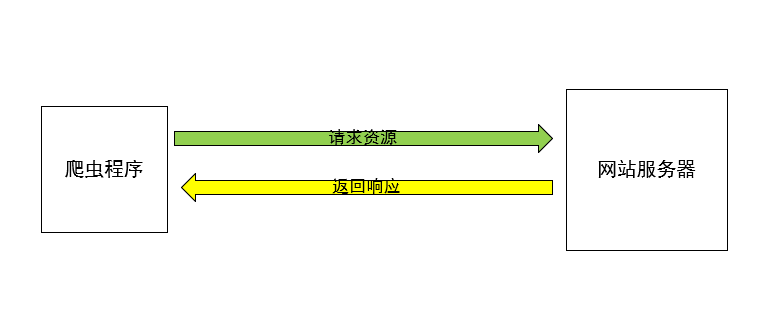
那么爬虫程序在获取了资源之后应该做什么呢? 根据需求可能不太一样,但是一般来说都是需要进行资源的解析、数据清洗、数据分析、保存,等等。最重要的是爬虫后续的工作。
python实现爬虫
python有很多爬虫的库,包括urllib、urllib2、requests,以及requests作者基于requests开发的requests-html,这些都是优秀的爬虫库。
这里使用的是常用的requests库,其它的都差不多,只是替换了一下api而已。
爬虫实例:
# 首先导入支持库
import requests

# 向网页发起请求,获取网页资源的响应
response = requests.get("http://www.baidu.com/")
# 返回response对象
# 查看响应状态
print(response.status_code)  # 返回200则为成功响应
执行结果:
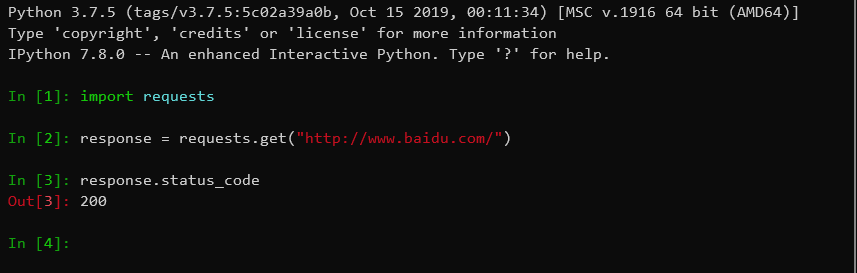
直接打印response也可以看到状态
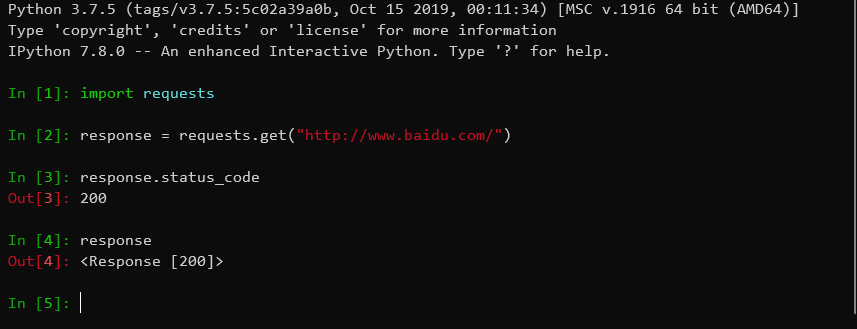
但是,在请求过程中,如果出现异常导致爬虫程序在请求阶段就停止,所以一般加上异常处理
try:
    response = requests.get('http://www.baidu.com/')
except Exception as e:
    print(e)
response对象
requests向服务器请求,返回response对象
官方文档
服务器返回的响应的内容全部包含在response对象中。
- 获取网页的HTML源码
try:
    response = requests.get('http://www.baidu.com/')
    html = response.text
except Exception as e:
    print(e)
print(html)
- 获取对象的内容
如果请求的是文件对象,如图片、视频等,可以通过
response.content获取文件的内容,再进行保存即可。
try:
    response = requests.get('http://www.baidu.com/')
    file_content = response.content
except Exception as e:
    print(e)
将爬虫请求进行封装
def small_spider(url, type='html'):
    try:
        r = requests.get(url)
    except Exception as e:
        print(e)
        return
    if type == 'html':
        return r.text
    elif type == 'file':
        return r.content
    else:
        return None
为了防反爬虫,在向服务器请求的时候添加user-agent。
from fake_useragent import UserAgent

def small_spider(url, type='html', user_agent=None):
    if user_agent is None:
        user_agent = UserAgent().chrome
        headers = {'User-Agent':user_agent}
    try:
        r = requests.get(url, headers=headers)
    except Exception as e:
        print(e)
        return
    if type == 'html':
        return r.text
    elif type == 'file':
        return r.content
    else:
        return None
fake_useragent可以构造请求头,模拟浏览器向服务器发起请求。
除了用fake_useragent构造请求头之外,还可以自行添加请求头
Opera/9.80 (Windows NT 6.0) Presto/2.12.388 Version/12.14
Mozilla/5.0 (Windows NT 6.1; WOW64; rv:33.0) Gecko/20120101 Firefox/33.0
Mozilla/5.0 (MSIE 10.0; Windows NT 6.1; Trident/5.0)
Mozilla/5.0 (Windows NT 10.0; Win64; x64) AppleWebKit/537.36 (KHTML, like Gecko) Chrome/77.0.3865.90 Safari/537.36
Mozilla/5.0 (Macintosh; Intel Mac OS X 10_9_3) AppleWebKit/537.75.14 (KHTML, like Gecko) Version/7.0.3 Safari/7046A194A
# 请求头
HEADERS = (
    'Mozilla/5.0 (Windows NT 10.0; Win64; x64) AppleWebKit/537.36 (KHTML, like Gecko) Chrome/64.0.3282.119 Safari/537.36',
    'Opera/9.80 (Windows NT 6.0) Presto/2.12.388 Version/12.14',
    'Mozilla/5.0 (Windows NT 6.1; WOW64; rv:33.0) Gecko/20120101 Firefox/33.0',
    'Mozilla/5.0 (MSIE 10.0; Windows NT 6.1; Trident/5.0)',
    'Mozilla/5.0 (Windows NT 10.0; Win64; x64) AppleWebKit/537.36 (KHTML, like Gecko) Chrome/77.0.3865.90 Safari/537.36',
    'Mozilla/5.0 (Macintosh; Intel Mac OS X 10_9_3) AppleWebKit/537.75.14 (KHTML, like Gecko) Version/7.0.3 Safari/7046A194A'
    )

def small_spider(url, type='html', user_agent=None):
    global HEADERS
    if user_agent is None:
        user_agent = random.choice(HEADERS)
        headers = {'User-Agent':user_agent}
    try:
        r = requests.get(url, headers=headers)
    except Exception as e:
        print(e)
        return
    if type == 'html':
        return r.text
    elif type == 'file':
        return r.content
    else:
        return None
简单的爬虫请求函数的封装就完成了。即,对requests库的二次封装,方便后续的爬虫的调用,直接调用即可。