1:列表的展示与选择
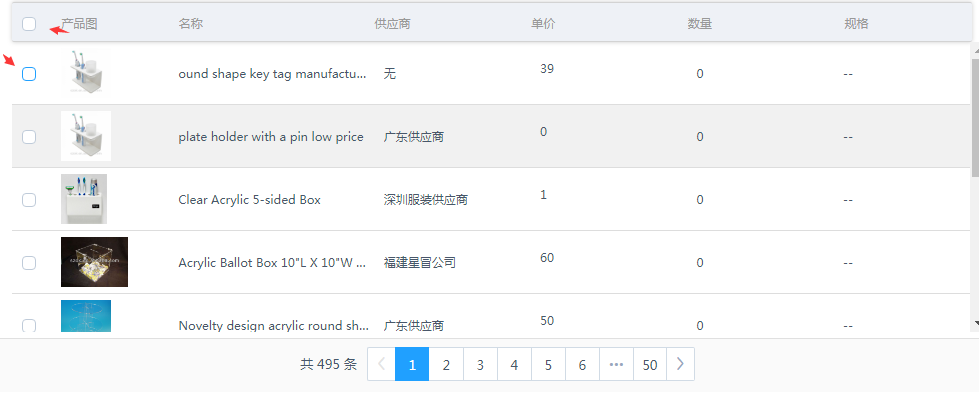
html部分:
<el-row class="userBoxHead">
<el-col :span="1">
<div class="grid-content ">
<el-checkbox v-model="allProduct" title="全选" @change="getAllProductInfo"> </el-checkbox>
</div>
</el-col>
<el-col :span="11">
<div class="grid-content ">
<span>产品图</span>
</div>
</el-col>
<el-col :span="12">
<div class="grid-content ">
<span>名称</span>
</div>
</el-col>
</el-row>
<el-checkbox-group v-model="choiceProductList" @change="changeProductList">
<el-row
class="userBoxList"
v-for="(elem,index) in proInfoList"
:key="'product'+index"
v-show="proInfoList.length>0"
>
<el-col :span="1">
<div class="grid-content bg-purple">
<el-checkbox :label="elem.id" :disabled="elem.noChecked"> </el-checkbox>
</div>
</el-col>
<el-col :span="11">
<div class="grid-content ">
<span>{{elem.img}}</span>
</div>
</el-col>
<el-col :span="12">
<div class="grid-content ">
<span>{{elem.name}}</span>
</div>
</el-col>
</el-row>
</el-checkbox-group>
//1:使用element的Layout布局 在表头设置名称和全选功能
//2:在数据展示页用element的el-checkbox-group 来实现全选
js 部分
//点击全选,获取当前展示的产品信息
getAllProductInfo() {
this.choiceProductList = []
if (this.allProduct) {
let self = this
$.each(this.proInfoList, function (i, row) {
self.choiceProductList.push(row.id)
self.getSpaceBoxInfo(row,i)
})
}
},
//判断当前选中列表的数是否全部选择
changeProductList(val){
//全选情况下 全选框显示为true
if(val.length==this.proInfoList.length){
this.allProduct=true
}else{
this.allProduct=false
}
}
2:Dialog 对话框(可移动弹窗)
html部分
<el-dialog
        title="云盘附件"
        :close-on-click-modal="false"
        :visible.sync="popup7"
        size="tiny"
        :modal="false"
        class="wl-popup7 dialogOne myOrderIcon"
        :before-close="popup7Cance"
      >
      <div>
      内容区域
      </div>
      <span slot="footer" class="dialog-footer">
          <el-button type="primary" @click="popup7Config">确认</el-button>
          <el-button @click="popup7Cance">取 消</el-button>
        </span>
      </el-dialog>
    js部分
      //  弹框居中设置及弹框拖拽
		/******************************/
		var windowW = $(window).width();
		//弹框拖拽设置
		var dialogDrag = function() {
			//				第一层的弹框
			$(".dialogOne").find('.el-dialog__header').addClass('handle1')
			//				第二层的弹框
			$(".dialogTwo").find('.el-dialog__header').addClass('handle2').removeClass('handle1')
			//				第三层的弹框
			$(".dialogThree").find('.el-dialog__header').addClass('handle3').removeClass('handle1').removeClass('handle2')
			$(function() {
				$(".dialogOne .el-dialog--tiny").Tdrag({
					scope: "body",
					handle: " .handle1"
				});
				$(".dialogTwo .el-dialog--tiny").Tdrag({
					scope: "body",
					handle: ".handle2"
				});
				$(".dialogThree .el-dialog--tiny").Tdrag({
					scope: "body",
					handle: ".handle3"
				});
			})
		}

			//调整窗口大小时,设置弹框居中
			var windowDialogCenter = function() {
				//此页弹框数
				$(window).resize(function() {
					var dialogLength = $('.el-dialog').length;
					windowW = $(window).width();
					for(var a = 0; a < dialogLength; a++) {
						var left = (windowW - $('.el-dialog').eq(a).outerWidth()) / 2;
						$('.el-dialog').eq(a).css({
							'top': '15%',
							'left': left
						});
					}
				});
				$(window).resize();
			}
			var dialog = '',
				dialogLength = 0;
			//点击关闭弹出框时,设置弹框居中
			var dialogCenter = function() {
				//清除弹框的居中样式
				$('.el-dialog').css({
					'transform': 'translateX(0)',
					'left': ''
				})
				//调整窗口大小时,设置弹框居中
				windowDialogCenter();
				//点击关闭,取消按钮时,设置父元素弹框居中;点击确认按钮,因为确认会触发许多事件,去具体页面添加,
				$('.el-dialog__headerbtn,.el-button--default').on('click', function() {
					var checkbox = $(this).parents('.el-dialog').find("input[type=checkbox]");
					checkbox.prop("checked", false);
					checkbox.parent(".checkboxStyle").removeClass('onCheckbox');
					var one = $(this).parents('.el-dialog__wrapper').hasClass('dialogOne'),
						two = $(this).parents('.el-dialog__wrapper').hasClass('dialogTwo'),
						three = $(this).parents('.el-dialog__wrapper').hasClass('dialogThree');
					if(one) {
						dialog = $('.dialogOne');
						dialogLength = $('.dialogOne').length;
					} else
					if(two) {
						dialog = $('.dialogTwo');
						dialogLength = $('.dialogTwo').length;
					} else if(three) {
						dialog = $('.dialogThree');
						dialogLength = $('.dialogThree').length;
					}
					dialogCenterDelay();
				})
			}

			//点击确认取消关闭时,设置弹框居中
			var dialogCenterDelay = function(parents) {
				setTimeout(function() {
					$(window).resize(function() {
						windowW = $(window).width();
						for(var a = 0; a < dialogLength; a++) {
							var left = (windowW - dialog.eq(a).children('.el-dialog').outerWidth()) / 2;
							dialog.eq(a).children('.el-dialog').css({
								'top': '15%',
								'left': left
							});
						}
						dialog = '', dialogLength = 0
					});
					$(window).resize();
				}, 300)
			}
3:element 的Tooltip 文字提示
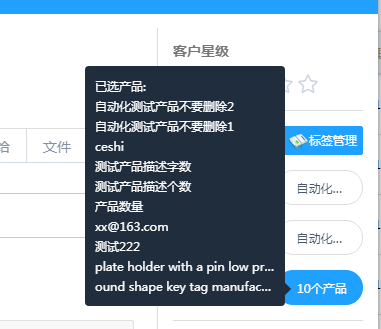
html
   <el-tooltip placement="left-end" v-if="showChoiceProduct.length>1 ">
        <div slot="content" class="productTool">
            <ul>
              <li>
                <span>已选产品:</span>
              </li>
              <li v-for="(row,dex) in showChoiceProduct" :key="'hover'+dex">
                <span :title="row.name">{{row.name}}</span>
              </li>
            </ul>
          </div>
          <div v-show="showChoiceProduct.length>0">
            <span
              v-if="showChoiceProduct.length>1"
              class="blureText"
              @click="showProduct"
            >{{showChoiceProduct.length}}个产品</span>
        </div>

    </el-tooltip>