

新老版本生命周期说明
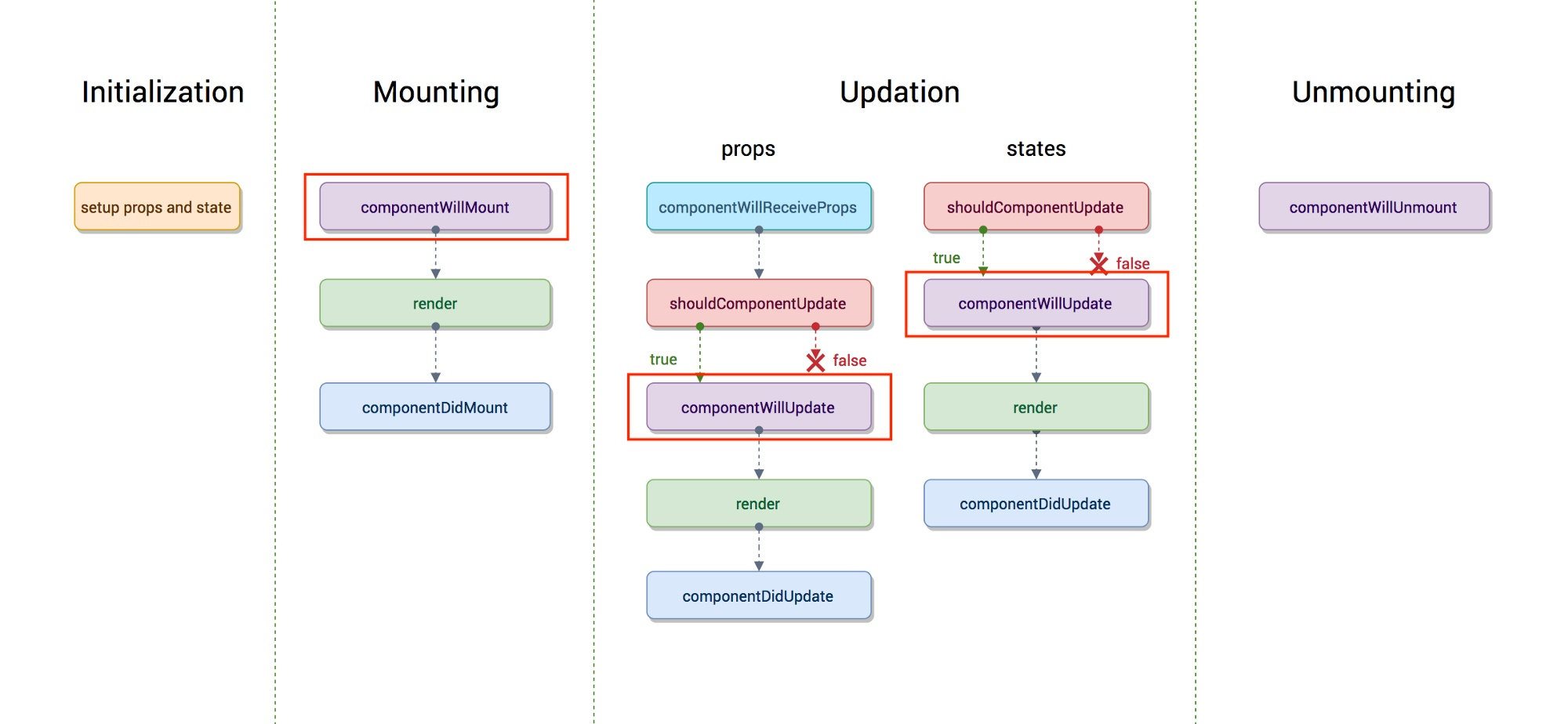
老版react生命周期函数
新版react生命周期函数
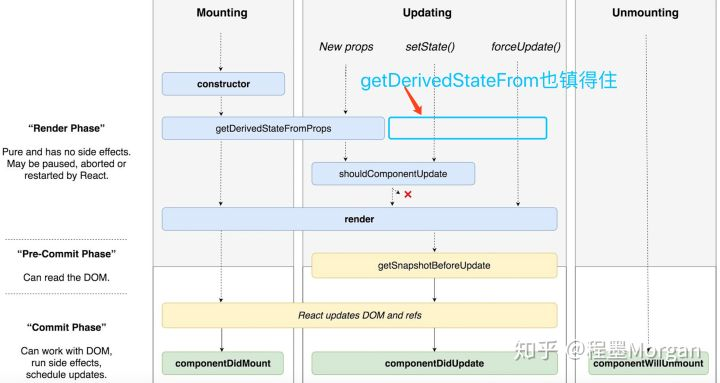
老版的react生命周期非常对称,但终究是有一些问题的,所以推出了getDerivedStateFromProps,去了一组生命周期API:
- componentWillReceiveProps
- componentWillMount
- componentWillUpdate
可以看到除了shouldComponentUpdate,render之前的所有生命周期函数全灭。
render之后还引入了一个新的声明周期函数getSnapshotBeforeUpdate,该函数会在render之后执行,而执行之时DOM元素还没有被更新,给了一个机会去获取DOM信息,计算得到一个snapshot,这个snapshot会作为componentDidUpdate的第三个参数传入。
老版react生命周期函数:
初始化阶段:
    getDefaultProps:获取实例的默认属性
    getInitialState:获取每个实例的初始化状态
    componentWillMount:组件即将被装载、渲染到页面上
    render:组件在这里生成虚拟的 DOM 节点
    componentDidMount:组件真正在被装载之后

运行中状态:
    componentWillReceiveProps:组件将要接收到属性的时候调用
    shouldComponentUpdate:组件接受到新属性或者新状态的时候(可以返回 false,接收数据后不更新,阻止 render 调用,后面的函数不会被继续执行了)
    componentWillUpdate:组件即将更新不能修改属性和状态
    render:组件重新描绘
    componentDidUpdate:组件已经更新

销毁阶段:
    componentWillUnmount:组件即将销毁
新版react生命周期函数:
初始化阶段:
    getDefaultProps:获取实例的默认属性
    getInitialState:获取每个实例的初始化状态
    getDerivedStateFromProps:纯函数,将props映射到state
    render:组件在这里生成虚拟的 DOM 节点
    componentDidMount:组件真正在被装载之后(在这里获取数据)

运行中状态:
    getDerivedStateFromProps:纯函数,将props映射到state
    shouldComponentUpdate:组件接受到新属性或者新状态的时候(可以返回 false,接收数据后不更新,阻止 render 调用,后面的函数不会被继续执行了)
    render:组件重新描绘
    getSnapshotBeforeUpdate:在最终确定的render执行之前执行,保证其获取到的元素状态与didUpdate中获取到的元素状态相同
    componentDidUpdate:组件已经更新

销毁阶段:
    componentWillUnmount:组件即将销毁
说明:
getDerivedStateFromProps
getDerivedStateFromProps的作用是将传入的props映射到state,可以改变状态。
它还是一个静态函数,里面不能使用this,也就是所谓的纯函数,防止了开发者在这里书写有副作用的代码,而且开发者只能通过prevState而不是prevProps来做对比,保证了state和props之间的简单关系以及不需要处理第一次渲染时prevProps为空的情况。
getSnapshotBeforeUpdate
getSnapshotBeforeUpdate:在最终确定的render执行之前执行,保证其获取到的元素状态与didUpdate中获取到的元素状态相同。
官网给了一个例子,是用getSnapshotBeforeUpdate处理scroll
大概是这样:
import React from "react"
import ReactDOM from "react-dom"
class News extends React.Component{
    constructor(props){
        super(props)
        this.scrollRef = React.createRef();
    }
    state = {
        // news:["news6","news5","new4","news3","news2","new1"]
        news:[]
    }
    componentDidMount(){
        this.timer = setInterval(()=>{
            this.setState({
                news:[`${this.state.news.length}`,...this.state.news]
            })
        },1000)
    }
    componentWillUnmount(){
        clearInterval(this.timer)
    }
    // 获取更新之前dom的快照
    getSnapshotBeforeUpdate(){
        // console.log(this.scrollRef.current.scrollHeight)
        // 在getSnapshotBeforeUpdate中返回了一个值,这个值会给componedDidUpdate的最后一个参数
        return this.scrollRef.current.scrollHeight;
    }
    componentDidUpdate(prevProps,prevState,lastScrollHeight){
        // console.log(lastScrollHeight)
        // console.log(this.scrollRef.current.scrollTop)  // 0
        let scrollTop = this.scrollRef.current.scrollTop;
        this.scrollRef.current.scrollTop = scrollTop+(this.scrollRef.current.scrollHeight-lastScrollHeight)
    }
    render(){
        let styles = {
            height:"100px",
            width:"200px",
            border:"1px solid red",
            overflow:"auto"
        }
        return(
            <ul style={styles} ref={this.scrollRef}>
               {
                   this.state.news.map((item,index)=><li key={index}>{item}</li>)
               }
            </ul>
        )
    }
}
ReactDOM.render(<News />, window.app)
