

这里记录一下我在项目组里面遇到刁钻业务需求, 并且使用了一些骚操作. 继承并重写了 element 组件的部分方法. (前提是需要你要看懂部分的组件源码)
需求 : 下拉选择框,多选, enter 回车去后台模糊查询相关联系人.
根据上述需求, 我在使用 element(2.12.0) 组件时, 基本上使用 select 组件就可以 95% 快速的写出符合需求的下拉选择框.
<el-select
  v-model="value"
  multiple
  filterable
  remote
  placeholder="请输入关键词"
  :remote-method="remoteMethod"
  :loading="loading"
>
  <el-option v-for="item in option" :key="item.value" :label="item.label" :value="item.value"></el-option>
</el-select>
但是有一点比较尴尬的是 remote-method 的触发是 keyup 事件, 而需求是需要 enter 事件触发.
element 官网并没有发现相关的属性或者配置 能够支持修改触发事件
放在 node_modules 的 element 又是第三方依赖, 源码不是随便能改的.
这种情况下就差一点点小需求,导致要自己封装过一个 select 组件往往是开发者最头痛的.
下列是我总结的骚操作:
步骤一:
新建一个.vue 文件, 将 element-select extends 继承下来 (名字随意).
<script>
import { Select } from "element-ui";
export default {
  name: "customSelect",
  extends: Select
};
</script>
步骤二:
根据需求, 将 element-select 里的需要修改的方法 copy 到 customSelect 组件里. 紧接着就是根据自己的需求去修改里面的逻辑了.
PS: 这里就需要一定的逻辑去看懂组件里面的代码逻辑了.
首先我们可以迅速找到 el-select 里放着个 el-input 并且写了很多 keydowm 相关事件. 并且根据需求, 我需要改写 keydown 的 enter 事件对应的 selectOption 方法.
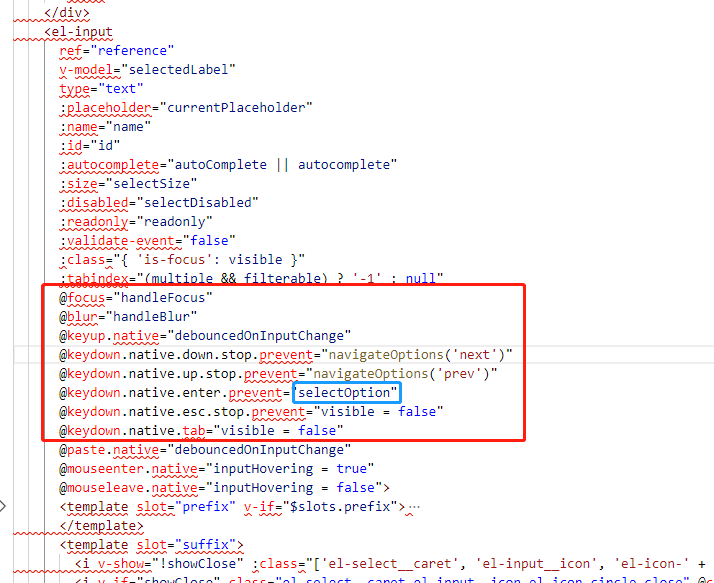
<script>
import { Select } from "element-ui";
export default {
  name: "customSelect",
  extends: Select,
  methods: {
    selectOption() {
      if (typeof this.remoteMethod === "function") {
        // 根据源码找到 data 中 query 变量就是 input 输入时的 value
        let val = this.query;
        // 每次 enter 回车时 将 val 传入已经写好的 remoteMethod 方法里
        this.remoteMethod(val);
      }
    }
  }
};
</script>
步骤三:
将相关影响到 enter 回车的 其余的 keydown 做个其他处理. 我研究了下里面的具体逻辑, keydown 都会走 handleQueryChange 方法, 这时我会把 handleQueryChange 里含有调用 remoteMethod 的代码注释掉.
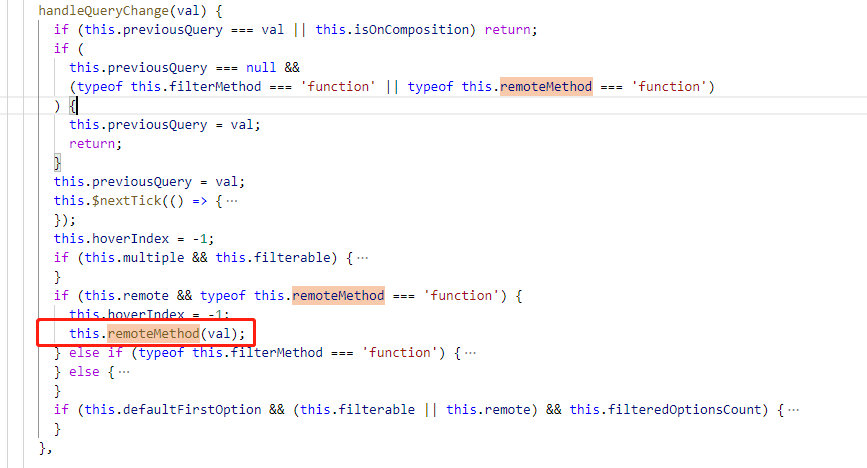
<script>
import { Select } from "element-ui";
export default {
  name: "customSelect",
  extends: Select,
  methods: {
    selectOption() {
      if (typeof this.remoteMethod === "function") {
        let val = this.query;
        this.remoteMethod(val);
      }
    },
    handleQueryChange(val) {
      if (this.previousQuery === val || this.isOnComposition) return;
      if (
        this.previousQuery === null &&
        (typeof this.filterMethod === "function" ||
          typeof this.remoteMethod === "function")
      ) {
        this.previousQuery = val;
        return;
      }
      this.previousQuery = val;
      this.$nextTick(() => {
        if (this.visible) this.broadcast("ElSelectDropdown", "updatePopper");
      });
      this.hoverIndex = -1;
      if (this.multiple && this.filterable) {
        this.$nextTick(() => {
          const length = this.$refs.input.value.length * 15 + 20;
          this.inputLength = this.collapseTags ? Math.min(50, length) : length;
          this.managePlaceholder();
          this.resetInputHeight();
        });
      }
      if (this.remote && typeof this.remoteMethod === "function") {
        this.hoverIndex = -1;
        // 注释调用 remoteMethod, 其余逻辑不变
        // this.remoteMethod(val);
      } else if (typeof this.filterMethod === "function") {
        this.filterMethod(val);
        this.broadcast("ElOptionGroup", "queryChange");
      } else {
        this.filteredOptionsCount = this.optionsCount;
        this.broadcast("ElOption", "queryChange", val);
        this.broadcast("ElOptionGroup", "queryChange");
      }
      if (
        this.defaultFirstOption &&
        (this.filterable || this.remote) &&
        this.filteredOptionsCount
      ) {
        this.checkDefaultFirstOption();
      }
    }
  }
};
</script>
最后一步:
在需要用到的页面去调用写好的组件就解决了
<template>
  <div>
    <custom-select
      v-model="value"
      multiple
      filterable
      remote
      placeholder="请输入关键词"
      :remote-method="remoteMethod"
      :loading="loading"
    >
      <el-option v-for="item in option" :key="item.value" :label="item.label" :value="item.value"></el-option>
    </custom-select>
  </div>
</template>

<script>
import customSelect from "./customSelect";
export default {
  name: "test",
  components: { customSelect },
  data() {
    return {
      option: [],
      value: [],
      list: [],
      loading: false,
      states: [
        "Alabama",
        "Arkansas",
        "California",
        "Kentucky",
        "Louisiana",
        "Maine",
        "Maryland",
        "Mississippi",
        "Missouri",
        "Montana",
        "Nebraska",
        "Wyoming"
      ]
    };
  },
  methods: {
    remoteMethod(query) {
      if (query !== "") {
        this.loading = true;
        setTimeout(() => {
          this.loading = false;
          this.option = this.list.filter(item => {
            return item.label.toLowerCase().indexOf(query.toLowerCase()) > -1;
          });
        }, 200);
      } else {
        this.option = [];
      }
    }
  },
  mounted() {
    this.list = this.states.map(item => {
      return { value: item, label: item };
    });
  }
};
</script>
