

小程序前端
index.html
<view class="container">
  <view class="userinfo">
    <button wx:if="{{!hasUserInfo && canIUse}}" open-type="getUserInfo" bindgetuserinfo="getUserInfo"> 获取头像昵称 </button>
    <block wx:else>
      <image bindtap="bindViewTap" class="userinfo-avatar" src="{{userInfo.avatarUrl}}" mode="cover"></image>
      <text class="userinfo-nickname">{{userInfo.nickName}}</text>
    </block>
  </view>
  <view class="usermotto">
    <text class="user-motto">{{motto}}</text>
  </view>
</view>
index.wxss
/**index.wxss**/
.userinfo {
  display: flex;
  flex-direction: column;
  align-items: center;
}

.userinfo-avatar {
  width: 128rpx;
  height: 128rpx;
  margin: 20rpx;
  border-radius: 50%;
}

.userinfo-nickname {
  color: #aaa;
}

.usermotto {
  margin-top: 200px;
}
index.js
//index.js
//获取应用实例
const app = getApp()

Page({
  data: {
    motto: 'Hello World',
    userInfo: {},
    hasUserInfo: false,
    canIUse: wx.canIUse('button.open-type.getUserInfo')
  },

  onLoad: function () {
    if (app.globalData.userInfo) {
      this.setData({
        userInfo: app.globalData.userInfo,
        hasUserInfo: true
      })
    } else if (this.data.canIUse) {
      // 由于 getUserInfo 是网络请求,可能会在 Page.onLoad 之后才返回
      // 所以此处加入 callback 以防止这种情况
      app.userInfoReadyCallback = res => {
        this.setData({
          userInfo: res.userInfo,
          hasUserInfo: true
        })
      }
    } else {
      // 在没有 open-type=getUserInfo 版本的兼容处理
      wx.getUserInfo({
        success: res => {
          app.globalData.userInfo = res.userInfo
          this.setData({
            userInfo: res.userInfo,
            hasUserInfo: true
          })
        }
      })
    }
  },
  getUserInfo: function (e) {
    console.log(e)
    app.globalData.userInfo = e.detail.userInfo

    //获取openid
    wx.login({
      success: function (res) {
        console.log(res.code)
        //发送请求获取openid
        wx.request({
          url: '你的域名/openid.php?code=code', //接口地址
          data: { code: res.code },
          header: {
            'content-type': 'application/json' //默认值
          },
          success: function (res) {
            //返回openid
            console.log(res)
            console.log(res.data)
            //向数据库注册用户,验证用户
            var that = this;
            wx.request({
              url: '你的域名/server.php?nickname=' + e.detail.userInfo.nickName + '&avatarUrl=' + e.detail.userInfo.avatarUrl + '&openid=' + res.data,
              data: {

              },
              header: {
                'content-type': 'application/json; charset=utf-8'
              },
              success: function (res) {
                //打印用户信息
                console.log(res.data)
              }
            })
          }
        })
      }
    })


    this.setData({
      userInfo: e.detail.userInfo,
      hasUserInfo: true,
    })
  }
})
后端(这里使用的是php)
server.php
<?php
header("Content-type:text/html;charset=utf-8");
$nickname = $_GET["nickname"];
$avatarUrl = $_GET["avatarUrl"];
$openid = $_GET["openid"];
$con = mysqli_connect("数据库名称","用户名","","数据库名","数据库端口");
mysqli_select_db($con ,"user");
// 解决乱码问题
$coding = 'SET NAMES UTF8';
mysqli_query($con,$coding);
$sql = "INSERT INTO usertest (nickname, avatarUrl, openid) VALUES ('$nickname', '$avatarUrl', '$openid')";
mysqli_query($con, $sql);
echo "注册成功!";
mysqli_close($con);
?>
openid.php
<?php
//声明CODE,获取小程序传过来的CODE
$code = $_GET["code"];
//配置appid
$appid = "你的appid";
//配置appscret
$secret = "你的appsecret";
//api接口
$api = "https://api.weixin.qq.com/sns/jscode2session?appid={$appid}&secret={$secret}&js_code={$code}&grant_type=authorization_code";
$info = file_get_contents($api); //发送HTTPs请求并获取返回的数据,推荐使用curl
$json = json_decode($info); //对json数据解码
$arr = get_object_vars($json);
$openid = $arr['openid'];
echo $openid;
注:上面的代码的来源参考是 segmentfault.com/a/119000001… 这个大神的。 在自己调试的过程中,改了一些代码。
说一下自己碰到的坑:
-
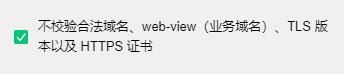
因为我是使用本地服务器xampp调试的,所以在开发者工具的右弹出栏要勾选这一项,在调试的时候我的域名就可以写上http://localhost...了。
-
数据库接收到的数据是乱码的,我查了很多资料,说要改tomcat或者是header要改的。我最后的解决方法是如下代码,但是具体解决方法要视自身的情况而定。
# server.php
// 解决乱码问题
$coding = 'SET NAMES UTF8';
mysqli_query($con,$coding);
// 下面是数据库插入的语句
3. 最后是openid的获取,参考大神的代码是 res.data.openid ,但是一直获取不到,我先把appid跟appsecret重新复制粘贴了一遍,以免这个错误拿不到token ;后来发现好像是openid.php下面的 httpGet() 方法有问题,所以我上网找了其他方法;但还是不行,最后控制台打印出来res数据,才知道是获取时命名的问题,把res.data.openid改成了res.data就可以获取到(这也跟后端怎么把数据放出来有关系吧...)。
