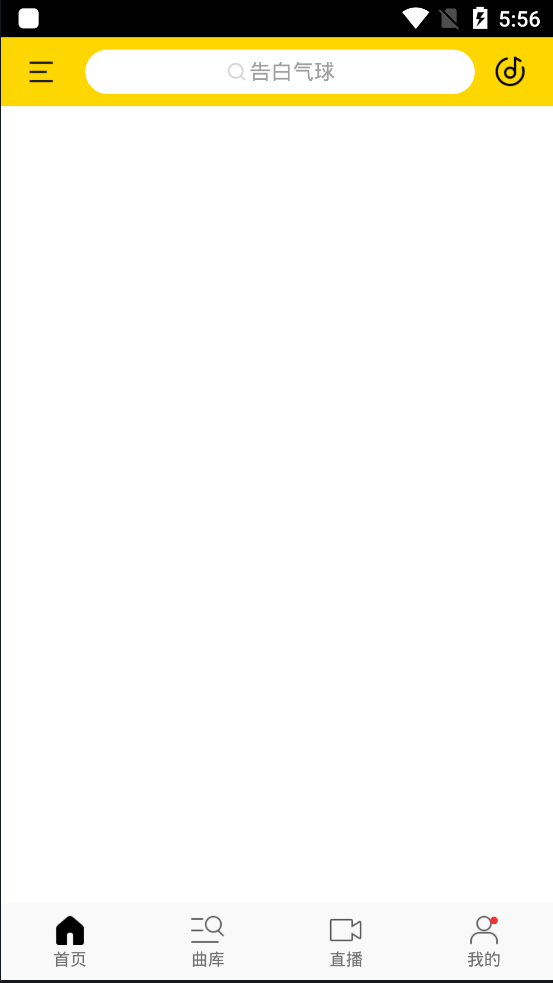
1:布局
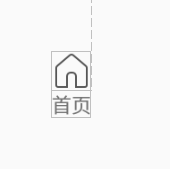
//  res/layout/bottom_layout.xml

<RelativeLayout xmlns:android="http://schemas.android.com/apk/res/android"
    android:id="@+id/bottom_layout"
    android:layout_width="match_parent"
    android:layout_height="match_parent"
    android:gravity="center">
    <TextView
        android:id="@+id/bottom_layout_text"
        android:text="首页"
        android:textSize="11sp"
        android:layout_below="@id/bottom_layout_img"
        android:layout_width="wrap_content"
        android:layout_height="wrap_content" />

    <ImageView
        android:id="@+id/bottom_layout_img"
        android:layout_width="wrap_content"
        android:layout_height="wrap_content"
        android:src="@drawable/nav_home"/>
    <TextView
        android:id="@+id/bottom_layout_point"
        android:layout_height="5dp"
        android:layout_width="5dp"
        android:layout_margin="2dp"
        android:layout_alignRight="@+id/bottom_layout_img"
        android:gravity="center"
        android:visibility="gone"
        android:background="@drawable/point"/>
</RelativeLayout>
//  res/drawable/point.xml

<?xml version="1.0" encoding="utf-8"?>
<shape xmlns:android="http://schemas.android.com/apk/res/android"
    android:shape="oval">

    <solid android:color="#ffee3531"/>
    <size android:width="10dp"
        android:height="10dp"/>
    <corners android:radius="5dp"/>

</shape>
2:自定义RelativeLayout
import android.content.Context;
import android.content.res.TypedArray;
import android.util.AttributeSet;
import android.view.LayoutInflater;
import android.view.View;
import android.widget.ImageView;
import android.widget.RelativeLayout;
import android.widget.TextView;
import androidx.annotation.DrawableRes;
public class BottomLayout extends RelativeLayout {
private RelativeLayout mLayout;
private ImageView mImageView;
private TextView mText;
private TextView mPoint;
public BottomLayout(Context context) {
this(context, null);
}
public BottomLayout(Context context, AttributeSet attrs) {
this(context, attrs, 0);
}
public BottomLayout(Context context, AttributeSet attrs, int defStyleAttr) {
super(context, attrs, defStyleAttr);
View view = LayoutInflater.from(context).inflate(R.layout.bottom2, this);
initView(view);
initAttrs(context, attrs);
}
private void initView(View view) {
mLayout = view.findViewById(R.id.bottom_layout);
mImageView = view.findViewById(R.id.bottom_layout_img);
mText = view.findViewById(R.id.bottom_layout_text);
mPoint = view.findViewById(R.id.bottom_layout_point);
}
private void initAttrs(Context context, AttributeSet attrs) {
TypedArray typedArray = context.obtainStyledAttributes(R.styleable.BottomLayout);
int indexCount = typedArray.getIndexCount();
for (int i = 0; i < indexCount; i++) {
initAttr(typedArray.getIndex(i), typedArray);
}
typedArray.recycle();
}
private void initAttr(int attr, TypedArray typedArray) {
if (attr == R.styleable.BottomLayout_bottom_layout_icon) {
setIcon(typedArray.getResourceId(attr,-1));
}
if (attr == R.styleable.BottomLayout_bottom_layout_text) {
setText(typedArray.getText(attr));
}
if (attr == R.styleable.BottomLayout_bottom_layout_point) {
boolean isShow = typedArray.getBoolean(attr, false);
setIsShow(isShow);
}
}
public void setIsShow(boolean isShow) {
if (isShow) {
mPoint.setVisibility(VISIBLE);
} else {
mPoint.setVisibility(GONE);
}
}
public void setIcon(@DrawableRes int img) {
mImageView.setImageResource(img);
}
public void setText(CharSequence text) {
mText.setText(text);
}
}
//  res/values/attrs.xml

<?xml version="1.0" encoding="utf-8"?>
<resources>
    <declare-styleable name="BottomLayout">
        //设置显示图标
        <attr name="bottom_layout_icon" format="reference|integer"/>
        //设置显示文字
        <attr name="bottom_layout_text" format="reference|string"/>
        //设置显示提示信息红点
        <attr name="bottom_layout_point" format="reference|boolean"/>
    </declare-styleable>
</resources>
3:使用
//   res/layout/activity_main.xml

<?xml version="1.0" encoding="utf-8"?>
<RelativeLayout xmlns:android="http://schemas.android.com/apk/res/android"
    xmlns:tools="http://schemas.android.com/tools"
    android:layout_width="match_parent"
    android:layout_height="match_parent"
    xmlns:app="http://schemas.android.com/apk/res-auto"
    tools:context=".MainActivity">

    <ImageView
        android:id="@+id/skinbk"
        android:layout_width="fill_parent"
        android:layout_height="fill_parent"
        android:scaleType="centerCrop"
        android:src="@color/white" />

    <include
        android:id="@+id/top_panel"
        layout="@layout/toptab_panel" />

    <xxx.NoScrollViewPager
        android:id="@+id/view_pager"
        android:layout_width="fill_parent"
        android:layout_height="fill_parent"
        android:layout_above="@id/bottom_layout"
        android:layout_below="@id/top_panel" />

    <LinearLayout
        android:id="@+id/bottom_layout"
        android:gravity="center_vertical"
        android:orientation="horizontal"
        android:layout_width="match_parent"
        android:background="#f9f9f9"
        android:layout_alignParentBottom="true"
        android:layout_height="50dp">

        <xxx.BottomLayout
            android:id="@+id/home"
            android:layout_weight="1"
            android:layout_width="match_parent"
            android:layout_height="match_parent"
            app:bottom_layout_icon="@drawable/nav_home_select"
            app:bottom_layout_text="首页"/>

        <xxx.BottomLayout
            android:id="@+id/classify"
            android:layout_weight="1"
            android:layout_width="match_parent"
            android:layout_height="match_parent"
            app:bottom_layout_icon="@drawable/nav_classify"
            app:bottom_layout_text="曲库"/>

        <xxx.BottomLayout
            android:id="@+id/live"
            android:layout_weight="1"
            android:layout_width="match_parent"
            android:layout_height="match_parent"
            app:bottom_layout_icon="@drawable/nav_live"
            app:bottom_layout_text="直播"/>

        <xxx.BottomLayout
            android:id="@+id/mine"
            android:layout_weight="1"
            android:layout_width="match_parent"
            android:layout_height="match_parent"
            app:bottom_layout_icon="@drawable/nav_mine"
            app:bottom_layout_text="我的"/>

    </LinearLayout>
</RelativeLayout>
4:Activity
import androidx.appcompat.app.AppCompatActivity;

import android.os.Bundle;
import android.view.View;
import java.util.ArrayList;
import java.util.List;

public class MainActivity extends AppCompatActivity implements View.OnClickListener {

    private static final int HOME = 0;
    private static final int CLASSIFY = 1;
    private static final int LIVE = 2;
    private static final int MINE = 3;

    private BottomLayout mHome, mClassify, mLive, mMine;

    @Override
    protected void onCreate(Bundle savedInstanceState) {
        super.onCreate(savedInstanceState);
        setContentView(R.layout.activity_main2);
        initView();
    }

    private void initView() {
        mHome = findViewById(R.id.home);
        mHome.setOnClickListener(this);
        mClassify = findViewById(R.id.classify);
        mClassify.setOnClickListener(this);
        mLive = findViewById(R.id.live);
        mLive.setOnClickListener(this);
        mMine = findViewById(R.id.mine);
        mMine.setOnClickListener(this);
        setBottomLayoutState(HOME);
        mMine.setIsShow(true);
    }

    @Override
    public void onClick(View v) {
        switch (v.getId()) {
            case R.id.home:
                setBottomLayoutState(HOME);
                break;
            case R.id.classify:
                setBottomLayoutState(CLASSIFY);
                break;
            case R.id.live:
                setBottomLayoutState(LIVE);
                break;
            case R.id.mine:
                setBottomLayoutState(MINE);
                break;
        }
    }

    private void setBottomLayoutState(int position) {
        for (int i = 0; i < 4; i++) {
            switch (i) {
                case HOME:
                    mHome.setText("首页");
                    if (position == HOME) {
                        mHome.setIcon(R.drawable.nav_home_select);
                        break;
                    }
                    mHome.setIcon(R.drawable.nav_home);
                    break;
                case CLASSIFY:
                    mClassify.setText("曲库");
                    if (position == CLASSIFY) {
                        mClassify.setIcon(R.drawable.nav_classify_select);
                        break;
                    }
                    mClassify.setIcon(R.drawable.nav_classify);
                    break;
                case LIVE:
                    mLive.setText("直播");
                    if (position == LIVE) {
                        mLive.setIcon(R.drawable.nav_live_select);
                        break;
                    }
                    mLive.setIcon(R.drawable.nav_live);
                    break;
                case MINE:
                    mMine.setText("我的");
                    if (position == MINE) {
                        mMine.setIcon(R.drawable.nav_mine_select);
                        break;
                    }
                    mMine.setIcon(R.drawable.nav_mine);
                    break;
            }
        }
    }
}