根据 千锋教育 - 李老师 在Bilibili发布的视频编写
内存版
Maven依赖引入
<!--spring 版本-->
<parent>
        <groupId>org.springframework.boot</groupId>
        <artifactId>spring-boot-starter-parent</artifactId>
        <version>2.1.9.RELEASE</version>
        <relativePath/>
</parent>
<!--spring cloud 版本-->
<dependency>
    <groupId>org.springframework.cloud</groupId>
    <artifactId>spring-cloud-dependencies</artifactId>
    <version>Greenwich.SR3</version>
    <type>pom</type>
    <scope>import</scope>
</dependency>


<dependencies>
        <dependency>
            <groupId>org.springframework.boot</groupId>
            <artifactId>spring-boot-starter-web</artifactId>
        </dependency>
        <dependency>
            <groupId>org.springframework.boot</groupId>
            <artifactId>spring-boot-starter-test</artifactId>
        </dependency>

        <!--spring cloud oauth2 -->
        <dependency>
            <groupId>org.springframework.cloud</groupId>
            <artifactId>spring-cloud-starter-oauth2</artifactId>
        </dependency>
    </dependencies>
配置文件
spring:
  application:
    name: oauth2-server
server:
  port: ${PORT:11000}
启动类
    @SpringBootApplication
    public class Oauth2Application {

        public static void main(String[] args) {
            SpringApplication.run(Oauth2Application.class,args);
        }
    }
配置类
/**
 * 授权码模式
 * 测试授权地址 http://127.0.0.1:11000/oauth/authorize?client_id=client&response_type=code
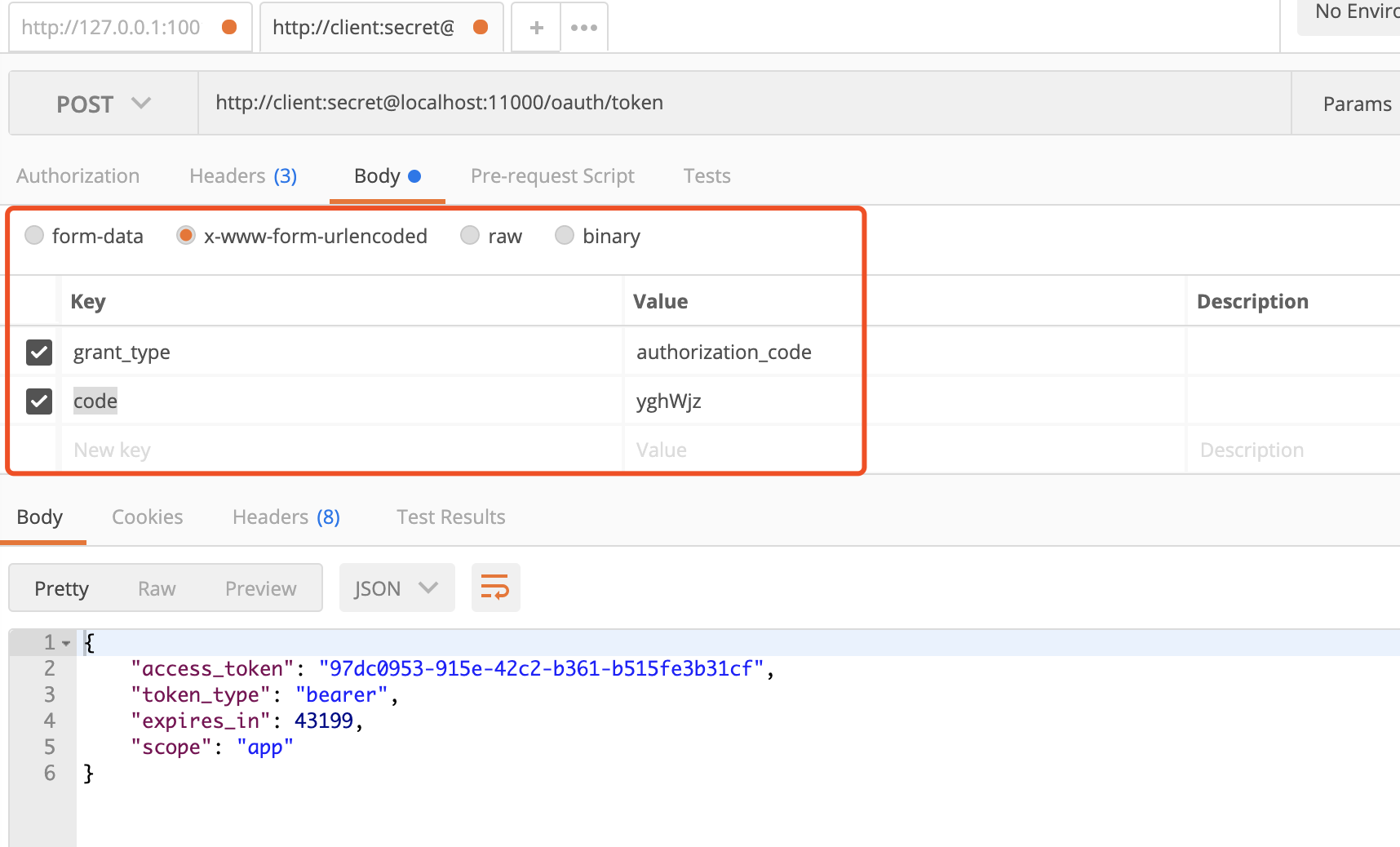
 * 通过回调的地址获取授权码 POST: http://client:secret@localhost:11000/oauth/token   body{'grant_type':'authorization_code','code':'返回的code'} x-www模式
 *
 */
@Configuration
@EnableAuthorizationServer
public class AuthorizationServer extends AuthorizationServerConfigurerAdapter {

    /**
     * 密码加密器
     */
    @Autowired
    private BCryptPasswordEncoder passwordEncoder;

    /**
     * 配置客户端
     * @param clients
     * @throws Exception
     */
    @Override
    public void configure(ClientDetailsServiceConfigurer clients) throws Exception {
        clients
                //存在哪里 inMemory =内存
                .inMemory()
                //客户端名称
                .withClient("client")
                //客户端授权码
                .secret(passwordEncoder.encode("secret"))
                //授权形式 授权码,密码等..
                .authorizedGrantTypes("authorization_code")
                //授权范围
                .scopes("app")
                //回调地址
                .redirectUris("www.baidu.com");

    }
}
配置类
@Configuration
@EnableWebSecurity
@EnableGlobalMethodSecurity(prePostEnabled = true,securedEnabled = true,jsr250Enabled = true) //客户端配置 - 相当于用户配置(配置账号密码 角色用)
public class WebSecurity extends WebSecurityConfigurerAdapter {

    /**
     * 密码加密器
     * @return
     */
    @Bean
    public BCryptPasswordEncoder passwordEncoder(){
        return new BCryptPasswordEncoder();
    }

    @Override
    protected void configure(AuthenticationManagerBuilder auth) throws Exception {
        auth.inMemoryAuthentication()
                //创建角色1
                .withUser("admin").password(passwordEncoder().encode("123456")).roles("ADMIN")
                .and()
                //创建角色2
                .withUser("user").password(passwordEncoder().encode("123456")).roles("USER");
    }
}
内存版测试
1.访问网址进入测试页面
http://127.0.0.1:11000/oauth/authorize?client_id=client&response_type=code
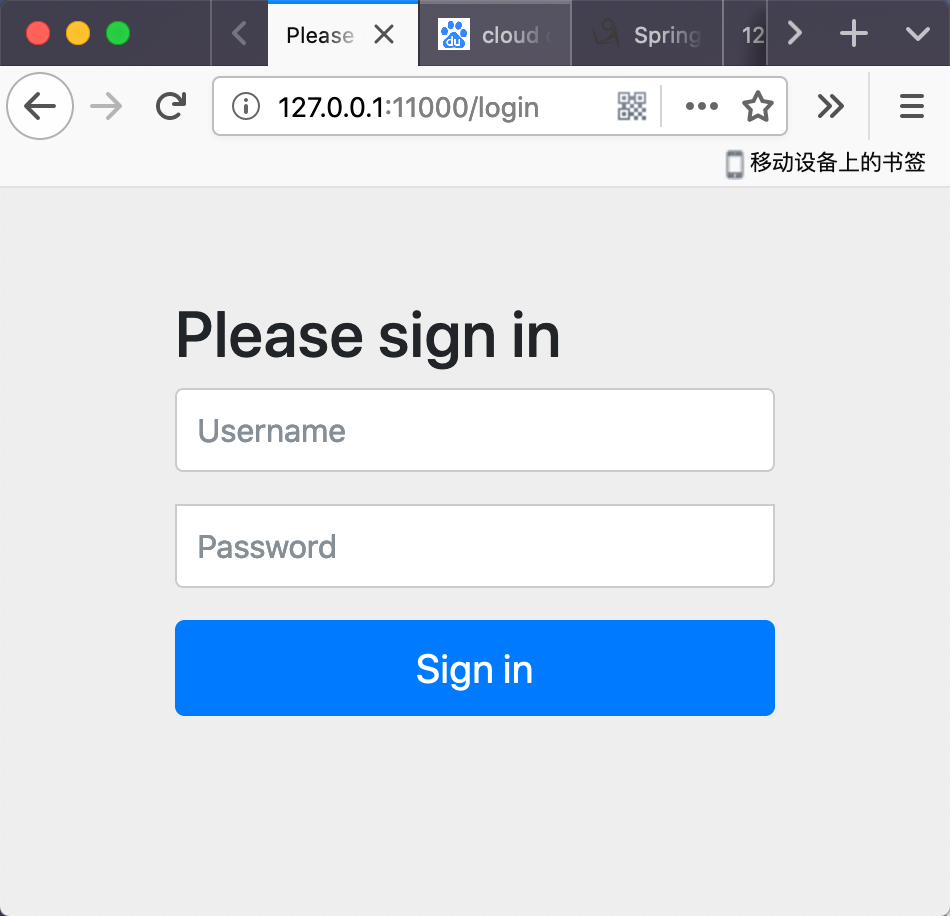
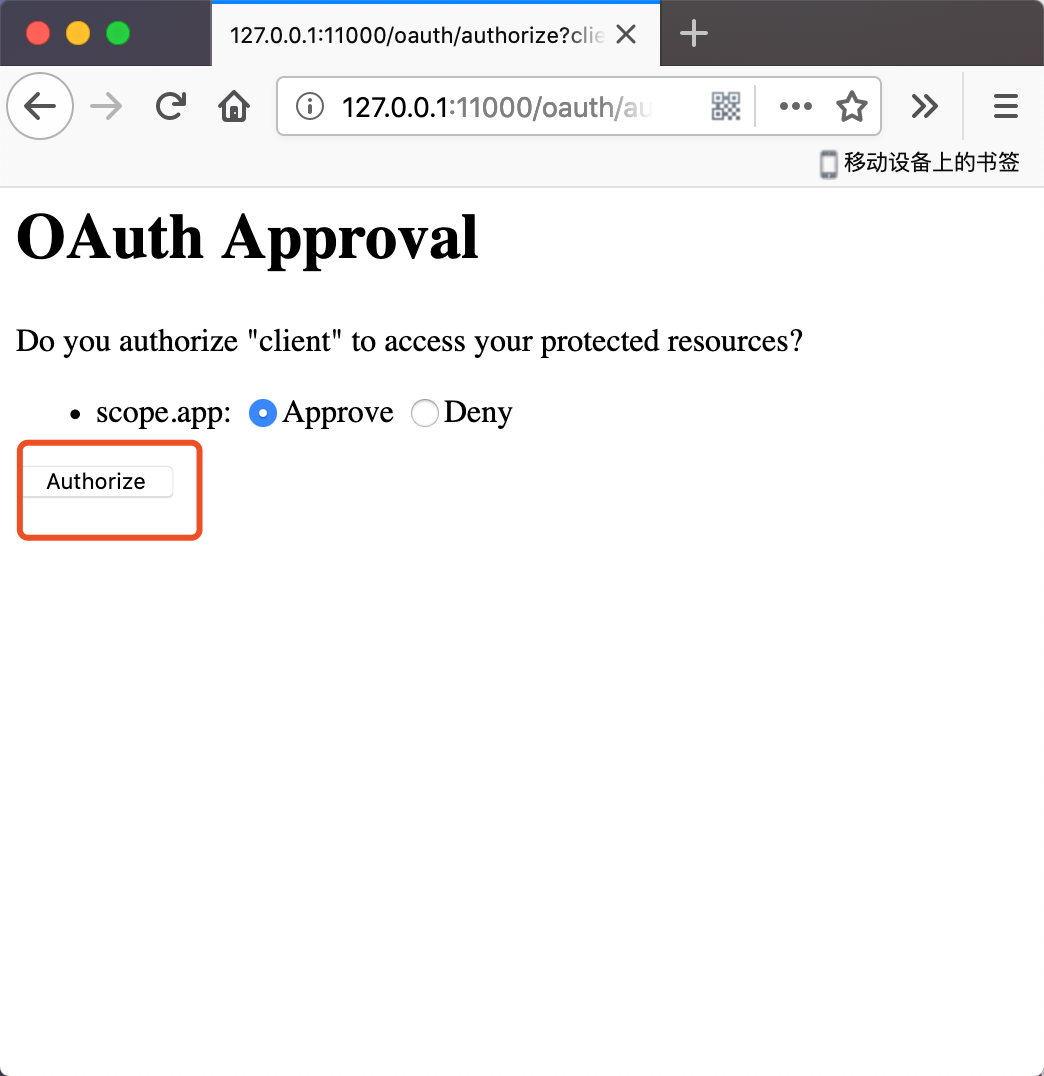
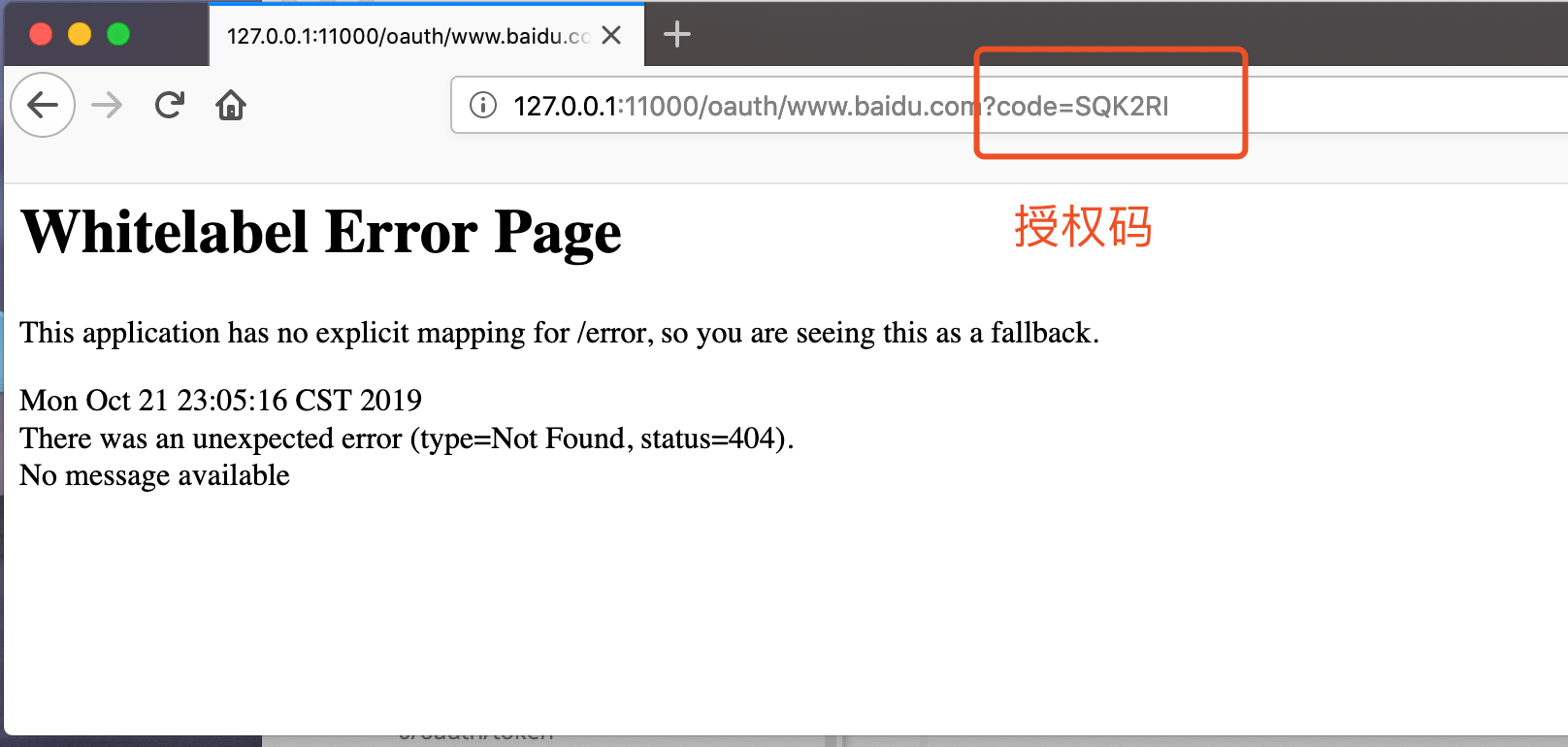
2、使用postman请求获取令牌
http://client:secret@localhost:11000/oauth/token
数据库版
数据库表结构(mysql)
spring 官方给出的表结构, 在Github自己去找
CREATE SCHEMA IF NOT EXISTS `oauth2` DEFAULT CHARACTER SET utf8;
USE `oauth2`;

-- -----------------------------------------------------
-- spring cloud 官方提供的表结构
-- oauth_access_token 生成的token
-- oauth_client_details 客户端信息
-- oauth_code 授权码
-- oauth_refresh_token 刷新token

-- Table `oauth2`.`clientdetails`
-- -----------------------------------------------------
CREATE TABLE IF NOT EXISTS `oauth2`.`clientdetails`
(
    `appId`                  VARCHAR(128)  NOT NULL,
    `resourceIds`            VARCHAR(256)  NULL DEFAULT NULL,
    `appSecret`              VARCHAR(256)  NULL DEFAULT NULL,
    `scope`                  VARCHAR(256)  NULL DEFAULT NULL,
    `grantTypes`             VARCHAR(256)  NULL DEFAULT NULL,
    `redirectUrl`            VARCHAR(256)  NULL DEFAULT NULL,
    `authorities`            VARCHAR(256)  NULL DEFAULT NULL,
    `access_token_validity`  INT(11)       NULL DEFAULT NULL,
    `refresh_token_validity` INT(11)       NULL DEFAULT NULL,
    `additionalInformation`  VARCHAR(4096) NULL DEFAULT NULL,
    `autoApproveScopes`      VARCHAR(256)  NULL DEFAULT NULL,
    PRIMARY KEY (`appId`)
)
    ENGINE = InnoDB
    DEFAULT CHARACTER SET = utf8;


-- -----------------------------------------------------
-- Table `oatuh2`.`oauth_access_token`
-- -----------------------------------------------------
CREATE TABLE IF NOT EXISTS `oauth2`.`oauth_access_token`
(
    `token_id`          VARCHAR(256) NULL DEFAULT NULL,
    `token`             BLOB         NULL DEFAULT NULL,
    `authentication_id` VARCHAR(128) NOT NULL,
    `user_name`         VARCHAR(256) NULL DEFAULT NULL,
    `client_id`         VARCHAR(256) NULL DEFAULT NULL,
    `authentication`    BLOB         NULL DEFAULT NULL,
    `refresh_token`     VARCHAR(256) NULL DEFAULT NULL,
    PRIMARY KEY (`authentication_id`)
)
    ENGINE = InnoDB
    DEFAULT CHARACTER SET = utf8;


-- -----------------------------------------------------
-- Table `oatuh2`.`oauth_approvals`
-- -----------------------------------------------------
CREATE TABLE IF NOT EXISTS `oauth2`.`oauth_approvals`
(
    `userId`         VARCHAR(256) NULL DEFAULT NULL,
    `clientId`       VARCHAR(256) NULL DEFAULT NULL,
    `scope`          VARCHAR(256) NULL DEFAULT NULL,
    `status`         VARCHAR(10)  NULL DEFAULT NULL,
    `expiresAt`      DATETIME     NULL DEFAULT NULL,
    `lastModifiedAt` DATETIME     NULL DEFAULT NULL
)
    ENGINE = InnoDB
    DEFAULT CHARACTER SET = utf8;


-- -----------------------------------------------------
-- Table `oatuh2`.`oauth_client_details`
-- -----------------------------------------------------
CREATE TABLE IF NOT EXISTS `oauth2`.`oauth_client_details`
(
    `client_id`               VARCHAR(128)  NOT NULL,
    `resource_ids`            VARCHAR(256)  NULL DEFAULT NULL,
    `client_secret`           VARCHAR(256)  NULL DEFAULT NULL,
    `scope`                   VARCHAR(256)  NULL DEFAULT NULL,
    `authorized_grant_types`  VARCHAR(256)  NULL DEFAULT NULL,
    `web_server_redirect_uri` VARCHAR(256)  NULL DEFAULT NULL,
    `authorities`             VARCHAR(256)  NULL DEFAULT NULL,
    `access_token_validity`   INT(11)       NULL DEFAULT NULL,
    `refresh_token_validity`  INT(11)       NULL DEFAULT NULL,
    `additional_information`  VARCHAR(4096) NULL DEFAULT NULL,
    `autoapprove`             VARCHAR(256)  NULL DEFAULT NULL,
    PRIMARY KEY (`client_id`)
)
    ENGINE = InnoDB
    DEFAULT CHARACTER SET = utf8;


-- -----------------------------------------------------
-- Table `oatuh2`.`oauth_client_token`
-- -----------------------------------------------------
CREATE TABLE IF NOT EXISTS `oauth2`.`oauth_client_token`
(
    `token_id`          VARCHAR(256) NULL DEFAULT NULL,
    `token`             BLOB         NULL DEFAULT NULL,
    `authentication_id` VARCHAR(128) NOT NULL,
    `user_name`         VARCHAR(256) NULL DEFAULT NULL,
    `client_id`         VARCHAR(256) NULL DEFAULT NULL,
    PRIMARY KEY (`authentication_id`)
)
    ENGINE = InnoDB
    DEFAULT CHARACTER SET = utf8;


-- -----------------------------------------------------
-- Table `oatuh2`.`oauth_code`
-- -----------------------------------------------------
CREATE TABLE IF NOT EXISTS `oauth2`.`oauth_code`
(
    `code`           VARCHAR(256) NULL DEFAULT NULL,
    `authentication` BLOB         NULL DEFAULT NULL
)
    ENGINE = InnoDB
    DEFAULT CHARACTER SET = utf8;


-- -----------------------------------------------------
-- Table `oatuh2`.`oauth_refresh_token`
-- -----------------------------------------------------
CREATE TABLE IF NOT EXISTS `oauth2`.`oauth_refresh_token`
(
    `token_id`       VARCHAR(256) NULL DEFAULT NULL,
    `token`          BLOB         NULL DEFAULT NULL,
    `authentication` BLOB         NULL DEFAULT NULL
)
    ENGINE = InnoDB
    DEFAULT CHARACTER SET = utf8;
插入测试数据
写个测试类获取一下加密后的密码,将其插入数据库
public class PasswordEncoderTest {
    public static void main(String[] args) {
        //输出: $2a$10$M8FZ82RsDjT/PrtcPsquUuZ1fdKnCZmFE81SsMdjRGIKjja7lmri6
        System.out.println(new BCryptPasswordEncoder().encode("secret"));
    }
}
INSERT INTO oauth_client_details ( client_id, client_secret, scope, authorized_grant_types, web_server_redirect_uri )
VALUE
	( 'client', '$2a$10$M8FZ82RsDjT/PrtcPsquUuZ1fdKnCZmFE81SsMdjRGIKjja7lmri6', 'app', 'authorization_code', 'https://www.baidu.com' );
项目配置
配置文件
spring:
  application:
    name: oauth2-server
  datasource:
    username: root
    password: 111111
    type: com.zaxxer.hikari.HikariDataSource
    driver-class-name: com.mysql.cj.jdbc.Driver
    jdbc-url: jdbc:mysql://127.0.0.1:3306/oauth2?useUnicode=true&characterEncoding=utf8
    hikari:
      minimum-idle: 5
      idle-timeout: 600000
      maximum-pool-size: 10
      auto-commit: true
      max-lifetime: 1800000
      connection-timeout: 30000
      connection-test-query: SELECT 1
server:
  port: ${PORT:11000}
Maven POM
    <dependencies>
        <dependency>
            <groupId>org.springframework.boot</groupId>
            <artifactId>spring-boot-starter-web</artifactId>
        </dependency>

        <dependency>
            <groupId>org.springframework.boot</groupId>
            <artifactId>spring-boot-starter-test</artifactId>
        </dependency>

        <!--spring cloud oauth2 -->
        <dependency>
            <groupId>org.springframework.cloud</groupId>
            <artifactId>spring-cloud-starter-oauth2</artifactId>
        </dependency>
        <dependency>
            <groupId>org.springframework.boot</groupId>
            <artifactId>spring-boot-starter-jdbc</artifactId>
            <exclusions>
                <exclusion>
                    <groupId>org.apache.tomcat</groupId>
                    <artifactId>tomcat-jdbc</artifactId>
                </exclusion>
            </exclusions>
        </dependency>
        <!--    号称全球最快连接池    -->
        <dependency>
            <groupId>com.zaxxer</groupId>
            <artifactId>HikariCP</artifactId>
        </dependency>
        <dependency>
            <groupId>mysql</groupId>
            <artifactId>mysql-connector-java</artifactId>
        </dependency>
    </dependencies>
在内存版的基础上对 AuthorizationServer 进行修改
@Configuration
@EnableAuthorizationServer
public class AuthorizationServer extends AuthorizationServerConfigurerAdapter {

    /**
     * 使用Spring提供的方法连接数据源   -   读取配置文件中的数据源
     *  使用@Primary 覆盖掉默认的数据源
     * @return
     */
    @Bean
    @Primary
    @ConfigurationProperties(prefix = "spring.datasource")
    public DataSource dataSource(){
       return DataSourceBuilder.create().build();
    }


    /**
     * 配置Token数据源
     * @return
     */
    @Bean
    public TokenStore tokenStore(){
        return new JdbcTokenStore(dataSource());
    }

    /**
     * 配置Client数据源
     * @return
     */
    @Bean
    public ClientDetailsService jdbcClientDetails(){
        return new JdbcClientDetailsService(dataSource());
    }

    /**
     * 密码加密器
     */
    @Autowired
    private BCryptPasswordEncoder passwordEncoder;

    /**
     * 配置客户端数据走JDBC
     * @param clients
     * @throws Exception
     */
    @Override
    public void configure(ClientDetailsServiceConfigurer clients) throws Exception {
        clients.withClientDetails(jdbcClientDetails());
    }


    /**
     * 配置Token数据走JDBC
     * @param endpoints
     * @throws Exception
     */
    @Override
    public void configure(AuthorizationServerEndpointsConfigurer endpoints) throws Exception {
        endpoints.tokenStore(tokenStore());
    }
}
数据库版测试
和内存版一样的套路 就不浪费口舌拉
#1.进行登录
http://127.0.0.1:11000/oauth/authorize?client_id=client&response_type=code
#2.拿到授权码
#3.获取令牌 通过POSTMAIN请求
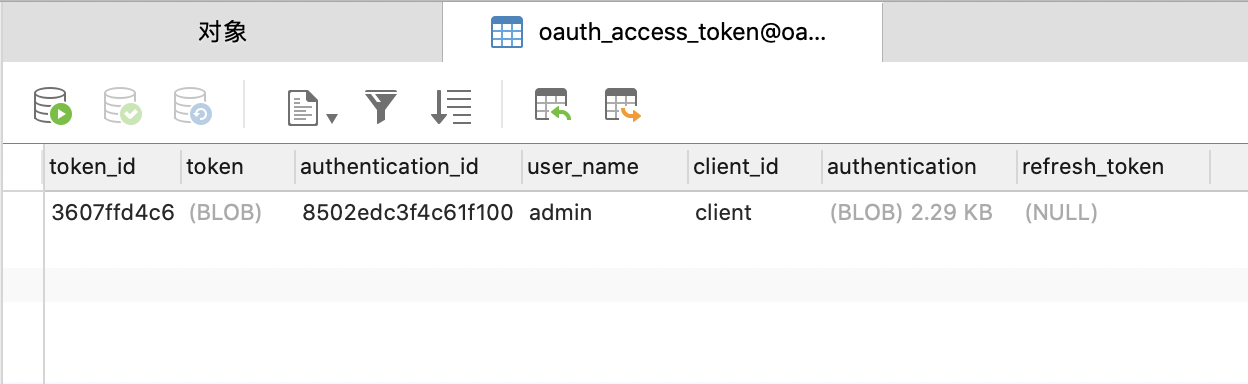
#4.查看数据库 oauth_access_token 表