

今天第一次用Mysql读取csv文件,遇到各种问题,耽误了好久的时间终于能正常读取了。把今天的学习总结一下:
1.直接导入
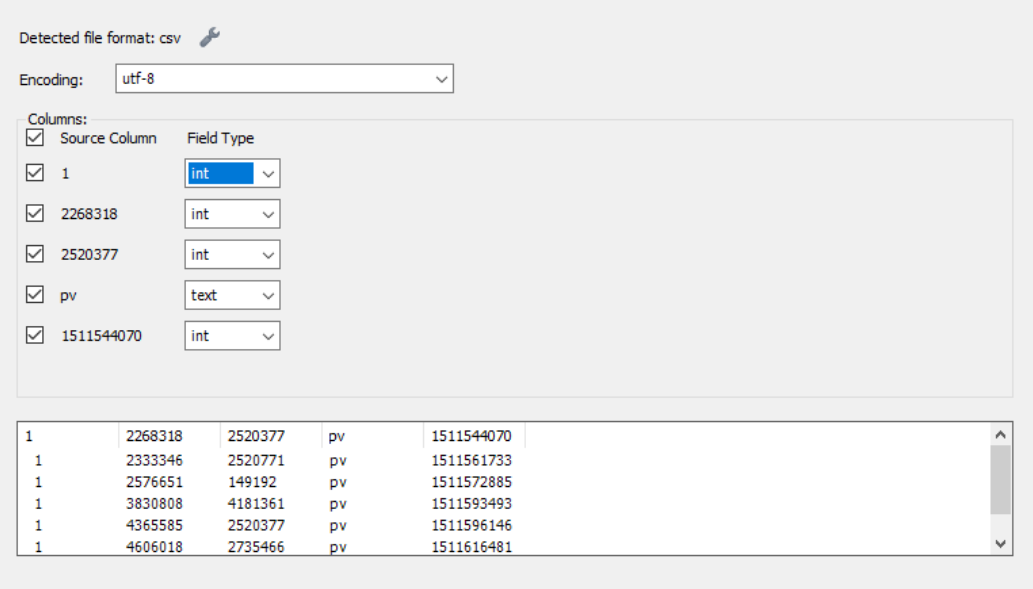
点击左边的数据库my_test,右键点击"Table Data Import Wizard",然后选择路径,按步骤一步一步来就行了,比较简单。

load data infile '文件路径.csv'
into table 表名
fields terminated by ','   #分隔符
ebclosed by '"'            #结尾符(可选,看情况)
lines terminated by '\n'   #换行标识符,也可能是'\r\n',windows是\n换行
ignore 1 lines;            #忽略第一行(有列名的话)
csv文件中,每列用‘,’分隔,全文结尾用‘"’结束,用‘\n’换行。
该方式也很适用大量数据的导入,读取900+M的文件大概耗时900s。
可能的问题及解决办法:
(1)修改读取权限/可读取路径:
查看读取文件的路径是否有限制?
show variables like '%secure_file_priv';


secure_file_priv=
则任何地址的文件都可以读取。如果修改为以下格式:
secure_file_priv='文件路径'
则只有该文件夹路径下的文件才可以读取,要把csv文件放在该文件夹下才可以,建议此种设置方式。
(2)设置读取文件的大小、连接时间之类:
适用于读取超时出错的情况.
基本要修改的有2个地方:
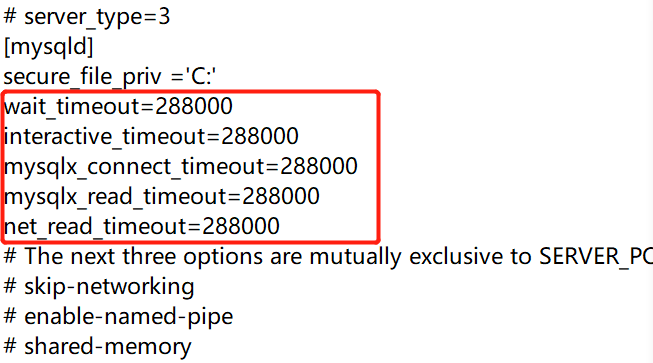
一是my.ini文件的设置,通过查找[mysqld],把对应的或没有的参数调,查看参数:
show variables like '%timeout%'
进入myini文件进行修改:

3.python导入
一种是借助python把大文件拆分成小文件保存后用mysql读取:
filename='文件路径'
save_file='文件路径'
with open(filename,'r',encoding='utf-8') as file:
    data=file.readlines()
    for i in range(len(data)-1):
        if ',,' in data[i]:
            del data[i]
    save_file=open(save_file,'w',encoding='utf-8')
    save_file.writelines(data[0:1000000])
    save_file.close()
另一种是直接用python连接数据库读取,我用的是anaconda的spyder,开始一直出错说包pymysql不存在,网上各种找方法折腾了好久一直安装失败,试了n次之后最后又突然安装好了?!无语!搞清楚你安装的python是哪个版本,确认是pymysql可以连接mysql数据库了,那就按照下面的方式安装吧!

以下是用python读取csv文件然后存储到mysql数据库的代码,这种适合数据特别大的数据。但是!我的mysql还存在一点问题没法用python实现数据库操作,后面再尝试解决吧...
#PyMySQL适用于Python3.x版本连接MySQL数据库
import pymysql
import pandas as pd
from sqlalchemy import create_engine
file = r'文件路径'
df = pd.read_csv(file)
#连接数据库:用户名,密码******,端口3306,数据库名
#create_engine("数据库类型+数据库驱动://数据库用户名:数据库密码@IP地址:端口/数据库",其他参数)
engine = create_engine("mysql+localhost://用户名:数据库密码@localhost:3306/数据库名",echo=True)
df.to_sql('users_data',con=engine,if_exists='replace',index=False)
或者用定义方法的办法:
import pymysql
connection=pymysql.connect(host='localhost',
                           user='用户名',
                           password='******',
                           db='数据库')
#创建光标对象,1个光标跟踪一种数据状态:创建、删除、写入、查询
cur=connection.cursor()
cur.execute("show databases;")
#查看有哪些数据库是否连接成功
print(cur.fetchall())
#load_csv(路径,表名,数据库名)
def load_csv(csv_file_path,table_name,database='mytest'):
    file=open(csv_file_path,'r',encoding='utf-8')
#读取第一行字段名创建表名
    reader=file.readline()
    b=reader.split(',')
#编写sql.create_sql负责创建表,data_sql负责导入数据
    create_sql='create table if not exists '+table_name+'('+b[0]+' int,'+b[1]+' int,'+b[2]+' int,'+b[3]+' varchar(255),'+b[4]+' varchar(255)'+')'
    data_sql="load data local infile '%s' into table %s fields terminated by ',' lines terminated by '\\r\\n' ignore 1 lines"%(csv_file_path,table_name)
#使用数据库
    cur.execute('use %s'% database)
#编码
    cur.execute('set names utf-8;')
    cur.execute('set character_set_connection=utf-8')
#执行创建表
    cur.execute(create_sql)
#导入数据
    cur.execute(data_sql)
    connection.commit()
#关闭连接
    connection.close()
    cur.close()
