

React-Native
1.StatusBar
这是控制状态栏的组件。 问题描述:适配IOS,Android有无刘海影响头部高度问题
技术难点:兼容问题,StatusBar 只有 Android 端有 currentHeight(状态栏高度)
解决方法:
//状态栏的高度
export function getStatusBarHeight() {
    if (Platform.OS == 'android') return StatusBar.currentHeight;
    if (isIphoneX() || isIphoneXR()) {
        return 34
    }
    return 20
}
2.在华为和OPPO上向后端发送请求无反应
问题描述:release包无法正常发起http请求的问题,但是debug模式下却可以
技术难点:兼容问题,在部分高系统版本的手机上,Android对于不安全的http请求的限制
解决方法:使用https协议,或更改配置 blog.csdn.net/z372574152/…
3.IOS端软键盘弹起遮挡输入框
问题描述:如题https://www.cnblogs.com/qiyecao/p/9628610.html
技术难点:兼容问题
解决方法:通过KeyboardAvoidingView组件,将页面推送上去。或者KeyboardAwareScrollView插件。详情:www.cnblogs.com/qiyecao/p/9…
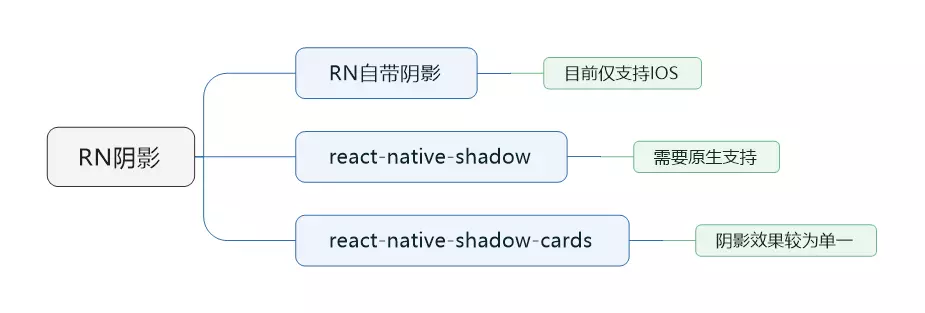
4.阴影属性只支持IOS
问题描述:如题
技术难点:兼容问题,在Android中需要使用elevation属性实现,但elevation仅提供一个灰色阴影,视觉效果不好。
解决方法:react-native-shadow-cards现了一个阴影框,ios与Android均兼容。其不需要原生支持,可实现一般效果的阴影,可满足通常阴影需求。
Vue
1.IOS微信内路由跳转,a跳b后,返回,再跳b,无法跳转
问题描述:如题
技术难点:兼容问题
解决方法:判断是否第一次进入b,若不是则重定向跳转
在入口文件main.js中加入代码如下:
router.beforeEach((to, from, next) => {
  window.scrollTo(0, 0);
  //判断手机是IOS还是Android
  var u = navigator.userAgent, app = navigator.appVersion;
  var isAndroid = u.indexOf('Android') > -1 || u.indexOf('Linux') > -1; //g
  var isIOS = !!u.match(/\(i[^;]+;( U;)? CPU.+Mac OS X/); //ios终端
  if (isIOS) {
    // 路由跳转前判断即将跳转的页面和当前首次进入的页面是否一致,如果不一致,则重定向(相当于带了刷新的功能)
    if (to.path !== global.location.pathname) {
      location.assign(to.fullPath);
    }
  }

  /* 路由发生变化修改页面title */
  if (to.meta.title) {
    document.title = to.meta.title
  }
  next()
})
微信公众号
1.首页开屏弹窗
问题描述:用户只有每天第一次进入,才弹出首屏弹窗
技术难点:判断用户是否是当天的第一次进入,需要计算第二天零点的时间
解决方法:
- 获取当前时间戳 time
- 获取第二天零点的时间戳 nextDayTime
- 如果 cookie 中没存时间,就弹出弹窗,并在 cookie 中存入第二天零点时间
- 如果 cookie 中存时间了,那么就比较当前时间戳 time 是否大于 cookie 中存的时间,如果大于,则是第一次进入,并用第二天的时间覆盖给 cookie
主要在于每次弹屏后要更新 cookie 为第二天的零点
var date = new Date();
var time = date.getTime();
<!--计算第二天零点的时间-->
<!--(用当前时间 + 一天的时间戳 - (当前时*60*60 + 当前分钟*60 + 当前秒)*1000)-->
var nextDayDate = new Date(date.getTime()+86400000-(date.getHours()*60*60 + date.getMinutes()*60 + date.getSeconds())*1000);
var nextDayTime = nextDayDate.getTime();
if(!$.cookie("open") || $.cookie("open") == "Invalid Date"){
    ifOpen();
    $.cookie("open", nextDayTime);
}else{
    if(time > $.cookie("open")){
        ifOpen();
        $.cookie("open", nextDayTime);
    }
}
2.支付成功打勾动画实现
问题描述:找不到和设计一样的.gif,且.gif开销很大
技术难点:头一回写SVG,里面属性及计算属性数值
解决方法:手写SVG,并实现动画效果
stroke:边框颜色
stroke-width:边框厚度
stroke-linecap:属性定义不同类型的开放路径的终结
stroke-dasharray:属性用于创建虚线。stroke-dasharray="虚线长度,虚线间隔,虚线长度" 可填多个值
cx 和 cy :属性定义圆点的 x 和 y 坐标。如果省略 cx 和 cy,圆的中心会被设置为 (0, 0)
r :属性定义圆的半径(半径的值要剪掉边框厚度的一半)
circle:圆
polyline:折线
point:坐标点
stroke-linecap:round 线条末端的线帽设置成圆形
stroke-linejoin:round 线条交接处设为圆角
stroke-dasharray:创建虚线,一节虚线的长度。设一节虚线为圆周长2πr
stroke-dashoffset:虚线偏移,将数值由整个圆周长调到 0 就能实现圆顺时针从无到有的动画效果,逆时针则由周长调到2倍的周长即可
animation-fill-mode:让动画播放完停留在最后一格
<body>
  <input type="checkbox" />
  <svg width="400" height="400">
    <circle class="circle" transform="rotate(-90 200 200)" fill="none" stroke="#68E534" stroke-width="20" cx="200"
      cy="200" r="190" stroke-linecap="round" />
    <polyline class="tick" fill="none" stroke="#68E534" stroke-width="24" points="88,214 173,284 304,138"
      stroke-linecap="round" stroke-linejoin="round" />
  </svg>
  <h2 class="title">Payment Success</h2>
</body>
body {
  display: flex;
  justify-content: center;
  align-items: center;
  min-height: 100vh;
  flex-direction: column;
}
h2 {
  font-family: Arial, Helvetica, sans-serif;
  font-size: 36px;
  margin-top: 40px;
  color: #333333;
  opacity: 0;
}
input[type="checkbox"]:checked~h2 {
  animation: .6s title ease-in-out;
  animation-delay: 1.2s;
  animation-fill-mode: forwards;
}
.circle {
  /* 设定一节虚线的长度为整个圆形周长 */
  stroke-dasharray: 1194;
  /* 设置偏移量 */
  stroke-dashoffset: 1194;
}
input[type="checkbox"]:checked+svg .circle {
  animation: circle 1s ease-in-out;
  /* 让动画播放完停留在最后一格 */
  animation-fill-mode: forwards;
}
.tick {
  stroke-dasharray: 350;
  stroke-dashoffset: 350;
}
input[type="checkbox"]:checked+svg .tick {
  animation: tick .8s ease-out;
  animation-fill-mode: forwards;
  animation-delay: .95s;
}
@keyframes circle {
  from {
    stroke-dashoffset: 1194;
  }
  to {
    stroke-dashoffset: 2388;
  }
}
@keyframes tick {
  from {
    stroke-dashoffset: 350;
  }
  to {
    stroke-dashoffset: 0;
  }
}
@keyframes title {
  from {
    opacity: 0;
  }
  to {
    opacity: 1;
  }
}
3.清明节全国哀悼日让首页全屏置灰
问题描述:让首页所有元素置灰,加在body上会使 position 为 absolute 或 fixed 的元素定位失效
技术难点:如何使滤镜生效且保证定位不变
解决方法:对于指定了 filter 样式且值不为 none 时,被应用该样式的元素其子元素中如果有 position 为 absolute 或 fixed 的元素,会为这些元素创建一个新的容器,使得这些绝对或固定定位的元素其定位的基准相对于这个新创建的容器。将该样式应用到根元素html上,即使创建了新的定位基准元素,也不会对子孙元素产生不符合预期的影响。
代码如下:
html.grayFilter {
    filter: grayscale(100%);
    -webkit-filter: grayscale(100%);
    -moz-filter: grayscale(100%);
    -ms-filter: grayscale(100%);
    -o-filter: grayscale(100%);
    -webkit-filter: grayscale(1);
}
