

学习之路
微信小程序入门
因为时代在变化和某些需求必须开始给自己充电,开始学习微信小程序。
起步
开始学习
下载微信小程序开发工具
下载地址:开发工具下载
微信小程序的配置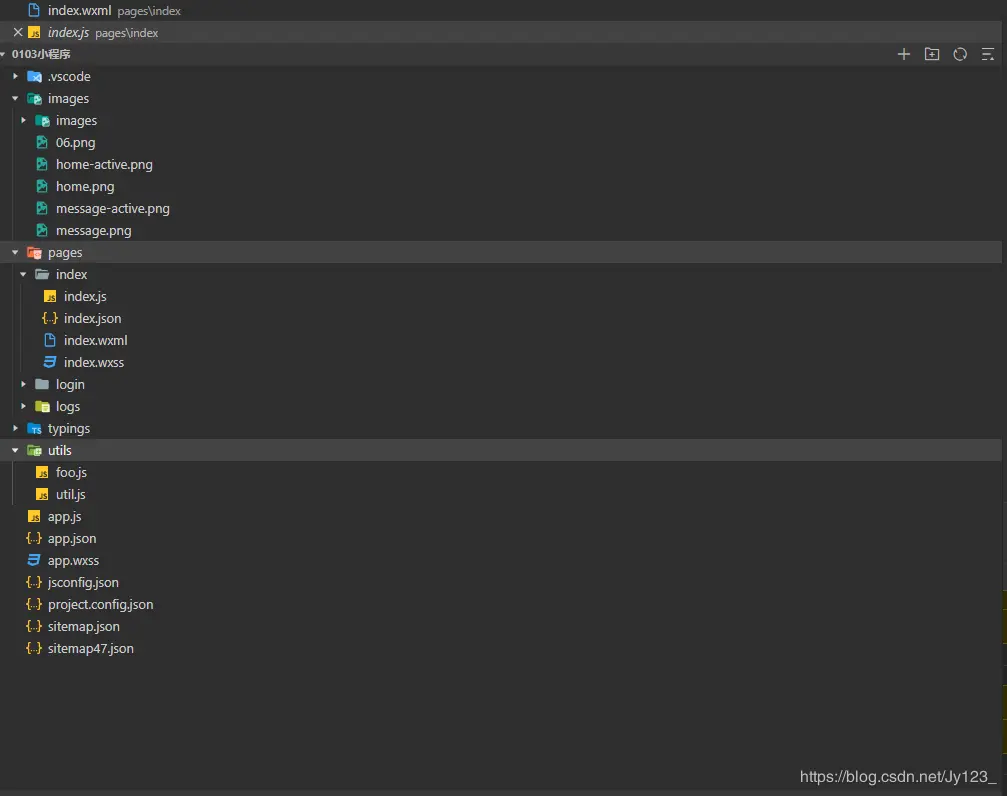
app.json 文件用来配置小程序进行全局配置 app.wxss 文件用来配置小程序全局的样式 sitemap 文件用来配置小程序及其页面是否允许被微信索引 utils 文件夹是用来配置模板全局方法 pages 文件夹里面是配置页面
微信小程序区别
app.js
console.log('--------------------------');
console.log(window);
console.log(document);
console.log('---------
- 小程序不是运行在浏览器里,所以没有BOM和DOM对象
- 小程序的js有一些额外的成员 App()方法,用于定义应用程序实例对象 page()方法,用于定义页面对象 getApp()方法,用来获取全局应用程序对象 getcurrentpages()方法,用来获取当前页面的通用栈(数组,最后一个就是当前页面 先进后出) wx 对象,用来提供核心API的
- 小程序的js是支持commonJS规范的 演示:
在utils 文件夹创建一个foo.js文件 (小程序不支持exports.xxx 只支持module.eports={})
function say(msg){
console.log('helllo'+msg);
}

// 导出say方法
module.exports={
  say:say
}
在app.js 文件调用模板
const foo = require('./utils/foo.js')
foo.say('world');
app.json 文件配置
{
  "pages": [
    "pages/index/index",
    "pages/logs/index",
    "pages/second/index"
  ],
  "window": {
    "navigationBarTitleText": "Demo"
  },
  "tabBar": {
    "list": [
      {
        "pagePath": "pages/index/index",
        "text": "首页"
      },
      {
        "pagePath": "pages/logs/index",
        "text": "日志"
      },
      {
        "pagePath": "pages/second/index",
        "text": "第三页"
      }
    ]
  },
  "networkTimeout": {
    "request": 10000,
    "downloadFile": 10000
  },
  "debug": true,
  "navigateToMiniProgramAppIdList": [
    "wxe5f52902cf4de896"
  ],
  "sitemapLocation": "sitemap71.json"
}
app.json 文件不能写注释
- pages 表示页面路由
- window 表示配置导航栏 "backgroundcolor" 窗口颜色 "backgroundTextStyle" 文本前景色 (light 、dark) "navigationBarBackgroundColor" 导航栏背景颜色 "navigationBarTitleText" 导航栏文本 "navigationBarTextStyle" 导航栏文本颜色
- tarBar 表示底部分页,由list数组组成必须最少2个最多5个 pagePath 表示页面路由 text 底部文本 color 颜色 selectedcolor 选中后的颜色 iconPath icon字体路径 selectedIconPath 选中后icon字体路径 backgroundColor 背景颜色 borderStyle 边框样式 position top在窗口上方 bottom在窗口下方 如果在窗口上方 icon字体图标将不显示
