进新公司维护老项目的时候,刚在svn 上check out下来,pod 项目,就出现:
Error: Multiple commands produce这是xcode 10更新以后一个的新创建系统,比之前的提供更好的可靠性与创建性能,而且可以获取项目配置问题(默认设置新创建系统)。
在苹果文档中,提及Xcode10中的关于旧项目New Build System更改适配中提及到以下两点
The new build system has stricter checks for cycles between elements in the build in order to prevent unnecessary rebuilds.
It is an error for any individual file in the build to be produced by more than one build command. For example, if two targets each declare the same output file from a shell script phase, factor out the declaration of the output file into a single target.
New Build System会对构建中的元素循环进行严格的检查,避免不必要的重建,这个也是错误出现的原因。
这里我遇到了两种错误形式:
1、info.plist
Multiple commands produce '/Users......../Info.plist':
1) Target '....../Info.plist'
2) Target '...../Info.plist'
2、Copy Pods Resources
Multiple commands produce '/Users..../Build/Products/Debug-iphoneos/xxx.app':
1) Target '....../Build/Products/Debug-iphoneos/xxx.app'
2) That command depends on command in Target 'xxx': script phase “[CP] Copy Pods Resources”
解决办法:
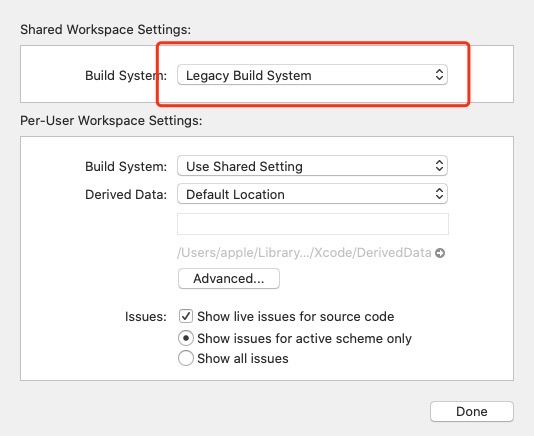
不使用New Build System,在File > Project/Workspace Settings中的Share Project/Workspace Settings 里build system 将New Build System(Default)切换成Legacy build system。
如图:
另一种方法:
Info.plist
在 target -> Build phase > Copy Bundle Resource 中找到info.plist,删除掉
Copy Pods Resources
在 target -> Build phase > Copy Pods Resources -> Output Files,删除
${TARGET_BUILD_DIR}/${UNLOCALIZED_RESOURCES_FOLDER_PATH}