

介绍
基于create-react-app路由跳转封装以及dva使用
软件架构
create-react-app + dva
安装教程
npm install /yarn install 安装依赖
npm run start 启动
npm run build 打包
使用说明
1、项目结构
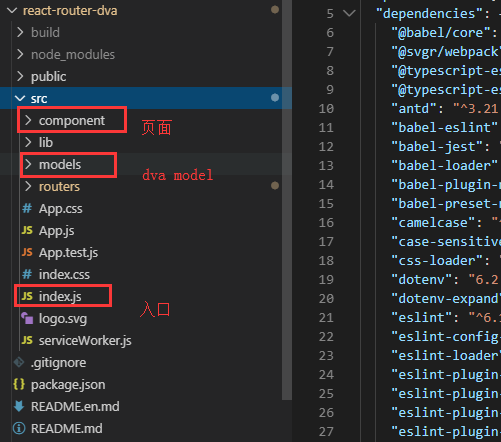
2、dva使用
在models文件夹中新建list.js model
export default {
namespace: "list",
state: {
data: "It's models data"
},
effects: {
/***
*test({}, { select, call, put }) {
var result = yield testApi({ });//api请求
yield put({ type: 'loginSuccess', data });
}***/
},
reducers: {
/*test(state, action) {
return { ...state, ...{} };
}*/
}
};
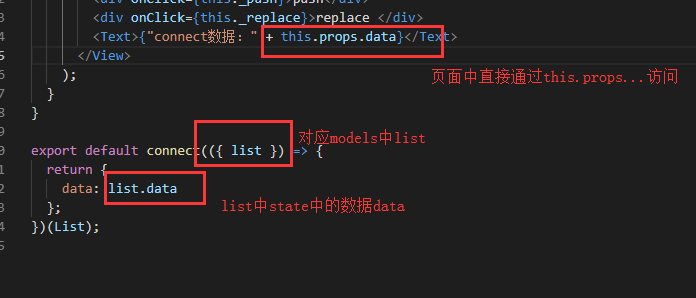
component文件夹中新建List.js页面
import React from "react";
import { connect } from "dva";
import { View, Text, Dimensions } from "react-native";
import H5Nav from "../lib/H5Nav";
const HEIGHT = Dimensions.get("window").height;
class List extends React.Component {
_push = () => {
H5Nav.push("/test", { params: "123456", test: "23423" });
};
_replace = () => {
H5Nav.replace("/test");
};
render() {
return (
<View
style={{
justifyContent: "center",
alignItems: "center",
height: HEIGHT
}}
>
<div onClick={this._push}>push</div>
<div onClick={this._replace}>replace </div>
<Text>{"connect数据:" + this.props.data}</Text>
</View>
);
}
}
export default connect(({ list }) => {
return {
data: list.data
};
})(List);
在index.js文件中注册model
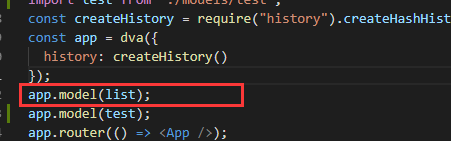
通过dva可将页面和逻辑分开,modal中进行一些api请求,页面只做页面显示
3、路由跳转
import H5Nav from "../lib/H5Nav";
路由设置 <Route exact path="/test" component={Test}>
H5Nav.push("/test",{param1:"param1"}); //路由跳转
页面中获取路由参数:H5Nav.getParams(); //获取全部参数
H5Nav.getParams("key"); //获取指定key值
H5Nav.replace("url"); //路由跳转,history中不添加记录
H5Nav.goBack(); //返回上一个页面
H5Nav.go(detal);//指定跳转
4、url
https://gitee.com/yilianxinjue/react-router-dva.git
