

Redux
Redux = Flux + Reducer
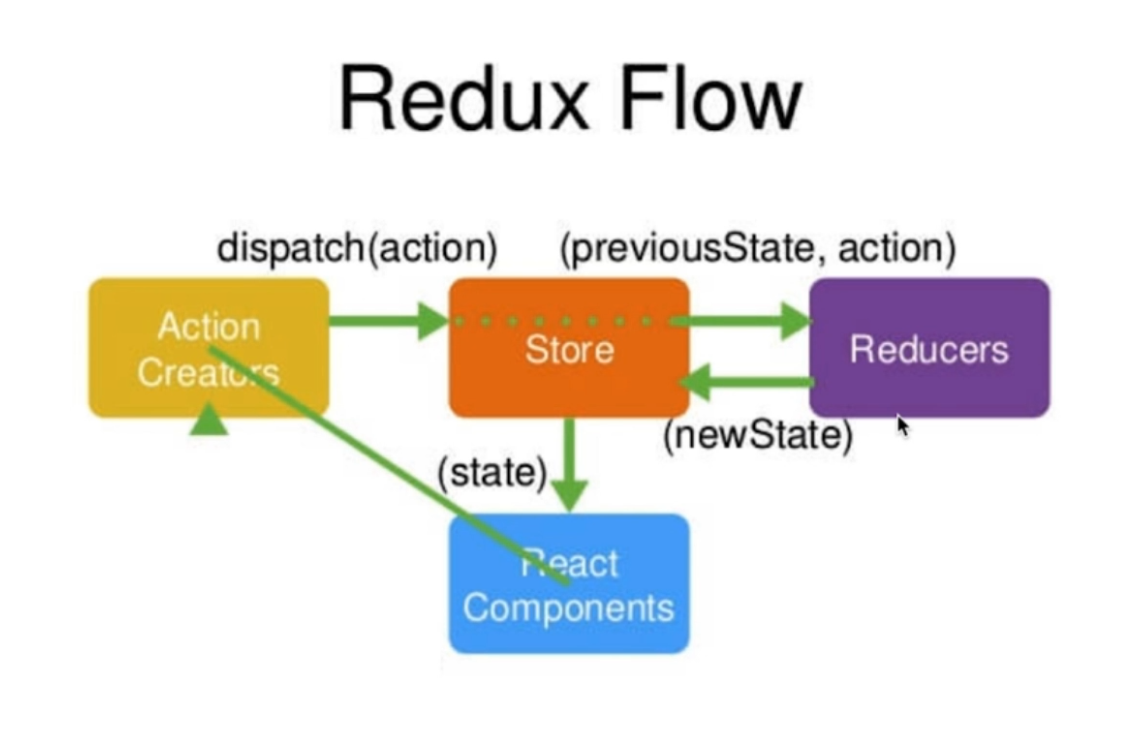
- stroe/index.js
import { createStore } from 'redux'
import reducer from './reducer'
const store = createStore()
export default store
- reducer.js
reducer是一个纯函数,reducer可以接收state但是觉得不能修改state
import {CHANGE_SOMETHING} from './actionTypes.js'
const defaultState = {
  inputValue: '',
  list: [1, 3]
}
export default (state = defaultState, action) => {
  if(action.type === CHANGE_SOMETHING){
      const newState = JSON.parse(JSON.Stringify(state))
      newState.inputValue  = action.value
      return newState
  }
  return state
}
- 组件中的使用
import store from './store'
constructor(){
  this.state = store.getState() //获取state
  this.handleStroeChange = this.handleStroeChange.bind(this)
  store.subscribe(this.handleStroeChange)
}
handleStroeChange(e){
    this.setState(store.getState())
}
- 组件中派发action
import {CHANGE_SOMETHING} from './actionTypes.js'
import {getInputChangeAction} from './actionCreators.js'
import store from './store'
const action = getInputChangeAction('val')
store.dispatch(action)
- actionTypes.js
其实这样已经能够使用redux了,但是为了避免因为拼写错误导致代码出错,并且这种错误又不容易发现(因为没有细致的提示),我们将actiontype提取为常量。
export const CHANGE_SOMETHING = 'change_something'
- actionCreators.js
import {CHANGE_SOMETHING} from './actionTypes.js'
export const getInputChangeAction = (val)=>({
  type:CHANGE_SOMETHING,
  value:val
})
- store是唯一的
- 只有store可以改变自己的内容
- reducer是个纯函数
Redux DevTools
安装Redux DevTools插件
配置Redux DevTools插件
const store = createStore(reducer,
  window.__REDUX_DEVTOOLS_EXTENSION__ && window.__REDUX_DEVTOOLS_EXTENSION__())
redux中间件
中间件是只action和store之间
Redux-thunk
使用的Redux-thunk之后,要结合redux-devtools-extension重新配置一下Redux DevTools。
import { createStore, applyMiddleware, compose } from 'redux'
import thunk from 'redux-thunk'
import reducer from './reducer'

const composeEnhancers =
  typeof window === 'object' &&
  window.__REDUX_DEVTOOLS_EXTENSION_COMPOSE__
    ? window.__REDUX_DEVTOOLS_EXTENSION_COMPOSE__({
    }) : compose
const enhancer = composeEnhancers(
  applyMiddleware(thunk)
)
const store = createStore(reducer, enhancer)
export default store
Redux-thunk的使用
- actionCreators里面创建的actionCreator的返回值是函数
export const getTodoList = () => {
  return (dispatch) => {
    axios.get('./list.json').then((res) => {
      // const data = res.data

    }, () => {
    	const data = ['学英语']
    	const action = initListAction(data)
    	dispatch(action)
    })
  }
}
- 在componentDidMount派发action后,第一步中的函数会自动执行,这个时候就可以把接口请求从视图中提取出来
componentDidMount () {
  // axios.get('./todolist').then((resp) => {
  // 	const data = resp.data
  // 	const action = initListAction(data)
  // }, () => {
  // })
  var action = getTodoList()
  store.dispatch(action)
}
Redux-saga
使用的Redux-saga之后,要重新配置一下Redux DevTools。
import { createStore, applyMiddleware, compose } from 'redux'
import reducer from './reducer'
import createSagaMiddleware from 'redux-saga'
import todoSagas from './sagas'

const sagaMiddleware = createSagaMiddleware()

const composeEnhancers =
  typeof window === 'object' &&
  window.__REDUX_DEVTOOLS_EXTENSION_COMPOSE__
    ? window.__REDUX_DEVTOOLS_EXTENSION_COMPOSE__({
    }) : compose

const enhancer = composeEnhancers(
  applyMiddleware(sagaMiddleware)
)
const store = createStore(reducer, enhancer)
sagaMiddleware.run(todoSagas)
export default store
Redux-saga的使用
- 创建saga.js文件
import { call, put, takeEvery, takeLatest } from 'redux-saga/effects'
import { GET_TODO_LIST } from './actionTypes'
import { initListAction } from './actionCreators'
import axios from './axios'

function * getTodoList () {
  // axios.get('./list').then((resp) => {
  // 	const data = resp.data
  // 	const action = initListAction(data)
  // 	// 把数据更新到store
  // 	put(action)
  // })
  try {
  	const res = yield axios.get('./list')
  	const action = initListAction(res.data)
  	yield put(action)
  } catch (e) {
  	ConstantSourceNode
  }
}

function * mySaga () {
  yield takeEvery(GET_TODO_LIST, getTodoList)
}
export default mySaga
- 当在组件中通过dispatch()方法派发action的时候,不仅reducer中会接收到修改信息,saga中也会接收到,这样就可以将异步请求放在saga.js文件中统一管理。
//actionCreators.js
export const getTodoList = () => ({
  type: GET_TODO_LIST
})
//组件中
componentDidMount () {
  var action = getTodoList()
  store.dispatch(action)
}
React-redux
React-redux的使用
- 安装react-redux
yarn add react-redux
- 引用组件处的使用
import React from 'react'
import ReactDOM from 'react-dom'
import TodoList from './react-redux/TodoList'
import store from './react-redux/store'
import { Provider } from 'react-redux'
const 	App = (
  <Provider store={store}>
    <TodoList />
  </Provider>
)
ReactDOM.render(App, document.getElementById('root'))
- 组件内部的使用
import React, { Component } from 'react'
import { connect } from 'react-redux'
class TodoList extends Component {
  constructor (props) {
    super(props)
  }
  render () {
  	return (<div>
      <div>
      <input value={this.props.inputValue} onChange={this.props.hanleInputChange} />
      <button }>提交</button>
    </div>
      <ul>
      <li>dell</li>
    </ul>
  		</div>)
  }
  hanleInputAdd () {

  }
}
//
const mapStateToProps = (state) => {
  return {
  	inputValue: state.inputValue
  }
}
// store.dispatch方法挂载到store上
const mapDispatchToProps = (dispatch) => {
  return {
  	  hanleInputChange (e) {
  	  	const inputValue = e.target.value
  	  	const action = {
  	  		type: 'change_input_value',
  	  		value: inputValue
  	  	}
  	  	dispatch(action)
    }
  }
}

export default connect(mapStateToProps, mapDispatchToProps)(TodoList)
