

参考了React Native+React Navigation+Redux开发实用教程 这篇文章也可以参考参考react-native 中使用redux
1.APP结构
React Native+React Navigation+Redux搭建,搭建成功后尝试加一个小功能。
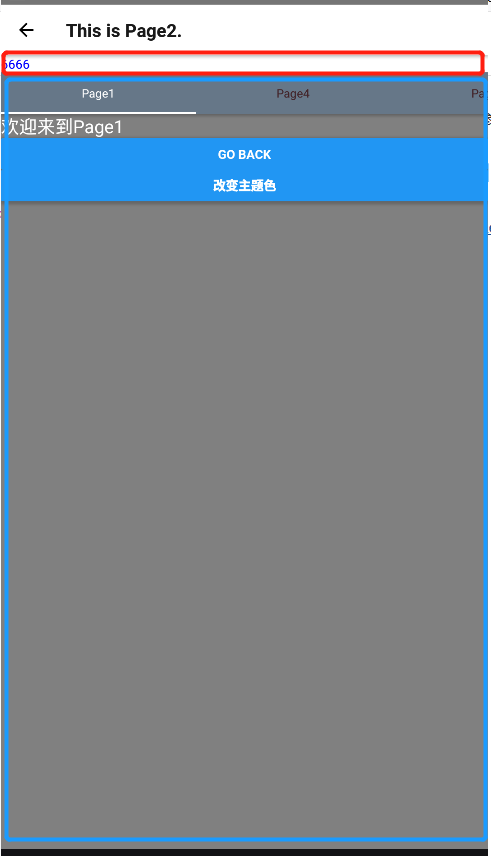
Page2页面最上面是一个Text,下面是通过createMaterialTopTabNavigator创建了一组tab,现在通过点击Page1中改变主题色按钮,改变Page2上Text的文字颜色
2.Action
action记录所有你要做的意图,比如我要改变主题色
- ./action/types ------------所有的意图以字符串方式在这里声明
export default {
    THEME_CHANGE: "THEME_CHANGE",
}
- ./action/theme/index------------theme的action
import Types from '../types';
/**
 * 第一个参数,string类型的type,第二个参数,根据自己需要的数据
 * 主题变更
 * @param theme
 * @returns {{type: string, theme: *}}
 */
export function onThemeChange(theme) {
    return {type: Types.THEME_CHANGE, theme: theme}
}
- ./action/index------------所有的action统一在这里导出
/**
 * 所有的action,对外使用
 */
import { onThemeChange } from './theme/index'
export default{
    onThemeChange
}
3.Reducer
reducer 就是一个纯函数,接收旧的 state 和 action,返回新的 state。
(previousState, action) => newState
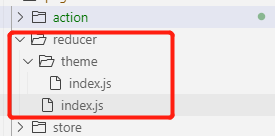
- ./reducer/theme/index------------theme的reducer,将接受的action里的theme加到旧的state中,返回新的state
import Types from '../../action/types';
const defaultState = {
    theme: 'blue'
}
export default function onAction(state = defaultState, action) {
    switch (action.type) {
        case Types.THEME_CHANGE:
            //返回新的state,新的state携带theme属性
            return {
                ...state,
                theme: action.theme
            }
        default:
            return state;
    }
}
- ./reducer/index------------将所有的reducer聚合到一起
import {combineReducers} from 'redux'
import theme from './theme'
import {rootCom, RootNavigator} from '../../navigators/AppNavigators';
//将所有的redux聚合

//1.指定默认state
const navState = RootNavigator.router.getStateForAction(RootNavigator.router.getActionForPathAndParams(rootCom));

/** * 2.创建自己的 navigation reducer, */
const navReducer = (state = navState, action) => {
    const nextState = RootNavigator.router.getStateForAction(action, state);
    // 如果`nextState`为null或未定义,只需返回原始`state`
    return nextState || state;
};

/** * 3.合并reducer * @type {Reducer<any> | Reducer<any, AnyAction>} */
const index = combineReducers({
    nav: navReducer,
    theme: theme,
});

export default index;
4.页面代码
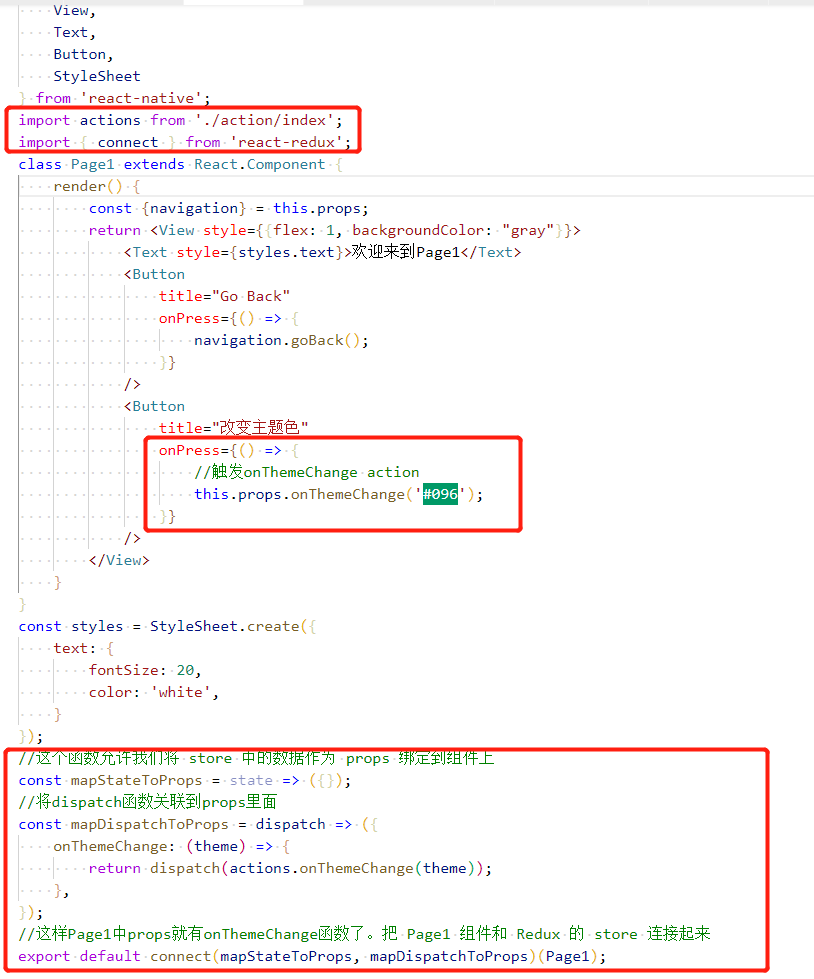
Page1中的点击事件里,触发action的onThemeChange事件,并将色值作为参数传递进去。dispatch出state(包含了theme字段)
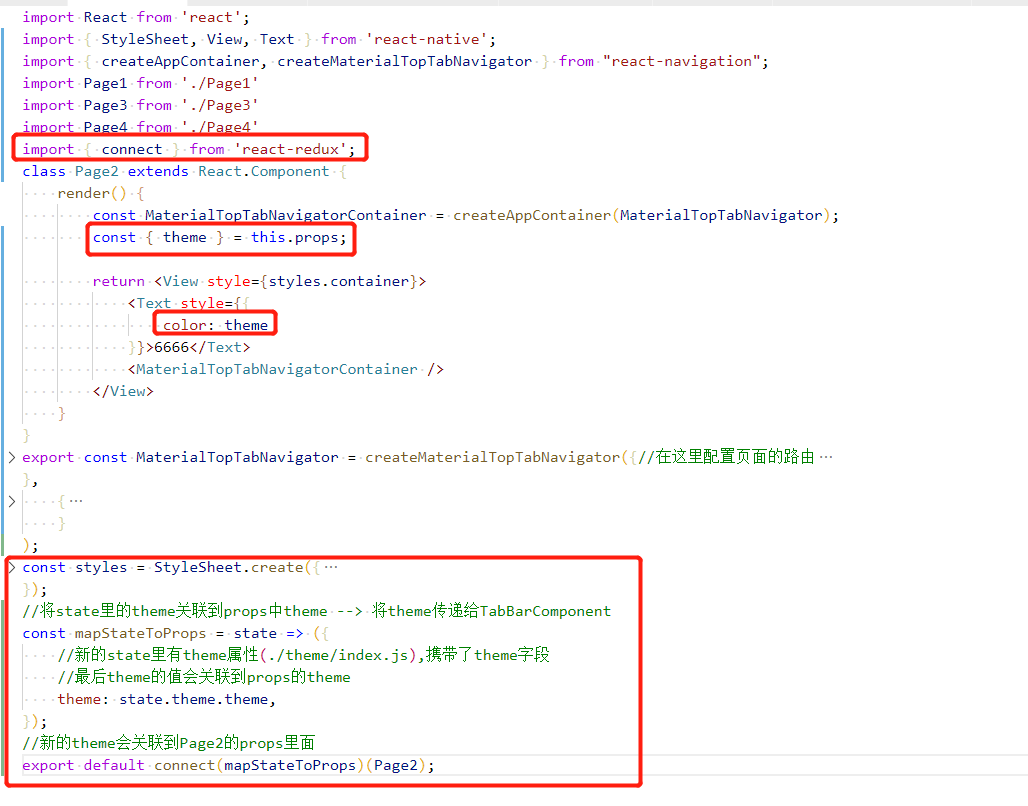
Page2中接收到事件后,取出state中的theme,关联到其props里面,这样Text的文字颜色就改变了
5.总结流程
- Page1点击事件触发dispatch
const mapDispatchToProps = dispatch => ({
    onThemeChange: (theme) => {
        return dispatch(actions.onThemeChange(theme));
    },
});
- 触发./action/theme/index onThemeChange方法,返回一个state
export function onThemeChange(theme) {
    return {type: Types.THEME_CHANGE, theme: theme}
}
- actions.onThemeChange(theme)方法返回的state传递到Reducer进行处理,返回新的state
const defaultState = {
    theme: 'blue'
}
export default function onAction(state = defaultState, action) {
    switch (action.type) {
        case Types.THEME_CHANGE:
            //返回新的state,新的state携带theme属性
            return {
                ...state,
                theme: action.theme
            }
        default:
            return state;
    }
}
- Page2接收到新的state,将新state中theme关联到props里面,更新UI
const mapStateToProps = state => ({
    //新的state里有theme属性(./theme/index.js),携带了theme字段
    //最后theme的值会关联到props的theme
    theme: state.theme.theme,
});

...

    <Text style={{
        color: theme
    }}>6666</Text>
结束
