正文:
前提: hdoop 3.1.2,mysql环境,sqoop 1.4.7
1.使用sqoop从mysql倒数数据到hadoop(hdfs)
注意: 每次导入的数据结果存储到隔离的文件,新旧数据在多个文件中
1.1 全表导入
1.1.1 sqoop import --connect jdbc:mysql://xx.xx.xxx.xxx/xx --username xxxx --password xxxxxxx --target-dir xxdir --query "select x1,x2,x3,x4 from xxx where \$CONDITIONS" -m 1
1.1.2 sqoop import --connect jdbc:mysql://xx.xx.xxx.xxx/xx --username xxxx --password xxxxxxx --table xx --columns 'x1,x2,x3,x4' --where '1=1' -m 1
1.2 增量导入
1.2.1 append : 只对数据进行新增,不支持更新. checkcolumn一般为自增列
sqoop import --connect jdbc:mysql://xx.xx.xxx.xxx/xx --username xxxx --password xxxxxxx --table xx --columns 'x1,x2,x3,x4' -m 1 --check-column id --incremental append --last-value 6789
1.2.2 lastmodified: 支持新增和更新. checkcolumn一般为时间类型
sqoop import --connect jdbc:mysql://xx.xx.xxx.xxx/xx --username xxxx --password xxxxxxx --table xx --columns 'x1,x2,x3,x4' -m 1 --check-column modify_time --incremental lastmodified --last-value "2019-10-12 11:09:04" --append
1.3 并发导入
1.3.1 通过-m 参数能够设置导入数据的 map 任务数量,即指定了 -m 即表示导入方式为并发导入,这时我们必须同时指定 --split-by 参数指定根据哪一列来实现哈希分片,从而将不同分片的数据分发到不同 map 任务上去跑,避免数据倾斜。
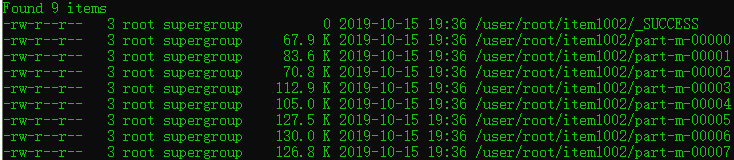
示例: sqoop import --connect jdbc:mysql://39.108.147.10/item --username java --password h6IGZQ7IOf82DCa1CtSYmalOfi2ymBOB --target-dir item1002 --query "select id,name,slogan,min_price,max_price from item where \$CONDITIONS" --split-by id -m 8
示例结果,如图:
重要Tip: 生产环境中,为了防止主库被Sqoop抽崩,我们一般从备库中抽取数据。 一般RDBMS的导出速度控制在60~80MB/s,每个 map 任务的处理速度5~10MB/s 估算,即 -m 参数一般设置4~8,表示启动 4~8 个map 任务并发抽取。
补充: 关于上面的Tip中的到处速度 60-80MB/s,是这样理解的 [以阿里云的服务器为例,假如服务器带宽峰值为100MB/s,让出40-20MB/s支撑线上业务,剩下的给map任务用.具体怎么是设定并发的map数量还要以服务器实际的带宽为准].
正文结束.
不当之处,还请不吝赐教.