参考
安装
可以通过npm工具安装
npm install clipboard --save
如果你不打算进行包管理,可以直接下载 zip文件
-
选择一个触发复制事件的DOM对象;.icon-copy
<el-button class="btn confirm copy icon-copy" ref="copy" data-clipboard-action="copy" data-clipboard-target="#inviteInfo" >复制链接</el-button> -
初始化实例对象:
toInitClipboard() { this.copyBtn = new this.clipboard(".icon-copy"); }, -
事件:实例对象监听copy事件,并作出对应的操作:
   clipboard.on("success", function() {
             _this.$message({
               message: tips.copySuccessTip,
               type: "success",
               duration: "3000"
             });
             //当copy成功或者失败的时候,销毁当前监听对象;
             clipboard.destroy();
           });
           clipboard.on("error", function() {
             _this.$message({
               message: tips.copyFailedTip,
               type: "error",
               duration: "3000"
             });
             //当copy成功或者失败的时候,销毁当前监听对象;
             clipboard.destroy();
           });
单页应用:可以更加精确地管理 DOM 的生命周期。你可以清理事件以及创建的对象。
浏览器支持
这个库依赖 Selection 和 execCommand APIs. 前者兼容 所有的浏览器 后者只兼容以下浏览器版本。
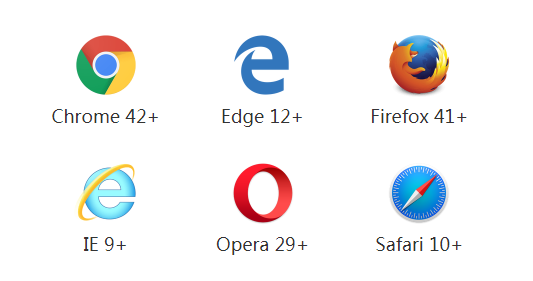
好消息是,如果你需要支持旧浏览器,clipboard.js 可以优雅降级。你所要做的就是在 success 事件触发时提示用户“已复制!”,error 事件触发时提示用户“按 Ctrl+C 复制文字”(此时用户要复制的文字已经选择了)。
你也可以通过运行 Clipboard.isSupported() 来检查浏览器是否支持 clipboard.js,如果不支持,你可以隐藏复制/剪切按钮。
实例源码
<template>
   <div>
         <!-- 邀请 -->
        <div style="margin-left: 15px;cursor: pointer">
          <div class="inviteBtnContainer" @click="toOpenInviteDialog">
            <span class="inviteBtnInfo">邀请</span>
          </div>
        </div>
        <div>
              <el-dialog
                :visible.sync="inviteDialogVisible"
                width="530px"
                z-index="6000"
                @close="handleCreateInviteClose"
                :close-on-click-modal="false"
              >
                <div style="width:100%;">
                  <img style="width:inherit" src="../../assets/img/invite.png" alt>
                </div>
                <div id="inviteTitleInfo" style="margin-top:29px;">
                  <div style="text-align: center">
                    <span class="inviteTitle">邀请其他企业</span>
                  </div>
                  <div style="text-align: center">
                    <span class="inviteTip">通过链接邀请的新的用户接受邀约后,注册通过后即可登录企业平台。</span>
                  </div>
                </div>
                <div id="inviteInfo" class="inviteInfo">
                  <div class="inviteContent">
                    <span>【{{tenantName}}】</span>
                    <span>企业管理员{{nickName}}</span>
                    <span>给你发来链接 :</span>
                    <div style="margin: 3px 0;">
                      <a>{{encodeUrl}}</a>
                    </div>
                    <div>
                      <span>点击进入xxx+平台一起协作工作吧!链接24小时内有效,为确保企业信息安全,切勿随意传播该条信息,客户服务热线021-606xxxxx【xxx+】</span>
                    </div>
                  </div>
                </div>
                <span slot="footer" class="dialog-footer footer-display center">
                  <el-button
                    class="btn confirm copy icon-copy"
                    ref="copy"
                    data-clipboard-action="copy"
                    data-clipboard-target="#inviteInfo"
                  >复制链接</el-button>
                  <el-button class="btn cancel" @click="inviteDialogVisible = false">取消</el-button>
                </span>
              </el-dialog>
        </div>
   </div>

</template>
exportdefault {
    data(){
        return {
            copyBtn:null,
        }
    },
    created() {
    this.init();

  },
   methods: {
    init() {
         this.toInitClipboard();
    },
    toInitClipboard() {
         this.copyBtn = new this.clipboard(".icon-copy");
    },
    handleCopyInvitationCode() {
          let _this = this;
          let clipboard = _this.copyBtn;
          clipboard.on("success", function() {
            _this.$message({
              message: tips.copySuccessTip,
              type: "success",
              duration: "3000"
            });
            //当copy成功或者失败的时候,销毁当前监听对象;
            clipboard.destroy();
          });
          clipboard.on("error", function() {
            _this.$message({
              message: tips.copyFailedTip,
              type: "error",
              duration: "3000"
            });
            //当copy成功或者失败的时候,销毁当前监听对象;
            clipboard.destroy();
          });
    },
    }
}