1.流程图:
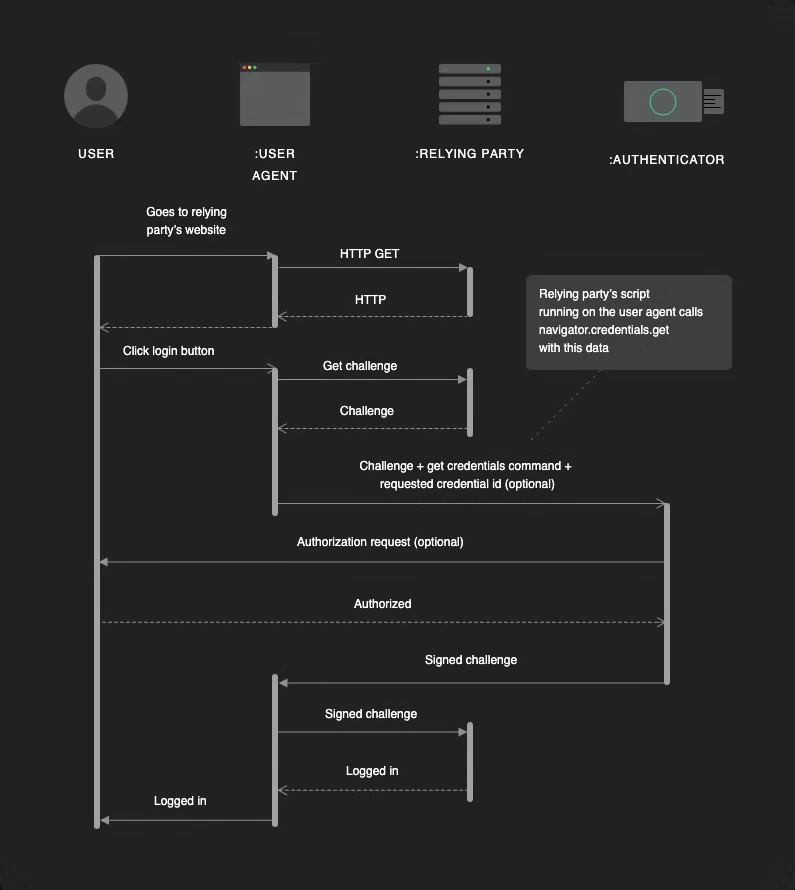
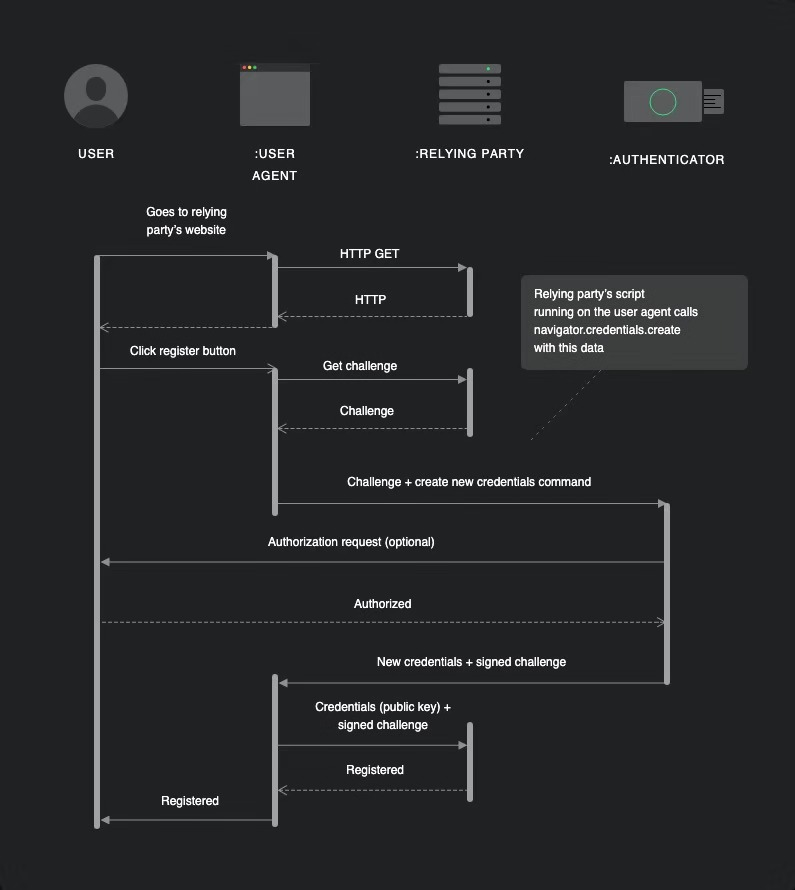
2.转码的函数
function _base64ToArrayBuffer(base64) {
  var binary_string =  window.atob(base64);
  var len = binary_string.length;
  var bytes = new Uint8Array( len );
  for (var i = 0; i < len; i++)        {
      bytes[i] = binary_string.charCodeAt(i);
  }
  return bytes.buffer;
}
function _arrayBufferToBase64( buffer ) {
  var binary = '';
  var bytes = new Uint8Array( buffer );
  var len = bytes.byteLength;
  for (var i = 0; i < len; i++) {
    binary += String.fromCharCode( bytes[ i ] );
  }
  return window.btoa( binary );
}

function _arrayBufferToString( buffer ) {
  var binary = '';
  var bytes = new Uint8Array( buffer );
  var len = bytes.byteLength;
  for (var i = 0; i < len; i++) {
    binary += String.fromCharCode( bytes[ i ] );
  }
  return binary;
}
3.落地
分为三个部分: 客户端 ,服务器, 登录因子(硬件设备fidokey,指纹,密码)
3.1 注册
用户点击登录按钮向服务器发送了一个http/https请求获取挑战challenge(一个base64的字符串);调用navigator.credentials.create(createCredentialDefaultArgs)方法,此时浏览器会弹出提示,请求用户的授权,授权成功客户端得到签名的challenge加上新的身份信息cred发送给服务器,服务器返回信息是否注册成功。
     const createCredentialDefaultArgs = {
            publicKey: {
                // Relying Party (a.k.a. - Service):
                rp: {
                      id: data.rp_id,
                      name: 'Wax FTW'
                },
            user: {
                id: new Uint8Array(16),
                name: data.user,
                displayName: data.user
            },

            origin: data.origin,

            pubKeyCredParams: [{
                type: "public-key",
                alg: -7
            }],
            // attestation: "direct",
            attestation:"none",
            // timeout: 60000,
            challenge: _base64ToArrayBuffer(data.challenge)
        }
    }
    // 发送给服务的参数信息以及转码规则
    navigator.credentials.create(createCredentialDefaultArgs)
    .then((cred) => {
        const transports = cred.response.getTransports()[0];// 登录因子类型
        axios.get('https://www.xxx.xxx/webauthn_register2',{
          params : {
            type: cred.type,
            rawID: _arrayBufferToBase64(cred.rawId),
            clientDataJSON: _arrayBufferToString(cred.response.clientDataJSON),
            sref:data.sref,
            token,
            transports,
            attestationObject:_arrayBufferToBase64(cred.response.attestationObject)
          }
        }).then((res)=>{
          console.log(res,'success register')
        })
    })
    .then((assertion) => {
        console.log(assertion,'hello world')
        // console.log("ASSERTION", assertion);
    })
    .catch((err) => {
        console.log('create defeat')
        // console.log("ERROR", err);
    });
3.2 登录
与注册的流程是一致的,先向服务器获取挑战,调用navigator.credentials.get()方法,客服端授权,获取签名的挑战,将这个挑战发送给服务器
axios.get('https://xxx.xxx/webauthn_login',{
  params:{
    email,
    origin: window.location.origin
  }
}).then(res=>{
    const data = JSON.parse(res.data.data)
    const allowCredentials = data.cred_ids.map(function(x){
      return {
          id: _base64ToArrayBuffer(x),
          type: "public-key",
          transports: ['usb','nfc','ble'] // internal
      }
    })
    const sref = res.data.sref;
    navigator.credentials.get({
      publicKey: {
        challenge: _base64ToArrayBuffer(data.challenge),
        allowCredentials
      }
    }).then((newCredential)=>{
        axios.get('https://xxx.xxx/webauthn_login2',{
          params:{
            sref,
            rawID: _arrayBufferToBase64(newCredential.rawId),
            type: newCredential.type,
            clientDataJSON: _arrayBufferToString(newCredential.response.clientDataJSON),
            authenticatorData: _arrayBufferToBase64(newCredential.response.authenticatorData),
            sig: _arrayBufferToBase64(newCredential.response.signature)
          }
        }).then((res)=>{
           	console.log('webauthn login succ')
        }).catch(err=>{
           	console.log('webauthn login fail')
        })
    }).catch((err)=>{
        console.log(err, '未授权或者授权失败');
    })
}).catch((err)=>{
   console.log('获取挑战失败')
})