

项目创建与目录结构设计
- app
    - image
        - *.(jpg|png|git|*): 图片资源
    - api
        - index.js: 项目所需接口
    - constant
        - index.js: 项目常量数据
    - components
        - Searchbar.js: 搜索条
        - Advertisement.js: 轮播广告
        - Products.js: 商品列表
    - page
        - Home.js 首页
        - Profile.js 个人页
    - navigation
        - Main.js 入口Tab页导航
首页原型和代码
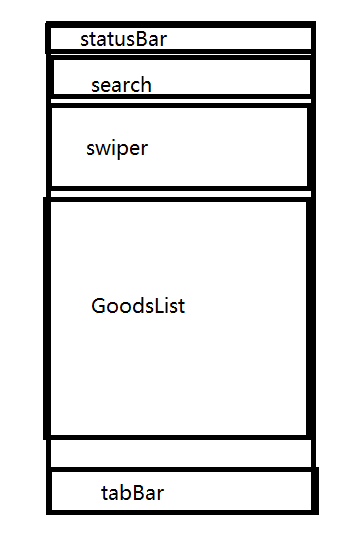
App.js
import React, {Component} from 'react';
import {
  Platform,
  StyleSheet,
  Text,
  View,
  StatusBar
} from 'react-native';

export default class App extends Component {
  render() {
    return (
      <View style={styles.container}>

        {/* 状态栏配置 */}
        <StatusBar
          hidden={false}
          animated={true}
          backgroundColor="#ccc"
          barStyle="light-content"
          translucent={false}
        ></StatusBar>

        {/* 搜索条 */}
        <View style={styles.searchbar}>
          <Text>搜索框</Text>
        </View>

        {/* 轮播广告 */}
        <View style={styles.advertisement}>
          <Text>广告</Text>
        </View>

        {/* 商品列表 */}
        <View style={styles.products}>
          <Text>商品列表</Text>
        </View>
      </View>
    );
  }
}

const styles = StyleSheet.create({
  container: {
    flex: 1,
    backgroundColor: '#F5FCFF',
  },
  searchbar: {
    height: 40,
    backgroundColor: "green"
  },
  advertisement: {
    height: 200,
    backgroundColor: "yellow",
  },
  products: {
    flex: 1,
    backgroundColor: "blue"
  }
});
首页组件抽取
- 创建搜索条组件:
app/components/Searchbar.js - 创建轮播广告组件:
app/components/Adverticement.js - 创建商品列表组件:
app/components/Products.js
抽取后首页代码
import React, {Component} from 'react';
import {
  Platform,
  StyleSheet,
  Text,
  View,
  StatusBar
} from 'react-native';

import Searchbar from './app/components/Searchbar';
import Adverticement from './app/components/Adverticement';
import Products from './app/components/Products';

export default class App extends Component {
  render() {
    return (
      <View style={styles.container}>

        {/* 状态栏配置 */}
        <StatusBar
          hidden={false}
          animated={true}
          backgroundColor="#ccc"
          barStyle="light-content"
          translucent={false}
        ></StatusBar>

        {/* 搜索条 */}
        <Searchbar></Searchbar>

        {/* 轮播广告 */}
        <Adverticement></Adverticement>

        {/* 商品列表 */}
        <Products></Products>

      </View>
    );
  }
}

const styles = StyleSheet.create({
  container: {
    flex: 1,
    backgroundColor: '#F5FCFF',
  },
});
搜索条组件
import React, { Component } from 'react'
import {
    Text,
    StyleSheet,
    View,
    TextInput,
    Button,
    Alert
} from 'react-native'

export default class Searchbar extends Component {

    constructor(props) {
        super(props);
        this.state = {
            searchValue: ""
        }
    }

    _changeText = (newValue) => {
        this.setState({searchValue: newValue})
    }

    _search = () => {
        Alert.alert(this.state.searchValue);
    }

    render() {
        return (
            <View style={styles.searchbar}>
                <TextInput
                    placeholder="输入搜索关键字"
                    value={this.state.searchval}
                    onChangeText={this._changeText}
                    style={styles.input}
                ></TextInput>
                <Button
                    title="搜索"
                    onPress={this._search}
                    style={styles.button}
                ></Button>
            </View>
        )
    }
}

const styles = StyleSheet.create({
    searchbar: {
        flexDirection: "row",
        justifyContent: "center",
        alignItems: 'center',
        paddingHorizontal: 10,
        height: 40,
    },
    input: {
        flex: 1,
        marginRight: 10,
        paddingLeft: 6,
        height: 30,
        borderWidth: 2,
        borderColor: "#ccc",
        borderRadius: 5,
        lineHeight: 12,
        fontSize: 12
    },
    button: {
        width: 40,
        height: 30,
        backgroundColor: "green"
    }
})
轮播广告组件
版本一,使用ScrollView实现轮播效果
import React, { Component } from 'react'
import {
    Text,
    StyleSheet,
    View,
    ScrollView,
    Dimensions,
    Image
} from 'react-native'

export default class Adverticement extends Component {

  constructor(props) {
        super(props);
        this.state = {
            currentPage: 0,
            advertisements: [
                {
                    uri: "https://gw.alicdn.com/imgextra/i1/136/O1CN01xoz2hX1CsKQIYu7SH_!!136-0-lubanu.jpg"
                },
                {
                    uri: "https://img.alicdn.com/tps/i4/TB1Vi2mfy_1gK0jSZFqSuwpaXXa.jpg"
                },
                {
                    uri: "https://gw.alicdn.com/imgextra/i1/1/O1CN01JSzuqi1BsUxCNVonv_!!1-0-lubanu.jpg"
                }
            ]
        }
    }

    render() {
        return (
            <View style={styles.advertisement}>
                <ScrollView
                    horizontal={true}
                    showsHorizontalScrollIndicator={false}
                    pagingEnabled={true}
                >
                    {
                        this.state.advertisements.map((item, index) => {
                            return (
                                <View
                                    key={index}
                                    style={[styles.item, {backgroundColor: "blue"}]}>
                                    <Image
                                        source={item.uri}
                                        style={styles.image}>
                                    </Image>
                                </View>
                            )
                        })
                    }
                </ScrollView>
            </View>
        )
    }
}

const styles = StyleSheet.create({
    advertisement: {
        height: 200,
        backgroundColor: "yellow",
    },
    item: {
        width: Dimensions.get("window").width,
        height: 200
    }
})
版本二,自动轮播效果
import React, { Component } from 'react'
import {
    Text,
    StyleSheet,
    View,
    ScrollView,
    Dimensions
} from 'react-native'

export default class Adverticement extends Component {

    constructor(props) {
        super(props);
        this.state = {
            currentPage: 0,
            advertisements: ["1", "2", '3']
        }
    }

    // 挂载后启动定时器
    componentDidMount() {
        this._startTimer();
    }

    // 下载后清除定时器
    componentWillUnmount() {
        this._endTimer();
    }

    _startTimer = () => {
        this.timerId = setInterval(() => {
            // 计算下一页码
            let nextPage = this.state.currentPage + 1;
            nextPage = nextPage >= this.state.advertisements.length? 0 : nextPage;
            this.setState({currentPage: nextPage});

            // 计算scrollView组件的offsetX值,实现自动轮播
            let offsetX = Dimensions.get("window").width * this.state.currentPage;
            this.refs.scrollView.scrollTo({x: offsetX, y: 0, animated: true});
        }, 1500);
    }

    _endTimer = () => {
        clearInterval(this.timerId);
    }

    render() {
        return (
            <View style={styles.advertisement}>
                <ScrollView
                    horizontal={true}
                    showsHorizontalScrollIndicator={false}
                    pagingEnabled={true}
                    ref="scrollView"
                >
                    <View style={[styles.item, {backgroundColor: "blue"}]}>
                        <Text>广告1</Text>
                    </View>
                    <View style={[styles.item, {backgroundColor: "pink"}]}>
                        <Text>广告2</Text>
                    </View>
                    <View style={[styles.item, {backgroundColor: "orange"}]}>
                        <Text>广告3</Text>
                    </View>
                </ScrollView>
            </View>
        )
    }
}

const styles = StyleSheet.create({
    advertisement: {
        height: 200,
        backgroundColor: "yellow",
    },
    item: {
        width: Dimensions.get("window").width,
        height: 200
    }
})
版本三,增加点状指示器
版本四,点击路由跳转
商品列表组件
import React, { Component } from 'react'
import {
    Text,
    StyleSheet,
    View,
    FlatList,
    Image
} from 'react-native'

export default class Products extends Component {

    constructor(props) {
        super(props);
        this.state = {
            products: [
                {
                    id: "1",
                    title: "小米MIX3",
                    subTitle: "滑盖手机,咔咔咔",
                    image: ""
                },
                {
                    id: "2",
                    title: "华为Mate20",
                    subTitle: "黑科技,牛逼牛逼",
                    image: ""
                },
                {
                    id: "3",
                    title: "魅族",
                    subTitle: "漂亮无需多言",
                    image: ""
                },
                {
                    id: "4",
                    title: "锤子",
                    subTitle: "漂亮的不像实力派",
                    image: ""
                },
                {
                    id: "5",
                    title: "三星",
                    subTitle: "我的电池绝对靠谱",
                    image: ""
                },
                {
                    id: "6",
                    title: "苹果",
                    subTitle: "我的价格是真的不贵",
                    image: ""
                }
            ]
        }
    }

    _renderItem = ({item, index}) => {
        return (
            <View style={styles.item}>
                <Image
                    source={item.uri}
                    style={styles.image}>
                </Image>
                <View style={styles.content}>
                    <Text style={styles.title}>{item.title}</Text>
                    <Text style={styles.subTitle}>{item.subTitle}</Text>
                </View>
            </View>
        )
    }

    _keyExtractor = (item, index) => {
        return item.id;
    }

    render() {
        return (
            <FlatList
                data={this.state.products}
                renderItem={this._renderItem}
                keyExtractor={this._keyExtractor}
            ></FlatList>
        )
    }
}

const styles = StyleSheet.create({
    products: {
        flex: 1,
        backgroundColor: "blue"
    },
    item: {
        flexDirection: 'row',
        justifyContent: "center",
        alignContent: 'center',
        marginHorizontal: 10,
        marginTop: 10,
        height: 60,
    },
    image: {
        marginRight: 10,
        width: 50,
        height: 50,
        backgroundColor: "green"
    },
    content: {
        flex: 1
    },
    title: {
        lineHeight: 28,
        fontSize: 16,
        color: "#000"
    },
    subTitle: {
        lineHeight: 18,
        fontSize: 12,
        color: "#ccc"
    }
})
首页完整代码
import React from "react";
import {
  Platform,
  Dimensions,
  StyleSheet,
  Text,
  View,
  StatusBar,
  ScrollView,
  TextInput,
  Button,
  FlatList,
  TouchableNativeFeedback,
  Alert,
  Image,
  RefreshControl
} from 'react-native';

const width = Dimensions.get("window").width;
const circleSize = 8;
const circleMargin = 5;

export default class Home extends React.Component {

  constructor(props) {
    super(props);
    this.state = {
      currentPage: 0,
      searchText: "xxx",
      isRefreshing: false,
      advertisements: [
        {
          title: "美女",
          backgroundColor: "orange",
          image: require("../../img/double-11.png")
        },
        {
          title: "豪车",
          backgroundColor: "purple",
          image: require("../../img/eyes.png")
        },
        {
          title: "美景",
          backgroundColor: "skyblue",
          image: require("../../img/five-year.png")
        }
      ],
      products: [
        {key: 'Devin', data: {
          image: require("../../img/eyes.png"),
          title: "商品1",
          subTitle: "描述1"
        }},
        {key: 'Jackson', data: {
          image: require("../../img/eyes.png"),
          title: "商品2",
          subTitle: "描述2"
        }},
        {key: 'James', data: {
          image: require("../../img/eyes.png"),
          title: "商品3",
          subTitle: "描述3"
        }},
        {key: 'Joel', data: {
          image: require("../../img/eyes.png"),
          title: "商品4",
          subTitle: "描述4"
        }},
        {key: 'John', data: {
          image: require("../../img/eyes.png"),
          title: "商品5",
          subTitle: "描述5"
        }},
        {key: 'Jillian', data: {
          image: require("../../img/eyes.png"),
          title: "商品6",
          subTitle: "描述6"
        }},
        {key: 'Jimmy', data: {
          image: require("../../img/eyes.png"),
          title: "商品7",
          subTitle: "描述7"
        }},
        {key: 'Julie', data: {
          image: require("../../img/eyes.png"),
          title: "商品8",
          subTitle: "描述8"
        }},
      ]
    }
  }

  componentDidMount() {
    this._startTimer()
  }

  componentWillUnmount() {
    this._endTimer();
  }

  _startTimer() {
    this.timer = setInterval(() => {
      let nextPage = this.state.currentPage + 1;
      nextPage = nextPage < 3? nextPage : 0;
      this.setState({currentPage: nextPage});

      const offsetX = width * nextPage;
      this.refs.scrollView.scrollTo({x: offsetX, y: 0, animated: true})
    }, 2000);
  }

  _endTimer() {
    clearInterval(this.timer);
  }

  _scrollBeginDrag = () => {
    this._endTimer();
  }

  _scrollEndDrag = () => {
    this._startTimer();
  }

  _renderItem = ({item}) => {
    return (
      <TouchableNativeFeedback onPress={() => {
        const {navigation} = this.props;
        navigation && navigation.push("detail", {a:"传参"})
      }}>
        <View style={styles.productRow}>
          <Image style={styles.productImage} source={item.data.image}></Image>
          <View style={styles.productText}>
            <Text style={styles.productTitle}>{item.data.title}</Text>
            <Text style={styles.productSubtitle}>{item.data.subTitle}</Text>
          </View>
        </View>
      </TouchableNativeFeedback>
    );
  }

  _renderSeparator = ({index}) => {
    return (
      <View key={index} style={styles.divider}></View>
    )
  }

  _renderRefreshContrl = () => {
    this.setState({isRefreshing: true});
    setTimeout(() => {
      const newProducts = Array.from(Array(10)).map((v, i) => ({
        key: ""+i,
        data: {
          image: require("../../img/eyes.png"),
          title: `新商品${i+1}`,
          subTitle: `新描述${i+1}`
        }
      }));
      this.setState({isRefreshing: false, products: newProducts});
    }, 2000);
  }

  render() {

    // 计算轮播指示器位置
    const advertisementCount = this.state.advertisements.length;
    const indicatorWidth = circleSize * advertisementCount
      + circleMargin * advertisementCount * 2;
    const indicatorOffsetX = (width - indicatorWidth) / 2;

    return (
      <View style={styles.container}>
        {/* 状态栏背景色和透明只在Android中有效 */}
        <StatusBar
          barStyle="light-content"
          backgroundColor="#eee"
          translucent={false}>
        </StatusBar>
        {/* 搜索条 */}
        <View style={styles.searchBar}>
          <TextInput
            style={styles.searchBar_input}
            underlineColorAndroid="transparent"
            onChangeText={text => {
              this.setState({searchText: text});
              console.log(text);
            }}
            placeholder="搜索商品">
          </TextInput>
          <Button
            style={styles.searchBar_button}
            color="#841584"
            onPress={() => {
              Alert.alert(`搜索内容:${this.state.searchText}`);
            }}
            title="搜索">
          </Button>
        </View>
        {/* 轮播广告 */}
        <View style={styles.advertisement}>
          <ScrollView
            ref="scrollView"
            onScrollBeginDrag={this._scrollBeginDrag}
            onScrollEndDrag={this._scrollEndDrag}
            horizontal={true}
            showsHorizontalScrollIndicator={false}
            pagingEnabled={true}>
            {
              this.state.advertisements.map((item, i) => {
                return (
                  <TouchableNativeFeedback key={i}>
                    <Image
                      source={item.image}
                      style={[styles.advertisement_item, {
                        backgroundColor: item.backgroundColor
                      }]}>
                    </Image>
                  </TouchableNativeFeedback>
                )
              })
            }
          </ScrollView>
          <View style={[
            styles.indicator, {
              left: indicatorOffsetX
            }
          ]}>
            {
              this.state.advertisements.map((item, i) => {
                const dynamicStyle =
                  i === this.state.currentPage
                  ? styles.circleSelected
                  : {};
                return (<View key={i} style={[styles.circle, dynamicStyle]}></View>)
              })
            }
          </View>
        </View>
        {/* 商品列表 */}
        <View style={styles.products}>
          {/* 默认情况下每行都需要提供一个不重复的 key 属性。你也可以提供一个keyExtractor函数来生成 key。 */}
          <FlatList
            data={this.state.products}
            renderItem={this._renderItem}
            onRefresh={this._renderRefreshContrl}
            refreshing={this.state.isRefreshing}
            ItemSeparatorComponent={this._renderSeparator}>
            {/* refreshControl={<RefreshControl
              refreshing={this.state.isRefreshing}
              onRefresh={this._renderRefreshContrl}
              title="正在刷新"
              colors={["red", "yellow"]}
              progressBackgroundColor="blue"
              progressViewOffset={50}
            />}> */}
          </FlatList>
        </View>
      </View>
    );
  }
}

const styles = StyleSheet.create({
  container: {
    flex: 1,
  },
  searchBar: {
    flexDirection: "row",
    padding: 4,
    marginTop: 24,
    height: 40,
    backgroundColor: "#eee"
  },
  searchBar_input: {
    flex: 1,
    borderWidth: 2,
    borderRadius: 8,
    borderColor: "gray",
    marginRight: 6,
    paddingLeft: 10
  },
  searchBar_button: {
    color: "white",
  },
  advertisement: {
    height: 180,
    backgroundColor: "green"
  },
  advertisement_item: {
    width: width,
    height: "100%",
    backgroundColor: "red",
  },
  indicator: {
    position: "absolute",
    top: 160,
    flexDirection: "row"
  },
  circle: {
    width: circleSize,
    height: circleSize,
    borderRadius: circleSize / 2,
    backgroundColor: '#ccc',
    marginHorizontal: circleMargin
  },
  circleSelected: {
    backgroundColor: '#fff',
  },
  products: {
    flex: 1,
    backgroundColor: "#eee"
  },
  productRow: {
    flexDirection: "row",
    alignItems: 'center',
    height: 60
  },
  productImage: {
    alignSelf: 'center',
    marginHorizontal: 10,
    width: 40,
    height: 40
  },
  productText: {
    flex: 1,
    marginVertical: 10,
  },
  productTitle: {
    flex: 3,
    fontSize: 16
  },
  productSubtitle: {
    flex: 2,
    fontSize: 14,
    color: "#ccc"
  },
  divider: {
    height: 1,
    marginHorizontal: 5,
    backgroundColor: "lightgray"
  }
});
Tab路由管理
运行yarn add react-navigation安装路由插件。
Tab首页
把App.js内容复制到app/page/Home.js
Tab个人页
创建app/page/Profile.js
import React from "react";
import { StyleSheet, View, Text } from 'react-native';

export default MovieDetail = (props) => {
    return (
        <View style={styles.container}>
            <Text>个人信息</Text>
        </View>
    );
}

const styles = StyleSheet.create({
    container: {
        flex: 1,
        justifyContent: 'center',
        alignItems: 'center',
    }
});
Tab路由
app/page/index.js
import React from "react";
import Home from './home'
import Profile from './profile'

export default createBottomTabNavigator(
    {
        // 路由配置,key值会作为tabBar的label显示
        Home: {
            screen: Home,
            navigationOptions: () => ({
                tabBarLabel: "首页"
            })
        },
        Profile: {
            screen: Profile,
            navigationOptions: () => ({
                tabBarLabel: "我的"
            })
        },
    },
    {

    }
)
主路由
商品详情页
app/page/Detail.js
import React, { Component } from 'react';
import { Text, StyleSheet, View, TouchableOpacity } from 'react-native'

export default class Detail extends Component {

    constructor(props) {
        super(props);
        this.navigation = this.props.navigation;
        this.navigationParams = this.navigation.state.params;
    }

    _pressBack = () => {
        const {navigation} = this.props;
        navigation && navigation.pop();
    }

    render() {
        return (
        <View style={styles.container}>
            <TouchableOpacity onPress={this._pressBack}>
                <Text style={styles.back}>返回{this.navigationParams.a}</Text>
            </TouchableOpacity>
            <Text style={styles.text}> 商品详情 </Text>
        </View>
        )
    }
}

const styles = StyleSheet.create({
    container: {
        flex: 1,
        justifyContent: "center",
        alignItems: 'center',
    },
    text: {
        fontSize: 20
    },
    back: {
        fontSize: 20,
        color: "yellow"
    }
})
主路由配置
App.js
import {createStackNavigator} from 'react-navigation';
import Main from './app/page/Main';
import Detail from './app/page/Detail';

export default createStackNavigator(
  {
    main: {
      screen: Main,
      navigationOptions: ({navigation, navigationOptions}) => ({
        header: null,
      })
    },
    detail: {
      screen: Detail,
      navigationOptions: ({navigationOptions}) => ({
        title: "商品详情",
      })
    }
  },
  {
    initialRouteName: "main"
  }
)
