

react-arc-progress.js
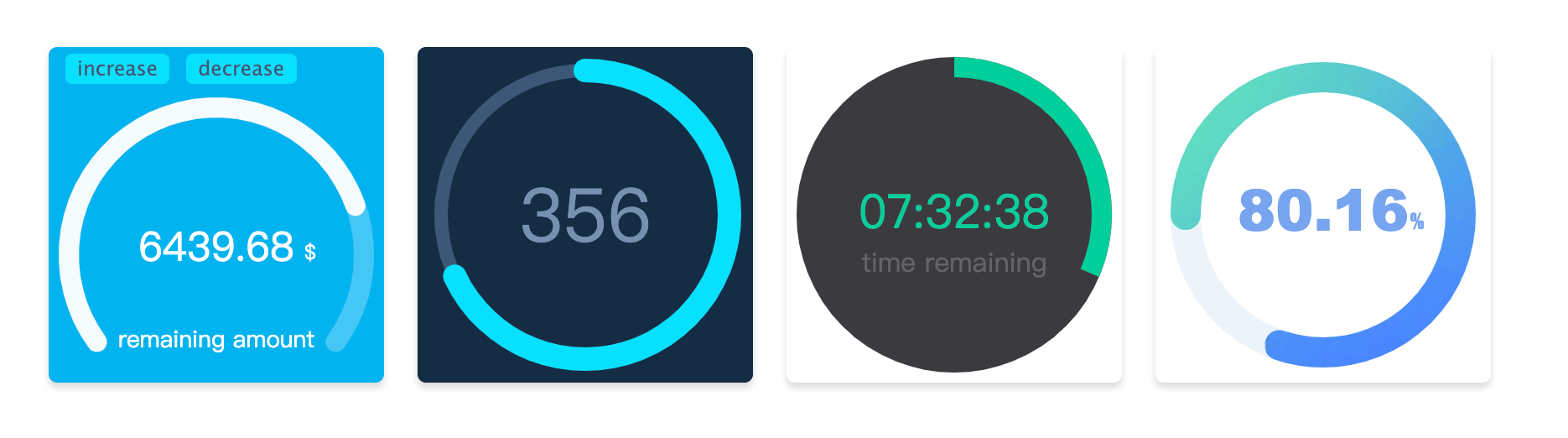
使用canvas绘制的react圆弧形进度条组件,由于使用了React Hook,依赖的React版本需要 >=16.8.0 Github地址
Installation
npm install react-arc-progress -S
Usage
import ArcProgress from 'react-arc-progress';

export default class MyArcProgress extends Component {
  state = {
    progress: .782,
    text: '6439.68',
  }

  render() {
    const {progress, text} = this.state;

    return (
      <ArcProgress
        progress={progress}
        text={text}
        observer={(current) => {
          const { percentage, currentText } = current;
          console.log('observer:', percentage, currentText);
        }}
        animationEnd={({ progress, text }) => {
          console.log('animationEnd', progress, text);
        }}
      />
    );
  }
}
Options
| Option | type | Description |
|---|---|---|
| size | number | 生成进度条canvas容器的大小,默认为200 |
| progress | number (必传) | 设置进度条的进度,取值范围为0 - 1 |
| text | string | 设置进度条文字 |
| arcStart | number | 设置圆环的起始点,具体用法见下 |
| arcEnd | number | 设置圆环的结束点,具体用法见下 |
| thickness | number | 设置圆环进度条的厚度 |
| fillThickness | number | 设置圆环进度条填充内容的厚度,不设置该项时默认与thickness一致 |
| emptyColor | string | 设置圆环进度条为空部分的颜色 |
| fillColor | string or object | 设置圆环进度条填充部分的样式,可以设置纯色或渐变色,也可以使用图片进行填充,具体用法见下 |
| lineCap | string | 设置圆环进度条末端的类型,有3个可选的值,分别是:butt, round, square。默认值是 round |
| speed | number | 设置动画速度阈,范围为-100到100,默认为0 |
| animation | boolean or number | 设置动画持续时间,单位为毫秒值,当取值为false时,没有过渡动画 |
| textStyle | object | 设置文字样式,具体用法见下 |
| customText | array | 设置自定义的文字内容,具体用法见下 |
| animationEnd | function | 进度条动画结束时候的回调 |
| onError | function | 捕获错误的回调 |
| observer | function | 监听进度条动画变化时的回调 |
Options 说明
arcStart 和 arcEnd
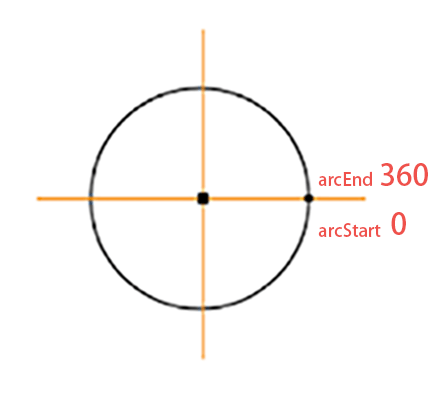
如图所示标注了弧形的起点和重点,方向为顺时针。如果你想绘制一个圆形进度条,可以设置arcStart为-90,arcEnd为270。如果想绘制一个半圆,可以设置arcStart为180,arcEnd为360。可以根据需要调整绘制起止角度数。
fillColor
fillColor为被填充的进度条颜色,可以传入色值为其定义颜色,如(#fe4d3c)。
如果想使用渐变色填充,改参数需要设置为对象类型,例如{gradient: [color 1, color2, color 2]},则会生成三个颜色的径向渐变色。
如使用图片填充,则需要将参数设置为对象格式{image: url},传入图片的url地址。例如 fillColor: {image: 'http://img.com/fillImg'} 时,则会使用该图片进行填充。
textStyle
设置传入text参数的文字样式,它需要为对象类型,可选的内容如下
| Name | Type | Description |
|---|---|---|
| size | string | 设置文字大小, 如 18px |
| color | string | 设置文字颜色, 如 #fa0556 |
| font | string | 设置文字字体, 如 Microsoft YaHei |
| x | number | 设置文字对齐的x轴 |
| y | number | 设置文字对齐的y轴 |
customText
customText 选项可以自定义文字内容,它的格式为数组,可以定义多个文字。其每个用法与textStyle参数一致,只是多了text字段。
| Name | Type | Description |
|---|---|---|
| text | string | 设置文字内容 |
| others | 其他参数内容与textStyle用法一致 |
