

一、安装
默认已经安装composer,进入到demo项目,通过composer安装指令安装
composer require topthink/think-captcha v1.0.7测试用的是topthink/think-captcha1.0.7,试过去版本安装,有的可能会报错。
二、创建控制器类
可以手动创建,也可以通过指令创建
php think make:controller index/Captcha --plain控制器类路径
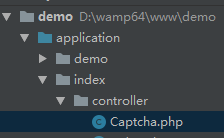
代码
<?php

namespace app\index\controller;

use think\Controller;

class Captcha extends Controller
{
    // 验证码表单
    public function index()
    {
        return $this->fetch();
    }

    // 验证码检测
    public function check($code='')
    {
        $captcha = new \think\captcha\Captcha();
        if (!$captcha->check($code)) {
            $this->error('验证码错误');
        } else {
            $this->success('验证码正确');
        }
    }
}
三、创建view模板文件
创建模板文件( application/index/view/captcha/index.html )
模板文件路径
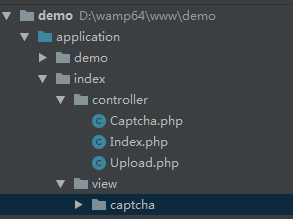
代码
<!doctype html>
<html>
<head>
    <meta charset="UTF-8">
    <title>验证码demo</title>
</head>
<body>
<h2>验证码demo</h2><FORM method="post" class="form" action="{:url('check')}">
    输入验证码:<INPUT type="text" class="text" name="code"><br/>
    <div>{:captcha_img()}</div>
    <INPUT type="submit" class="btn" value=" 提交 ">
</FORM>
</body>
</html>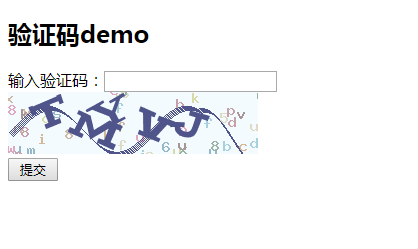
输入验证码即可测试,还可以配置验证码参数
四、验证码配置
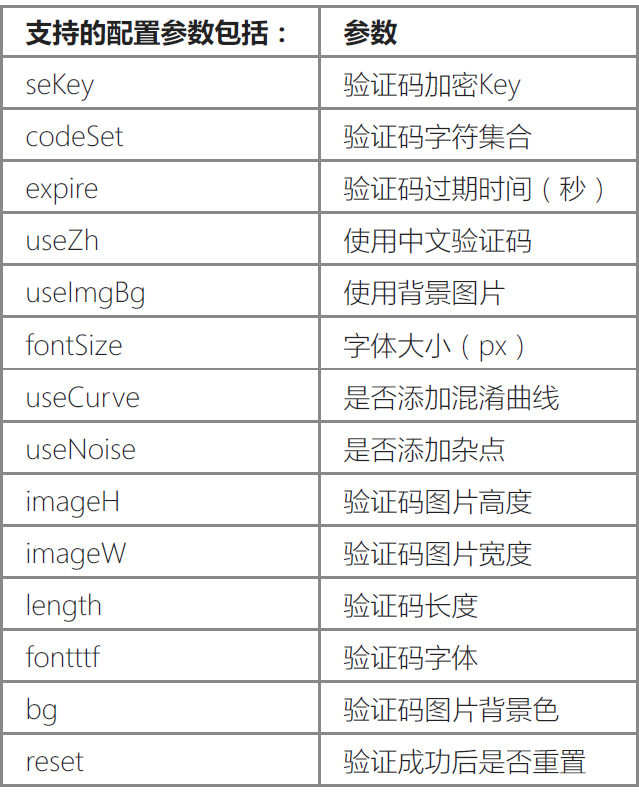
验证码的配置参数统一在应用配置文件( application/config.php )中添加captcha 配置参数,例
如:
'captcha' => [
    // 使用中文验证码
    'useZh' =>true,
    // 字体大小
    'fontSize' => 35,
    // 验证码长度(位数)
    'length' => 4,
],
还有更多的配置
五、总结
在登入,注册,修改密码等这页面可能会遇到需要验证码,先写个小demo测试一下,今后运用到实战当中去。

